AI Singing Voice and Song Cover Guide
This guide will walk you through how to train your own AI singing voice and use it to create song covers on MusicCreator.
Introduction
On MusicCreator, you can train a custom AI voice model from your own recordings and use different voice models to create AI song covers for any track. This lets you perform songs in your own voice (or other voices you create) without needing studio equipment or advanced production skills.
Getting Started
Train your voice model Go to AI Singing Voice Generator. On this page, enter a name for your voice model, then upload your voice recordings.
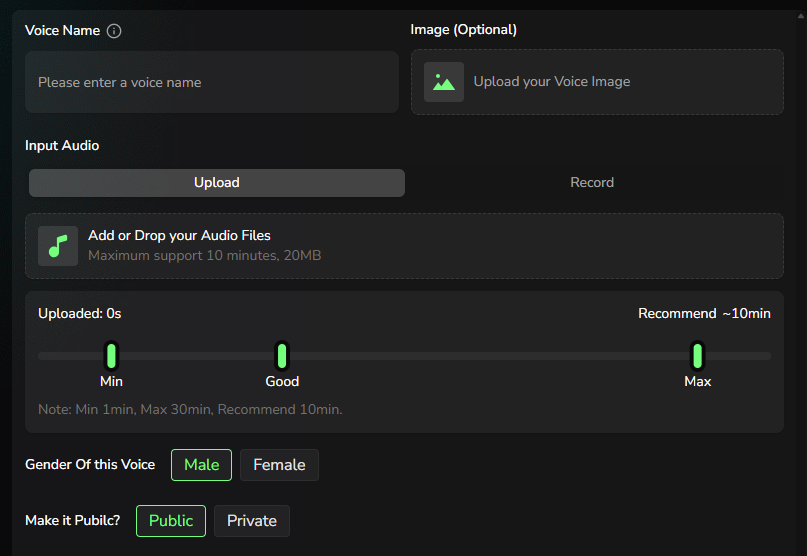
Train your voice model
You can either upload audio files or record directly in your browser. Supported audio length is 1–30 minutes, and we recommend providing at least 10 minutes of clear vocal audio for the best results.
Make sure your recordings are loud and clear, without noise, reverb, echo, or background music, so the model can learn your voice accurately.
After your audio is uploaded, select the gender of the voice and choose whether your model should be public or private. If you select “Public”, your voice model may appear in the platform’s voice library and be available for other users to try.
Generate your AI song cover
Go to AI Song Cover Generator. On this page, you will see two tabs: “My Voice Model” and “Library”.

- You can choose one of your own trained voice models under “My Voice Model”. If you don’t want to train a model yet, you can also try the ready-made voice models provided by MusicCreator in the “Library” tab.
- After selecting a voice model, upload the song you want to cover, or select a track from “My Music” that you have previously generated on MusicCreator.
- Finally, set the “Gender of this Music” to match the vocal gender you want for the cover, as this will directly affect the singing result.
- Click the “Cover” button and wait about 1–2 minutes; your AI-generated cover song will then be ready to preview and download.