Music Maker Website for Game Jam Soundtracks
Your jam game has a title screen, two levels and a boss, and nobody on the team writes music. A music maker website lets you turn a short cue sheet into instrumentals in a browser tab, between bug fixes. Describe each game state, keep one shared sound, and spend Sunday wiring tracks into the build.
A Jam Weekend, Music Included
Short answer: write the cue sheet on night one, generate on day two, and leave the last day for loops and volume in the engine.
- Friday night
Read the theme and the rules, list the game states and write one shared sound line for the whole soundtrack.
- Saturday morning
Generate the title and level cues on the music maker website first, since players hear them longest. Keep the better of two songs.
- Saturday evening
Add danger, boss and win or lose cues once the levels exist and you know how long they take to play.
- Sunday
Trim, set loop points and balance music against sound effects in your engine before you upload the build.
Music Supports the Game
Jams are judged on fun, creativity and theme fit, so music only has to support the game. A small set of consistent cues usually beats one ambitious track the team never finishes wiring in.
Keep the cue sheet on a sticky note next to the build list, and tick off each cue as it lands in the engine.
The Cue Sheet
Short answer: one row per game state tells you which cues to make, how long each should feel and what job it does.
| When the player… | The music should… | So the game… |
|---|---|---|
| opens the game | set the mood with a short, memorable title theme | feels finished from the first screen |
| explores a level | stay light and steady enough to hear for several minutes | doesn't tire people out on a long run |
| meets danger or a boss | switch to a faster, tenser cue in the same sound | signals that the stakes went up |
| wins or loses | play a few seconds you cut from a longer cue | gives every ending a clear beat |
Four or five cues are plenty for most jam games, and a music maker website makes each one from a single row. Name each file after its row, such as title, level-1 and boss, so the person wiring audio knows where it goes.
One Sound Across Every Cue
Short answer: repeat the same sound anchor in every brief and change only the scene and the tempo words.
Sound anchor+Game state+Mood and tempo=Cue brief
- pixel adventure, warm chiptune lead over soft strings + title theme + hopeful, mid tempo
- pixel adventure, warm chiptune lead over soft strings + forest level + light, steady, upbeat
- pixel adventure, warm chiptune lead over soft strings + boss battle + tense, driving drums, fast
The anchor keeps instruments and texture related, so the soundtrack sounds like one game. On a music maker website you can paste it into each new brief.
Where a Cue Gets Made
Short answer: Prompt mode on the AI Music Generator, with Instrumental Only on, covers almost every cue on the sheet.
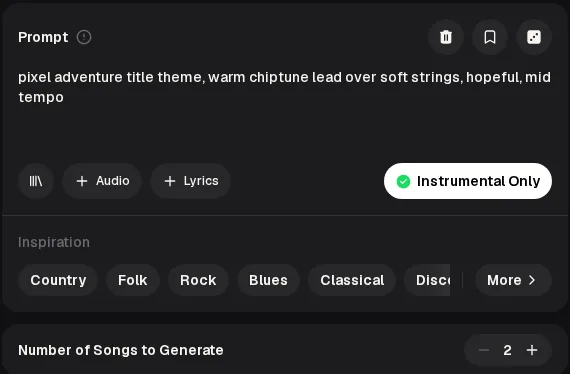
- Prompt Paste the cue brief: sound anchor, game state, mood and tempo words.
- Instrumental Only Switch it on so no vocal competes with dialogue or sound effects.
- Inspiration Tap a genre or mood chip when a brief feels thin.
- Number of Songs Leave it at 2 and keep the take that fits the scene.
Making a pixel-art game? The 8-bit music generator on the same music maker website adds console and scene choices made for retro sounds.
Make the Level Cue Last Longer
Short answer: run a level cue through the AI Music Extender when it repeats too soon for how long the level takes to play.
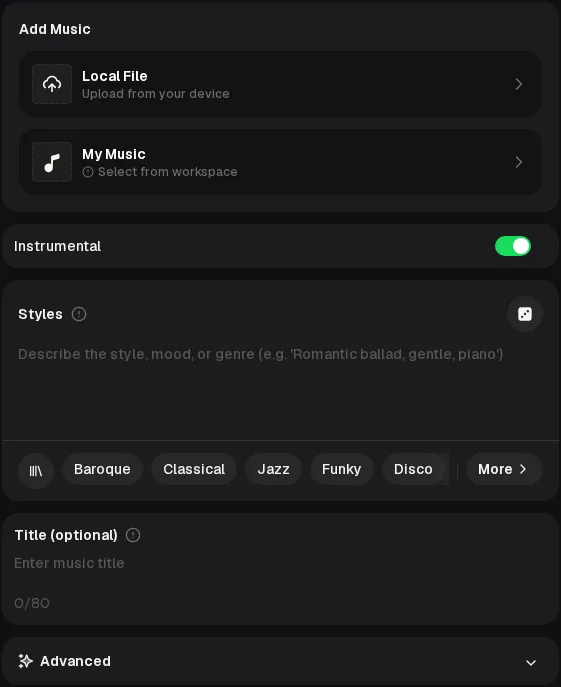 ABCD
ABCD- A
- Add the cue from My Music, or a Local File between 3 seconds and 8 minutes long.
- B
- Keep Instrumental on so the extension stays vocal-free like the original.
- C
- Paste the same sound anchor into Styles so the new part matches.
- D
- Advanced holds Weirdness, Style Influence and Audio Influence, each starting at 50%.
This is where a music maker website saves the most jam time. The extender adds new music to the cue rather than looping it. You still choose the loop points in your engine or editor.
From Brief to Build
Short answer: four steps on the music maker website take a cue from a line of text to a file your engine can play.
Brief
Write the cue brief from the sheet with the shared anchor.
Generate
Run it with Instrumental Only and keep the better of two songs.
Stretch
Extend level cues that repeat too soon for the play length.
Wire in
Download from the music maker website, trim, set loops and balance volume in the engine.
Paste the first brief into the music maker website with your sound anchor, switch on Instrumental Only and compare the two songs before the next playtest.
What It Does and Doesn't Do
Short answer: the music maker website writes and extends instrumentals; looping, mixing and adaptive music still happen in your engine.
| Does | Doesn't — try instead |
|---|---|
| Generates two instrumental songs per run from a text brief. | Set exact loop points — trim and loop in your engine or audio editor |
| Extends a cue you made or upload, from 3 seconds to 8 minutes long. | Switch music by game state for you — trigger cues from your game code |
| Offers Inspiration genre and mood chips when a brief feels thin. | Make sound effects such as jumps or coins — use a sound effects tool or library |
| Runs in a desktop or phone browser with nothing to install. | Confirm your jam allows AI assets — read the jam's rules page first |
Some jams ask teams to disclose AI-generated assets, and some don't allow them. Check before Friday night, whichever music maker sites your team uses, so the soundtrack doesn't get your entry disqualified.
Two More Example Cues
Short answer: an overworld cue and a dungeon cue, each written for a different game state and retro sound.
Together with the title screen cue at the top, these follow the cue sheet: one brief per game state, each with its own tempo and mood words. They were written as separate briefs for different retro consoles, so they show range rather than one shared anchor.
About these examples: they were made with the MusicCreator AI Music Generator from our own retro chiptune briefs, so your takes will sound different.
Music Maker Website FAQ
Short answer: free credits after a quick sign-up, two songs per run, and licensing that follows your plan.
Is this music maker website free for a jam?
The music maker website gives free credits after a quick sign-up: 30 credits a year, which is 15 generations at 2 credits per song. A four-cue jam soundtrack with one retry each fits inside that. Free users can download only a limited number of songs, while paid plans download MP3, WAV and FLAC. Unused credits reset on your renewal date, so plan cues before the jam starts.
Can I publish or sell the game with this music?
Monthly and yearly plans include commercial rights within the scope of the Commercial License. On a monthly plan the license certificate costs 5 credits per song, yearly plans include it at no extra cost, and Pay Once credits can get it for 5 credits per song. Licenses already obtained remain valid if you cancel, so download the files and certificates while your plan is active.
Will the tracks loop seamlessly in my engine?
Don't count on it. A music maker website writes a song with a start and an end, not a loop file, so trim the intro and outro yourself. Pick a take whose ending lands back on the same chord or groove as its start. Test the loop in the engine with the game running, because a seam that hides in a level can stand out on a quiet menu.
Does my jam allow AI-generated music?
That depends on the jam, not on the tool. Some jams welcome any assets, some ask you to label AI-generated assets in your submission, and some don't allow them at all. Read the rules page before the jam starts, and note which music maker website you used in your game page description. If the rules are unclear, ask the organisers before you build the soundtrack.
Can the whole team use it on different computers?
Yes. The music maker website runs in any modern desktop or phone browser, so a teammate on a borrowed laptop can join without installing anything. Each person signs in to their own account, and songs live in that account's My Music. Agree on one person to download and name the final cues, so the build doesn't end up with three copies of the boss track from different accounts.
How long can one cue be?
A song from the music maker website is usually long enough for a title screen or a short level, and you can stretch a level cue with the AI Music Extender. The extender accepts audio between 3 seconds and 8 minutes. For very long levels, a cue that repeats every couple of minutes is normal in games. Make sure the loop point is smooth rather than chasing one very long track.
Give Your Jam Game a Soundtrack
Write the cue sheet, pick one sound anchor and generate the title theme on the music maker website first, so the game sounds finished from the opening screen.