Rock AI for Band Demos
Sketch a full rock track before rehearsal, then split it into stems so every player can learn a part. Bands lose a lot of practice time explaining ideas out loud: the riff you hummed, the tempo you meant, the chorus that should hit harder. Rock AI lets you turn that idea into a demo the whole band can hear.
Describe the song, set the tempo, key and energy, pick a vocal or go instrumental, and generate two versions to argue about. Then separate the one you like into guitar, bass, drums and vocals so the drummer, the bassist and the singer each have something to work from. Free credits come after a quick sign-up.
What a rock AI demo solves for a band
A demo does not have to be good to be useful. It only has to give everyone the same reference so rehearsal starts from a shared idea instead of four different ones. These are the moments when bands reach for a quick rock AI sketch, and each one saves time that would otherwise go to explaining, guessing and starting over at the next practice.
Pitch the idea
Share a rough version in the chat so the band hears the vibe first.
Try the structure
Hear where the chorus lands before anyone learns the parts.
Settle the BPM
Generate at two tempos and vote instead of arguing.
Fill a gap
Sketch a short instrumental to bridge two songs in a set.
Rock AI settings a band actually cares about
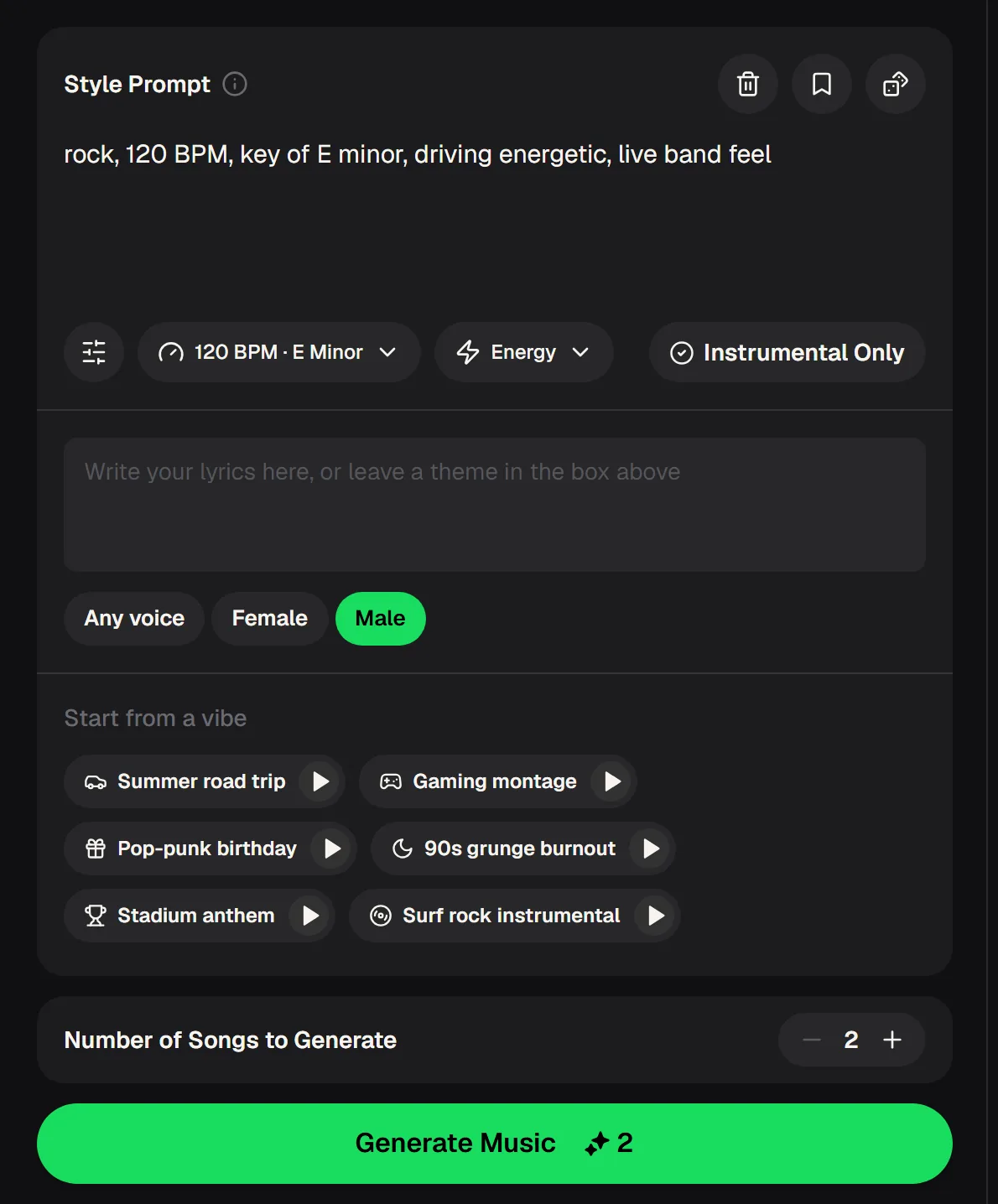
The rock AI panel keeps the controls a band would argue about anyway. Every control below is listed, so you can plan the demo before you open it. Write the prompt the way you would describe the song to a new member: the sound, the feel and what the chorus should do.
- Style Prompt
- Genre, sound and feel in your own words
- Tempo and key
- Example shown: 120 BPM, E Minor
- Energy
- Set how hard the track pushes
- Instrumental Only
- Switch on for a backing track
- Lyrics
- Write your own or leave a theme
- Voice
- Any voice, Female or Male
- Songs per run
- Two versions to compare
- Cost
- 2 credits per song
Presets are a fast way to start: the panel offers starting vibes such as 90s grunge burnout, Stadium anthem, Pop-punk birthday and Surf rock instrumental.
From rock AI sketch to rehearsal-ready parts
The point of the demo is what happens after it. This workflow takes one idea from the group chat to separate parts each member can practise at home, so the next rehearsal is about playing together rather than working out who plays what. It works for covers-band side projects and original material alike.
Describe and generate
Write the style, set tempo, key and energy, and let rock AI make two versions.
Pick the take
Share both with the band and keep the one that feels closest.
Split into stems
Open AI Stem Splitter from the song's Editor menu for guitar, bass, drums and vocals.
Learn your part
Each player practises along with their own stem before rehearsal.
Sketch the song with rock AI, split the best take into parts and send each player their stem to learn before rehearsal.
How stems turn one rock AI demo into four parts
The stem splitter is what makes a demo useful for a band rather than just a listener. It separates a generated song into individual parts, and because the demo was made on the site, the most detailed mode is available.
Pick the level of detail that matches your line-up. A trio might only need four stems, while a band with keys and two guitars will get more from six or from All Detected Stems.

When the rock AI demo is not quite the song
A first rock AI take rarely matches the version in your head. These adjustments usually close the gap in one or two more runs, and none of them need production skills. Keep the versions you reject; they are often useful when the band debates the arrangement.
Change one word in the style or tempo and run another take, and keep the rejected versions for the arrangement debate.
Rock AI prompts for common band situations
Start from one of these and swap in your own details. Name the sub-genre, describe the drums and guitars, and say what the chorus should do. Shorter prompts with one clear direction usually give a better demo than long lists of influences. Generate, listen as a band, and adjust one phrase at a time until the rock AI take matches the room.
Rock AI questions from bands
Short answers about making band demos with the rock generator, from credits to stems and downloads.
Is rock AI free to try?
MusicCreator is free to start, with free credits after a quick sign-up. Each generated song uses 2 credits, and every run gives two versions.
Can I add my own lyrics?
Yes. The rock AI panel has a lyrics box where you can write your own words or leave a theme for the AI to write around.
Can I get separate guitar and drum parts?
Yes. Open AI Stem Splitter from the song's Editor menu. Six-stem mode includes guitar, and All Detected Stems can find up to 12 stems in songs made on the site.
Can I download the demo?
Paid plans can download MP3, WAV and FLAC; free users can download a limited number.
Can the band release a song made with rock AI?
Monthly and annual plans both include commercial rights within the scope of the Commercial License. Downloading the license certificate costs 5 credits per song on a monthly plan and nothing extra on an annual plan.
Can I make it longer or rework a section?
Yes. Finished songs in My Workspace offer Extend and Replace Section in the Remix menu, along with Cover and Mashup.
The fastest rehearsals start with everyone already knowing the song. Spend practice time on the energy, the dynamics and the ending, the things only a band in a room can get right together, and turn the next idea into a rock AI demo by the weekend.
Bring a demo to your next rehearsal
Sketch the idea with rock AI, share two versions in the band chat and split the chosen take into parts so each player can learn theirs.