Song Maker for Everyday Life Moments
Turn a move, a pet, a road trip or a hard week into a full song with vocals. The best song ideas are often the ordinary ones: the first night in a new flat, the dog who steals socks, the drive home after a long shift, the Sunday when nothing went wrong.
This song maker turns a plain description of a moment like that, or a few lines you wrote yourself, into a complete song with melody, vocals and instruments, so the small things in your week get a soundtrack of their own.

The parts of a song, explained without jargon
Every pop, country or rock song you know is built from a few repeating parts. You do not have to write them all yourself, but knowing what they are helps you describe what you want and judge what a song maker gives back.
Think of it as a map, not a rulebook. Plenty of great songs break these patterns, but nearly all of them use at least a verse and a chorus, so those two are the best place to start.
The story
Sets the scene and moves the story forward. Lyrics change each time.
The big moment
The part people sing along to. Same words every time, usually the title.
The surprise
A short change of mood near the end, before the final chorus.
The earworm
One catchy phrase or melody that sticks after the song ends.
Two songs made by people starting from words
Both samples were made with the MusicCreator song maker from short written prompts, without recording a single note. Listen for how the verses and chorus are arranged, where the vocal sits, and how the instruments support it. Then imagine your own idea in the same shape.
Pay attention to how quickly the chorus arrives and how the vocal melody repeats, because those are the details you can ask for in your own prompt later on. Then picture your own everyday moment in the same shape.

Start from an idea or from your own words
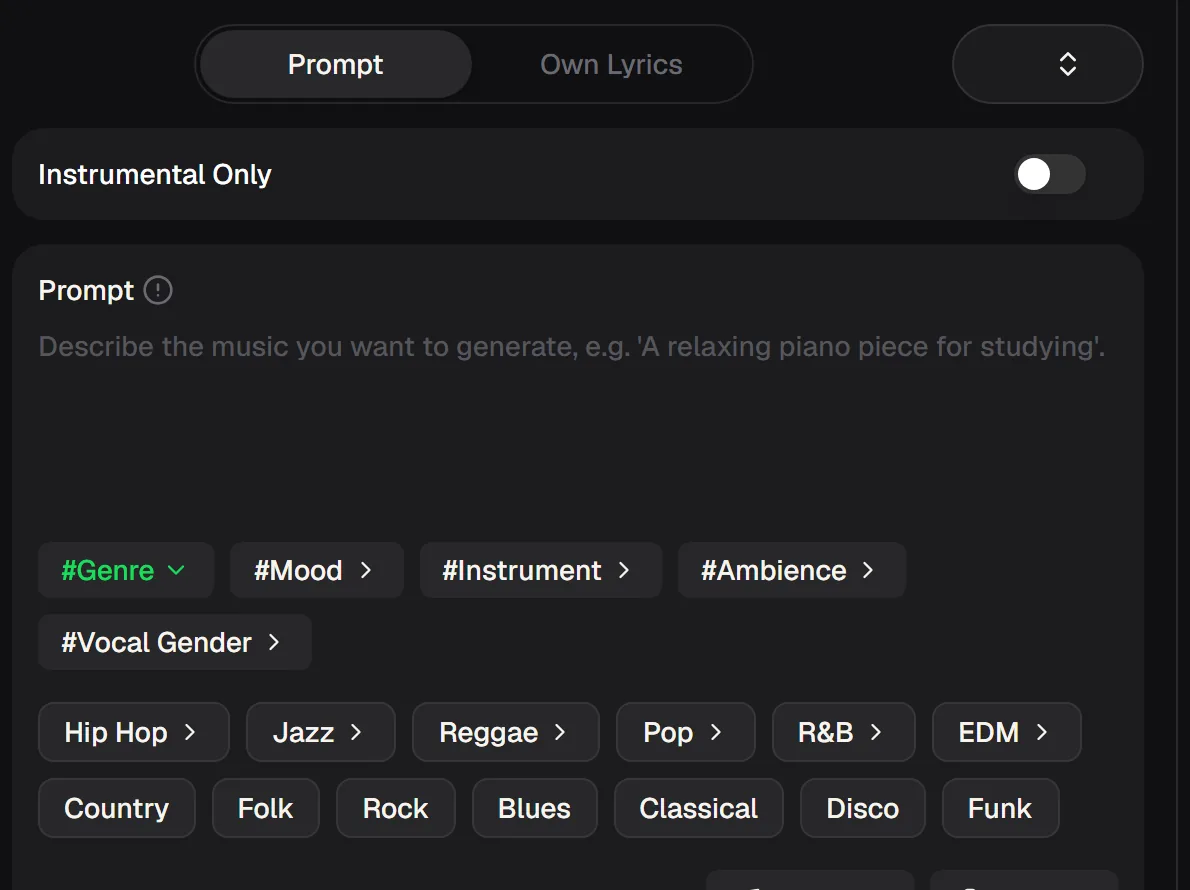
The song maker gives you two starting points, and both work well for everyday subjects. Pick the one that matches what you already have. If you only have a feeling, start with a prompt. If you have scribbled a few lines in your notes app, paste them in and let the AI sing them.
| Prompt mode | Own Lyrics mode | |
|---|---|---|
| What you type | A one-line idea | Your verses and chorus |
| Who writes the words | The AI | You |
| Best for | Hearing a mood quickly | Personal stories and gifts |
| Effort | Lowest | A little writing |
Start with a prompt if you only have a feeling, or paste the lines from your notes app and let the AI sing them.
What one run of the song maker gives you
A quick look at what to expect from one song maker run, so there are no surprises when you try it. Each run uses a small number of credits, and you always get two versions to choose between.
How to turn an everyday moment into a song
Give your song maker one moment from this week, not a whole life story. The aim is a song that sounds like that moment: the place, the people and the feeling. These four steps work for any small scene, from a rainy commute to a kitchen dance party.
Write who and what
Name who the song is about and one feeling, like "my sister moving away, hopeful".
Choose a genre you love
Pick the style you already listen to: pop, country, acoustic, R&B.
Generate two versions
Listen to both from start to end before deciding which one is yours.
Adjust one detail
Change the mood, the voice or a lyric line, then generate again.
Keep every version you like, even the imperfect ones. Comparing them later is how you learn what you actually want from a song, and that taste is the real skill behind songwriting, with or without AI.
When a song about your day falls flat
Everyday songs go wrong in a few predictable ways, usually because the prompt is too vague. Most of these disappear after one or two more song maker runs once you see how small changes in your prompt shape the result.

Song maker questions
Straight answers about turning everyday moments into songs.
How do I make a song on a song maker?
Open MusicCreator's song maker, choose Prompt mode, describe who the song is about, the feeling and a genre, then generate. You get two versions. Keep the one you like, or change one detail and try again.
Do I need to sing or play an instrument?
No. This song maker creates the vocals and the instruments for you. If you would rather not have vocals, switch on Instrumental Only.
Can I use my own lyrics?
Yes. In this song maker, switch to Own Lyrics mode and paste your verses and chorus. The AI writes a melody and sings your words over a full arrangement.
Which everyday moments make good songs?
Something specific and close to you works best: a friend's birthday, a pet, a trip, a hard week that turned out fine. Specific details give a song maker something real to write about, and they make the finished song feel personal rather than generic. Small, honest subjects usually beat big abstract ones.
Is the song maker free?
Yes, this song maker is free to start. New accounts receive 30 free credits a year (15 songs) after a quick sign-up, and each generated song uses 2 credits, so you can try a few songs before choosing a plan.
What music styles can I create?
Most popular styles, from pop and country to rock, R&B, folk and lofi. Name the style in your song maker prompt, or start from one of the genre generators listed in the site menu.
You do not need lessons, gear or a perfect voice to turn a moment into music with a song maker. Share the song with the person it is about; next week will bring another moment worth a song, and the one after that too.
Give this week a song of its own
Write one honest sentence about a moment from your week, choose a style you love and keep the version that moves you.