Voice Remover from Song Beside Your Editing App
See what your editing app already does with vocals, and when a voice remover from song upload makes more sense. We set the voice options in four popular apps beside a browser vocal remover.
Free credits after a quick sign-up; paid plans download MP3, WAV and FLAC.
What the voice remover from song panel asks for
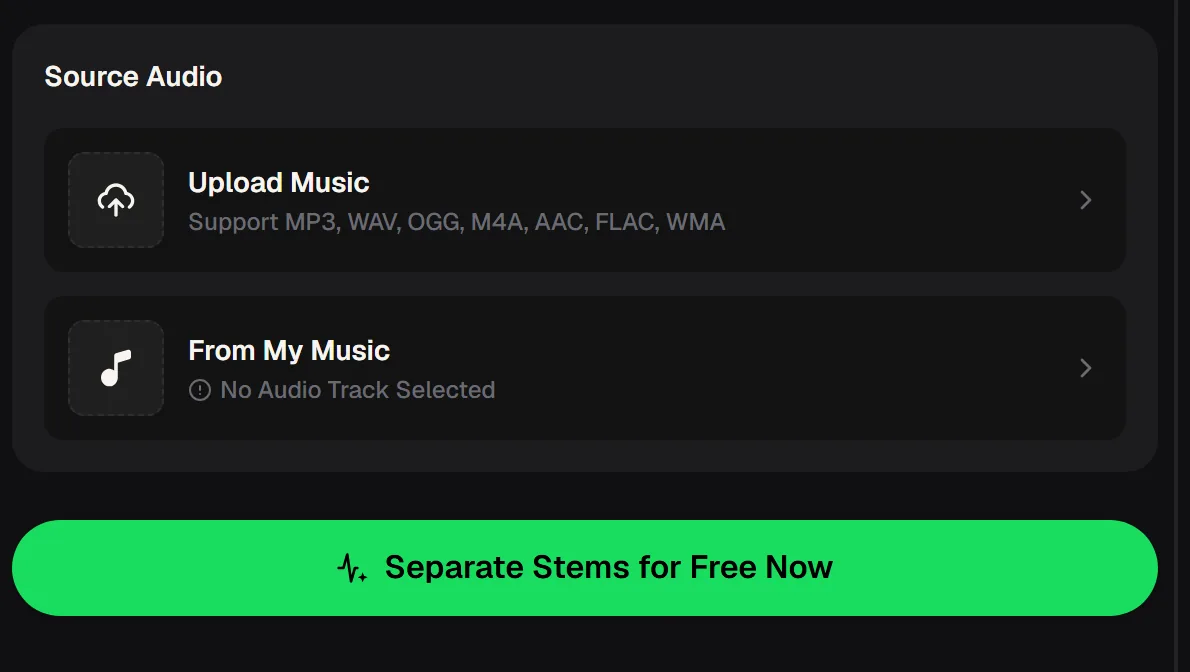
The panel needs one audio file and one click, with no project setup. The zoomed view shows the two source controls, so you can compare the effort with the menus inside your editing app.
Two ways in, one button
Upload Music takes MP3, WAV, OGG, M4A, AAC, FLAC or WMA, and From My Music picks a track already in your library. Separate Stems then returns a vocal track and an instrumental.
Because the voice remover from song panel takes audio files only, export the soundtrack first if your song sits inside a video project. You then get two files back: the isolated voice and the music without it, ready to import into any editor.
Voice removal options in four editing apps
Each app handles vocals differently, so the right route depends on where your project already lives. The table follows each maker's own help pages; plans and menus change, so recheck before you rely on a detail.
| CapCut desktop | BandLab | GarageBand | Audacity | |
|---|---|---|---|---|
| Built-in AI vocal split | ✓ Yes, Isolate voice | ✓ Yes, Splitter | – Not listed | – Via add-on plugin |
| Free tier can use it | – Pro feature for export | ✓ Yes, two splits a day | – Not applicable | ✓ Yes, plugin is free |
| Stems on free tier | – Voice or music | ✓ 2 or 4 stems | – None | ✓ 2 or 4 stems |
| Classic centre-channel removal | – Not listed | – Not listed | ✓ EQ or phase tricks | ✓ Vocal Reduction effect |

Sources: CapCut's vocal remover and resource pages, BandLab's Splitter help article, Apple's Logic Pro guide for Stem Splitter, and the Audacity manual plus the OpenVINO plugin notes. Apple places Stem Splitter in Logic Pro rather than GarageBand.
When your app is enough and when to upload
Stay in your app when its tool covers the job; upload when you need a file it cannot give you. Use the note below to choose, then check the result by ear before you commit to a mix.

A voice remover from song upload also helps when you have used up a daily split limit, or when the song only exists as a file on your phone or computer rather than inside an app project. Keep both returned tracks, since the vocal is useful for checking timing later.
Projects where people remove a song's voice
Searchers usually want the voice gone for a concrete project, not as an experiment. A voice remover from song fits each of the jobs that came up most in app forums and related questions we read.
Video background music
A short video needs the song's groove under a voiceover, so the singing has to go before the edit in CapCut or another editor.
Practice and covers
Musicians in BandLab or GarageBand want the instrumental to sing or play over while they record their own part.
Karaoke nights
Hosts need instrumentals of the songs on their list, often in bulk, which quickly runs into daily limits.
Podcast and talk segments
Producers editing in Audacity want a quieter bed with no competing lyrics under spoken audio.

Round trip from your app and back
The whole round trip takes a few minutes and keeps your original project untouched. Each step below is one short action in your app or on the voice remover from song panel.
- Step 1
Export
Save the song from your app as WAV or MP3.
- Step 2
Upload
Add it on the panel or pick it from My Music.
- Step 3
Separate
Start Separate Stems and wait for two tracks.
- Step 4
Download and import
Save both tracks and place the instrumental on its own track at zero.
Paid plans can download MP3, WAV and FLAC; free users can download a limited number. WAV or FLAC keeps the most detail when you mix again inside GarageBand, Audacity or a video editor.
Export one song from your editing app, upload it to the voice remover from song panel, and bring the instrumental back into your project, with free credits after a quick sign-up.
Upload your songHabits that give a cleaner instrumental
Most quality problems start with the file you export, not the remover. Use these habits whichever voice remover from song route you choose, inside an app or through an upload.
Export lossless WAV once when your app allows it.
Separate the clean song first, then add effects.
Listen to the chorus, where vocals are densest.
Keep it to check timing later.

Centre-channel removal, as in GarageBand phase tricks or Audacity's Vocal Reduction, also cuts anything mixed in the middle, such as kick and bass. An AI voice remover from song files avoids that by recognising the voice itself.
Voice remover from song questions
Short answers to the app questions people search most. App details follow each maker's own help pages.
Can you remove the voice from a song in CapCut?
Yes, on the desktop app. CapCut's help pages describe an Isolate voice option under the audio settings, with choices to remove or keep the vocal. CapCut lists it as a Pro feature, and its pages note that free users cannot export the result. If you are on the free plan, export the song as audio, separate it with an online vocal remover, and import the instrumental back into your CapCut timeline as a regular audio track.
How do I remove vocals in BandLab?
Use BandLab's Splitter. According to BandLab's help centre, free accounts can split a song into two stems, vocals and others, or four stems, vocals, drums, bass and others, up to two splits per day, with more stems on paid memberships. It imports MP3 and WAV files. If you need more songs on the same day or want the files outside BandLab, an upload-based voice remover from song files returns a vocal and an instrumental you can download.
Can GarageBand remove vocals from a song?
GarageBand has no AI stem separation listed in Apple's documentation; Apple describes Stem Splitter as a Logic Pro feature. In GarageBand people use EQ cuts or phase inversion, which remove centre-panned sound and often take kick and bass with the voice. A cleaner route is a voice remover from song files: separate the song first, then drag the instrumental file into a GarageBand track and record over it as usual.
Does Audacity have a vocal remover?
Audacity's manual describes a Vocal Reduction and Isolation effect that removes centre-panned audio, and notes it is no longer bundled with recent releases. Separately, the free OpenVINO plugin adds AI Music Separation with two-stem and four-stem modes on supported computers. If installing plugins is not practical, upload the song to a vocal remover, download the instrumental, and open it in Audacity to keep editing.
Which files can I upload and download?
The voice remover from song panel accepts MP3, WAV, OGG, M4A, AAC, FLAC and WMA uploads, and you can also choose a track from My Music. It takes audio files only, so export the soundtrack from a video project first. Paid plans can download MP3, WAV and FLAC; free users can download a limited number. WAV or FLAC keeps the most detail if you plan to mix the instrumental again in your editing app.
Can I publish a song after removing the voice?
Using a voice remover from song does not change who owns the original song, so the rights of the songwriter and label still apply to the instrumental you create from it. For songs you made on MusicCreator, monthly and annual plans both include commercial rights within the scope of the Commercial License. Downloading the license certificate costs 5 credits per song on a monthly plan and nothing extra on an annual plan.
Get the instrumental your app can't export
Upload the song to the voice remover from song tool, separate the voice and import the instrumental back into your project, with free credits after a quick sign-up.
Separate your song now