AI trap beats are everywhere on TikTok in 2026. From gaming edits and anime clips to gym reels, car videos, fashion transitions, and meme content, creators are using heavy 808s, fast hi-hats, dark melodies, and high-energy drops to make short videos feel more viral.
With an AI music generator, you no longer need music production skills or expensive beat-making software. You can simply describe the trap beat you want, choose a style like Dark Trap, Phonk, Drill, or Rage Beat, and generate a TikTok-ready track in seconds.
In this guide, you’ll learn how to create AI trap beats for TikTok, write better music prompts, choose the right BPM, and generate royalty-free trap music for Reels, Shorts, gaming videos, and social media content.
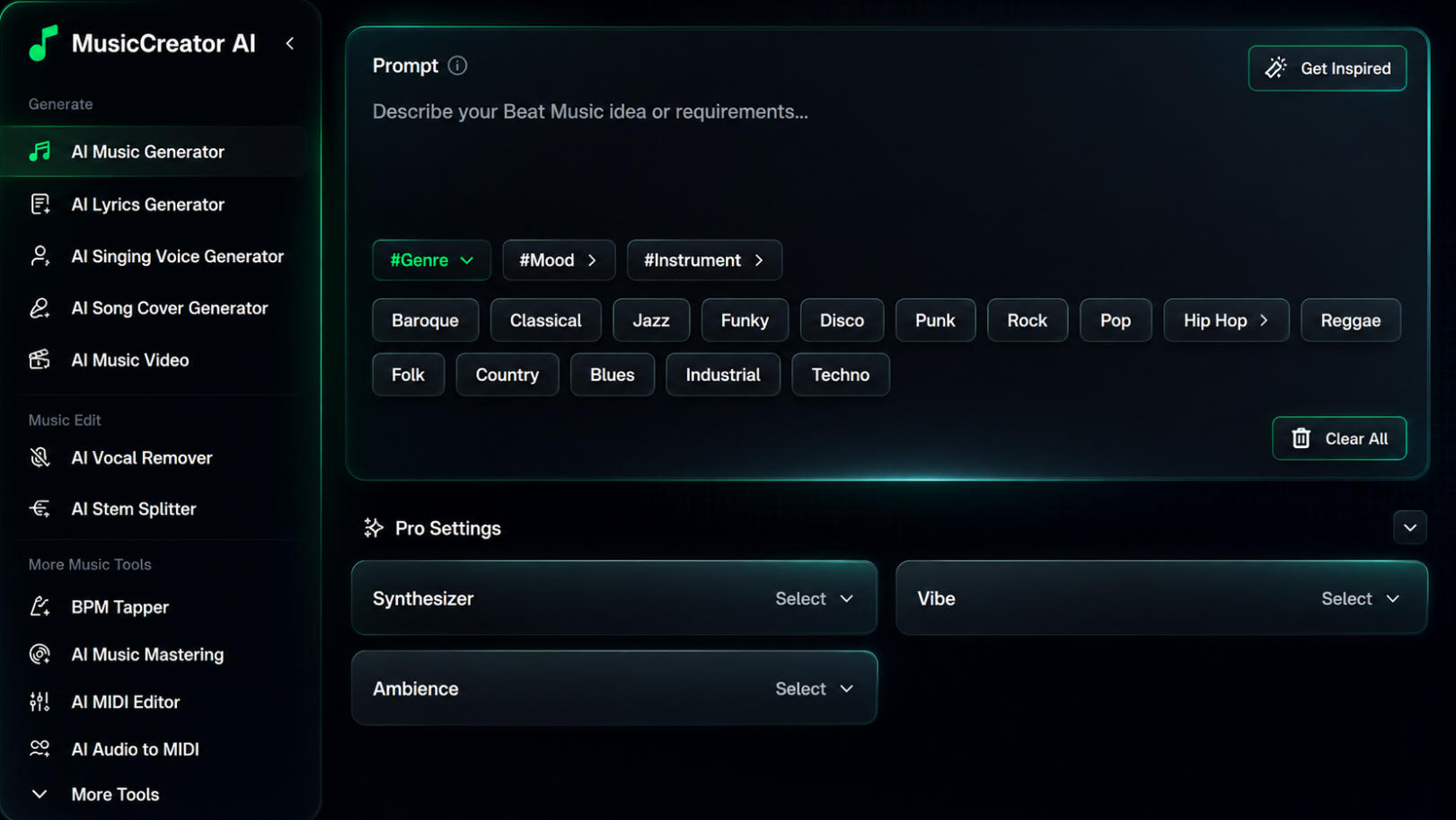
Start with a Trap Beat Prompt
The easiest way to create a TikTok trap beat is to start with a clear music prompt. Instead of typing a vague idea like “make a trap beat,” describe the sound, energy, instruments, and use case you want.
For TikTok content, your prompt should usually include:
- the beat style, such as dark trap, phonk, drill, or rage beat
- the mood, such as aggressive, cinematic, energetic, or emotional
- the rhythm elements, such as heavy 808s, fast hi-hats, punchy drums, and catchy loops
- the use case, such as gaming edits, anime clips, gym reels, car videos, or fashion transitions
For example, you can enter:
Dark aggressive trap beat with distorted 808s, fast hi-hats, cinematic atmosphere, and viral TikTok energy.
This gives the AI enough direction to generate a beat that feels short-form friendly, high-energy, and ready for TikTok-style edits.
Choose the Right Genre, Mood, and Pro Settings
After writing your prompt, the next step is to guide the AI with the right music settings. These options help the generator understand the type of trap beat you want to create, the emotional direction of the track, and the instruments or sound textures that should appear in the final result.
For TikTok trap beats, don’t choose settings randomly. A good short-form beat usually needs a strong genre direction, a clear mood, and a sound design style that matches the video scene.
1. Select the Right Genre
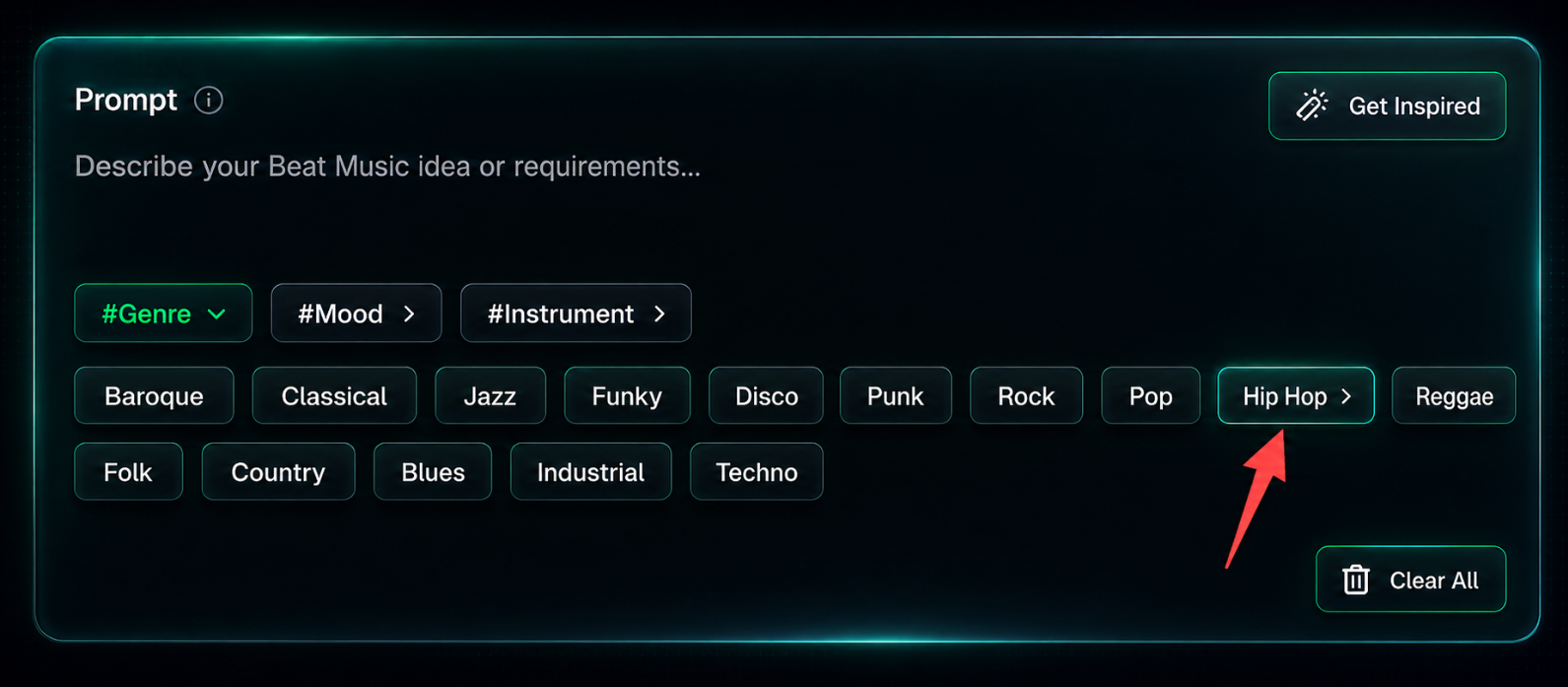
Start by choosing a genre that matches the type of TikTok content you want to create.
For most TikTok trap beats, you can start with:
- Hip Hop — best for classic trap beats, rap-style edits, and creator videos
- Techno — good for high-energy, futuristic, or cyber-style trap
- Industrial — useful for darker, aggressive, heavy beats
- Pop — better if you want a cleaner, more catchy TikTok-friendly sound
- Rock — useful for hybrid trap, gym edits, or intense video transitions
For example, if you want a dark, viral trap beat for gaming or anime edits, you can choose Hip Hop as the base genre and combine it with a darker mood in the next step.
2. Choose a Mood for the Beat
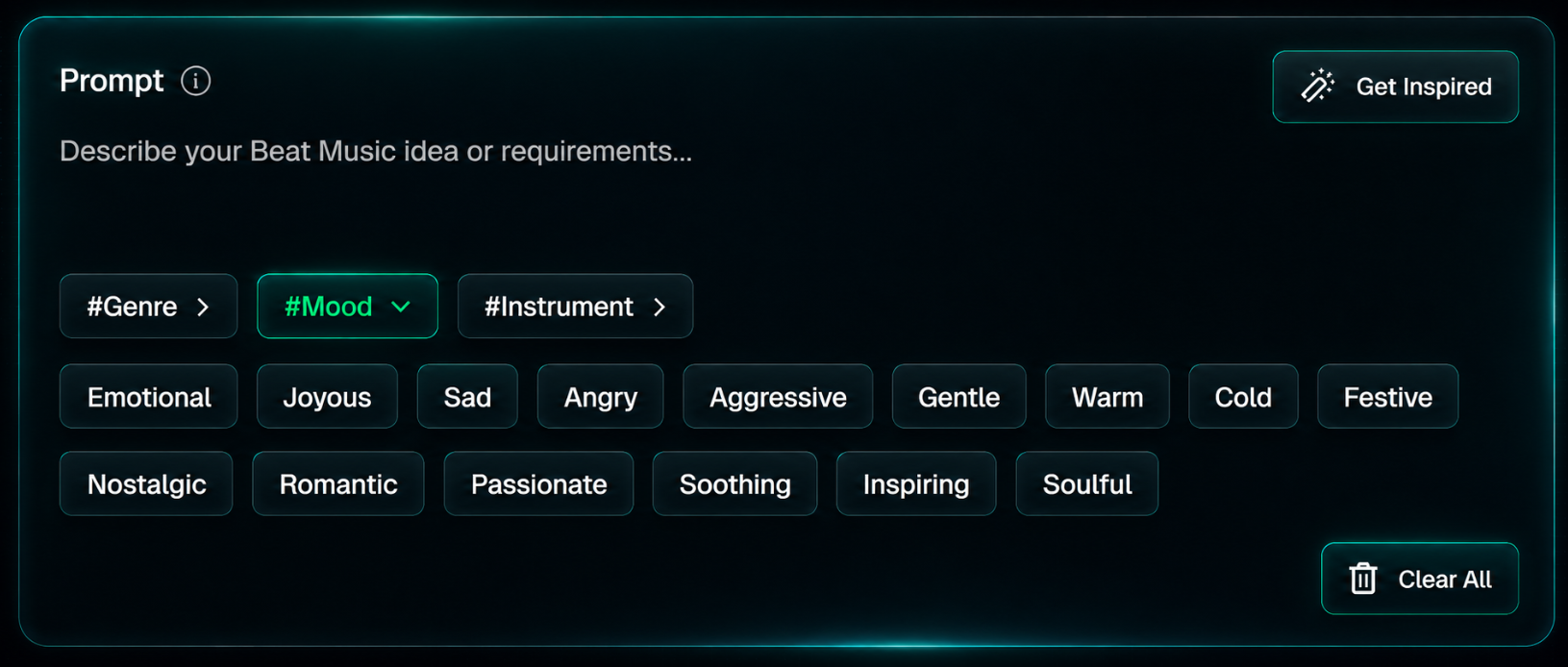
Mood controls the emotional direction of your track. For TikTok trap beats, the most useful moods are usually:
| Mood | Best For |
|---|---|
| Dark | gaming edits, anime edits, car videos |
| Aggressive | gym reels, fight edits, street-style videos |
| Energetic | viral transitions, dance clips, fast edits |
| Cinematic | dramatic edits, storytelling videos |
| Emotional | anime scenes, sad edits, character videos |
If your goal is to create a beat that feels viral on TikTok, avoid choosing a mood that is too soft or too neutral. Trap beats usually work better when the mood is strong and easy to feel within the first few seconds.
3. Use Instrument Settings to Shape the Sound
Instrument settings help the AI decide what kind of sound elements should appear in the beat.
For TikTok trap beats, you can guide the AI toward:
- 808 bass
- fast hi-hats
- punchy drums
- dark synths
- cinematic piano
- cowbells for phonk-style beats
- distorted bass for aggressive edits
If your interface only shows broad instrument options, you can still describe the exact instruments inside the prompt.
Example:
Dark trap beat with heavy 808 bass, fast hi-hats, distorted synths, and cinematic piano melodies for TikTok gaming edits.
4. Adjust Pro Settings for a More Specific Result
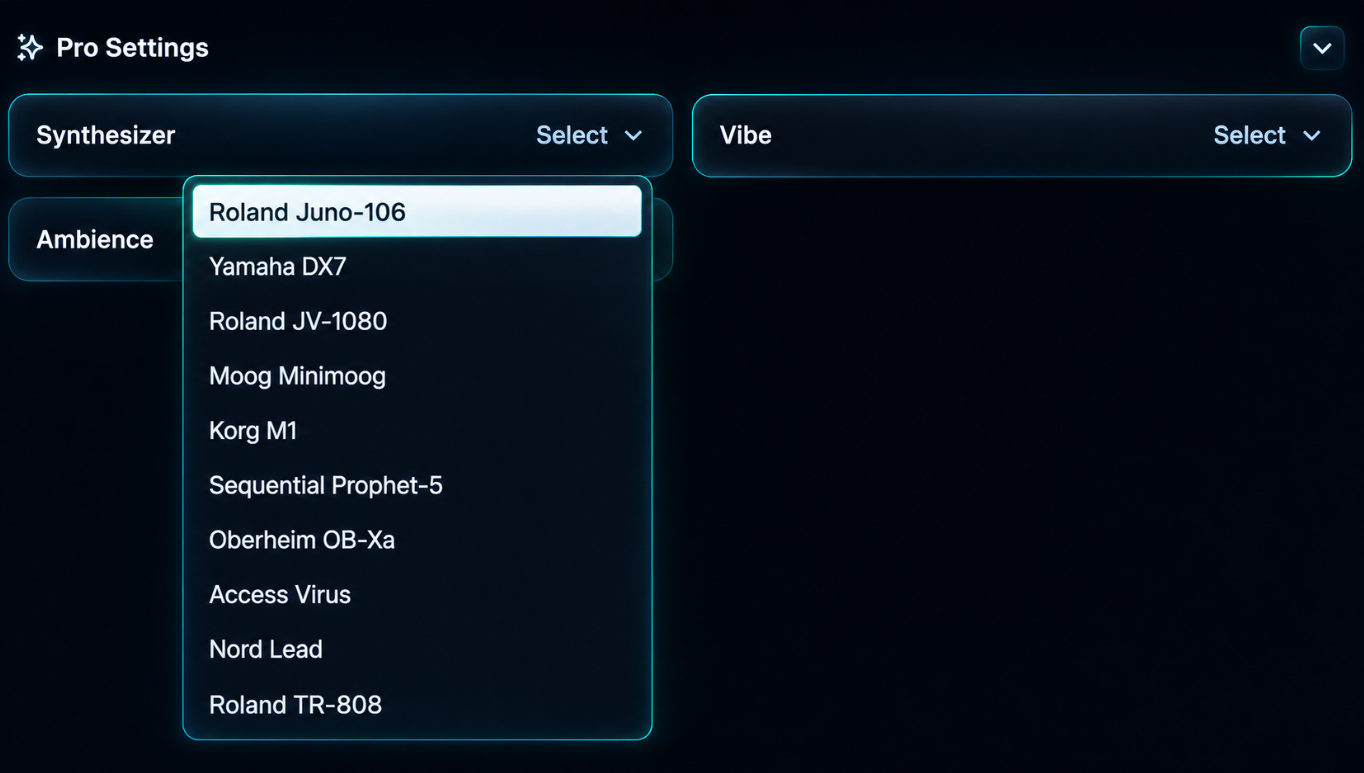
The Pro Settings section is useful when you want more control over the final beat. Instead of letting the AI guess everything, you can shape the sound with settings like Synthesizer, Vibe, and Ambience.
For TikTok trap beats, these settings help the AI understand three things:
- what kind of sound texture you want
- what kind of energy the beat should have
- what kind of atmosphere the track should create
For example, if you want a dark trap beat for gaming edits or car videos, you can choose a stronger synth style, a darker vibe, and an urban ambience. If you want a softer aesthetic beat, you can choose a warmer synth, a lofi vibe, and vinyl ambience.
Here are some useful Pro Settings combinations:
| TikTok Use Case | Synthesizer | Vibe | Ambience |
|---|---|---|---|
| Gaming edits | Roland TR-808 | Dark | Thunder |
| Car videos | Roland TR-808 | Dark | Cityscape |
| Anime edits | Sequential Prophet-5 | Dark | Rain |
| Gym reels | Roland TR-808 | Party | Thunder |
| Fashion transitions | Nord Lead | Groovy | Cityscape |
| Lofi trap edits | Yamaha DX7 | Lofi | Vinyl |
| Cinematic trap | Moog Minimoog | Ambient | Rain |
| Retro trap | Korg M1 | Groovy | Tape |
A simple setup for your first TikTok trap beat could be:
Genre: Hip Hop
Mood: Aggressive
Instrument: Synthesizer
Synthesizer: Roland TR-808
Vibe: Dark
Ambience: Cityscape
Then combine it with a clear prompt:
Create a dark aggressive trap beat for TikTok videos with heavy 808 bass, fast hi-hats, punchy drums, distorted synths, and an urban city atmosphere. Make it energetic, loopable, and suitable for gaming edits, anime clips, car videos, gym reels, and viral short-form content.
This gives the AI a clear creative direction and usually produces a beat that feels more focused, modern, and suitable for short-form TikTok videos.
Match the Vibe to Your TikTok Video Style
After choosing your synthesizer and basic settings, the next step is to select the right Vibe. This helps the AI understand how the beat should feel.
For TikTok trap beats, Vibe is especially important because different video styles need different energy. A gym reel may need a powerful and aggressive sound, while an anime edit may need something darker or more emotional.
In MusicCreator AI, you can choose from Vibe options like:
Groovy
Lofi
Ambient
Party
Dark
Each option works better for a different type of short-form video.
| Vibe | Best For | Beat Direction |
|---|---|---|
| Dark | gaming edits, anime edits, car videos | intense, cinematic, underground |
| Party | gym reels, hype videos, dance clips | energetic, catchy, high-impact |
| Groovy | fashion videos, lifestyle edits, creator content | smooth, rhythmic, stylish |
| Lofi | aesthetic videos, chill edits, study content | soft, relaxed, nostalgic |
| Ambient | cinematic videos, slow edits, emotional scenes | spacious, atmospheric, immersive |
For most TikTok trap beats, Dark is a strong starting point. It works well for gaming clips, anime edits, car videos, and dramatic transitions.
If you want the beat to feel more energetic and viral, choose Party. If you want it to feel more stylish and smooth, choose Groovy.
A simple example:
Vibe: Dark
Use this when you want the beat to feel intense, modern, and suitable for short-form edits.
Add Ambience to Create a Stronger Scene
The Ambience setting adds background texture and atmosphere to your AI-generated track. This helps your trap beat feel less flat and more connected to a real visual scene.
In MusicCreator AI, you can choose from Ambience options like:
Birdsong
Waves
Thunder
Rain
Vinyl
Forest
Cityscape
Tape
Campfire
For TikTok trap beats, the most useful options are usually Cityscape, Thunder, Rain, Vinyl, and Tape.
| Ambience | Best For | Why It Works |
|---|---|---|
| Cityscape | car videos, street edits, fashion videos | creates an urban night-city feeling |
| Thunder | gaming edits, gym reels, dark trap | adds power, tension, and drama |
| Rain | anime edits, emotional videos, cinematic clips | creates a moody and dramatic atmosphere |
| Vinyl | lofi trap, aesthetic edits, nostalgic videos | adds warmth and texture |
| Tape | retro trap, underground edits, vintage-style videos | adds analog grit and character |
If your TikTok video is about cars, night streets, fashion, or urban lifestyle, Cityscape is usually the best choice.
If your video needs more intensity, such as a gaming highlight or gym edit, choose Thunder.
If your video is emotional, cinematic, or anime-related, choose Rain.
Recommended Vibe and Ambience Combinations
The easiest way to get a better result is to match your Vibe and Ambience with the type of TikTok video you want to create.
| TikTok Video Type | Recommended Vibe | Recommended Ambience | Why It Works |
|---|---|---|---|
| Gaming edits | Dark | Thunder | intense, dramatic, high-impact |
| Anime edits | Dark | Rain | emotional, cinematic, moody |
| Car videos | Dark | Cityscape | urban, night-drive, street feeling |
| Gym reels | Party | Thunder | energetic, powerful, aggressive |
| Fashion transitions | Groovy | Cityscape | stylish, modern, urban |
| Lofi trap edits | Lofi | Vinyl | warm, nostalgic, aesthetic |
| Cinematic clips | Ambient | Rain | spacious, emotional, immersive |
| Retro edits | Groovy | Tape | analog, vintage, textured |
For your first TikTok trap beat, a very safe setup is:
Genre: Hip Hop
Mood: Aggressive
Instrument: Synthesizer
Synthesizer: Roland TR-808
Vibe: Dark
Ambience: Cityscape
This combination gives the AI a strong direction: a dark, urban, bass-heavy trap beat that works well for TikTok edits, gaming clips, car videos, and short-form social content.
Best AI Trap Beat Prompts for TikTok
Now that you have selected your genre, mood, synthesizer, vibe, and ambience, the next step is to write a clear prompt.
A weak prompt would be:
Make a trap beat.
A better prompt describes the sound, energy, instruments, and use case:
Create a dark aggressive trap beat for TikTok videos with heavy 808 bass, fast hi-hats, punchy drums, distorted synths, and an urban city atmosphere. Make it energetic, loopable, and suitable for gaming edits, car videos, gym reels, and viral short-form content.
Here are several prompt examples you can use directly.
Prompt 1: Dark TikTok Trap Beat
Create a dark aggressive trap beat for TikTok videos with heavy 808 bass, fast hi-hats, punchy drums, distorted synths, and a night city atmosphere. Make it energetic, loopable, and suitable for gaming edits, car videos, and viral short-form content.
Recommended settings:
Genre: Hip Hop
Mood: Aggressive
Synthesizer: Roland TR-808
Vibe: Dark
Ambience: Cityscape
Best for:
- gaming edits
- car videos
- street clips
- dark TikTok transitions
Prompt 2: Gaming Trap Beat
Create an intense trap beat for TikTok gaming highlights with heavy 808 bass, rapid hi-hats, hard drums, distorted synths, and dramatic thunder energy. Make it powerful, aggressive, and suitable for fast action edits.
Recommended settings:
Genre: Hip Hop
Mood: Aggressive
Synthesizer: Roland TR-808
Vibe: Dark
Ambience: Thunder
Best for:
- gaming highlights
- action clips
- battle edits
- high-energy transitions
Prompt 3: Anime Trap Beat
Create an emotional anime trap beat with cinematic synths, heavy bass, fast hi-hats, dramatic melodies, and a rainy night atmosphere. Make it suitable for TikTok anime edits, character scenes, and storytelling clips.
Recommended settings:
Genre: Hip Hop
Mood: Emotional
Synthesizer: Sequential Prophet-5
Vibe: Dark
Ambience: Rain
Best for:
- anime edits
- emotional scenes
- character videos
- cinematic TikTok clips
Prompt 4: Gym Trap Beat
Create a powerful trap beat for TikTok gym reels with heavy 808 bass, punchy drums, aggressive synths, fast hi-hats, and thunder-like intensity. Make it energetic, hard-hitting, and motivating.
Recommended settings:
Genre: Hip Hop
Mood: Aggressive
Synthesizer: Roland TR-808
Vibe: Party
Ambience: Thunder
Best for:
- gym reels
- workout videos
- transformation clips
- hype content
Prompt 5: Fashion Transition Trap Beat
Create a stylish trap beat for TikTok fashion transitions with clean drums, smooth synths, catchy rhythm, confident energy, and an urban city atmosphere. Make it modern, groovy, and suitable for short-form lifestyle videos.
Recommended settings:
Genre: Hip Hop
Mood: Passionate
Synthesizer: Nord Lead
Vibe: Groovy
Ambience: Cityscape
Best for:
- fashion transitions
- lifestyle videos
- outfit edits
- creator content
Prompt 6: Lofi Trap Beat
Create a lofi trap beat with soft drums, warm synth textures, smooth bass, nostalgic melodies, and vinyl ambience. Make it relaxing, loopable, and suitable for aesthetic TikTok videos.
Recommended settings:
Genre: Hip Hop
Mood: Nostalgic
Synthesizer: Yamaha DX7
Vibe: Lofi
Ambience: Vinyl
Best for:
- aesthetic edits
- chill videos
- study content
- soft lifestyle clips
Final Thoughts
Creating AI trap beats for TikTok is not just about typing a simple prompt. To get a better result, you should guide the AI with the right combination of genre, mood, instrument, synthesizer, vibe, and ambience.
For most TikTok trap beats, start with Hip Hop, choose an aggressive or dark mood, use Roland TR-808 as your synthesizer, select Dark as the vibe, and add Cityscape ambience for an urban short-form sound.
Then write a clear prompt that describes the beat’s bass, drums, synths, energy, atmosphere, and TikTok use case.
The more clearly you guide the AI, the easier it is to generate a beat that feels modern, loopable, and ready for short-form video content.
Create Your Own AI Trap Beat
Ready to make your first TikTok trap beat?
Use MusicCreator AI to generate royalty-free trap music for TikTok, Reels, Shorts, gaming videos, anime edits, car videos, gym reels, and more.
Start with a prompt, choose your genre, mood, synthesizer, vibe, and ambience, then generate a TikTok-ready trap beat in seconds.