AI Rap Lyrics Generator for Battle Bars
Aim your rhymes at the words that matter with Rhyme Target in the AI rap lyrics generator, then turn the verse into a track in the second step. Battle rap lives on specifics: the opponent's name, their weak spot, the punchline that lands on the last syllable. A generic rap lyrics tool gives you generic bars.
This AI rap lyrics generator lets you describe the matchup in the Topic box, pick a rap style and an emotion such as Confident, and list the exact words you want the rhymes to hit. Use the draft as sparring material, rewrite the lines in your own voice, and practise the delivery over a beat made from the same lyrics. Free credits come after a quick sign-up.

What an AI rap lyrics generator adds to battle prep
Nobody wins a battle with lines a machine wrote for them, and that is not the point. The point is speed in the messy middle of writing: finding angles, testing rhyme chains and hearing how a scheme flows before you commit.
An AI rap lyrics generator gives you a stack of raw material to react to, steal from and improve. These are the stages of battle prep where it earns its place.
Find the angles
Describe your opponent and see which themes the draft goes after.
Chain the rhymes
Feed target words and study how the lines build toward them.
Prepare comebacks
Draft answers to the lines you expect them to throw at you.
Hear the flow
Turn the verse into music and practise the cadence out loud.
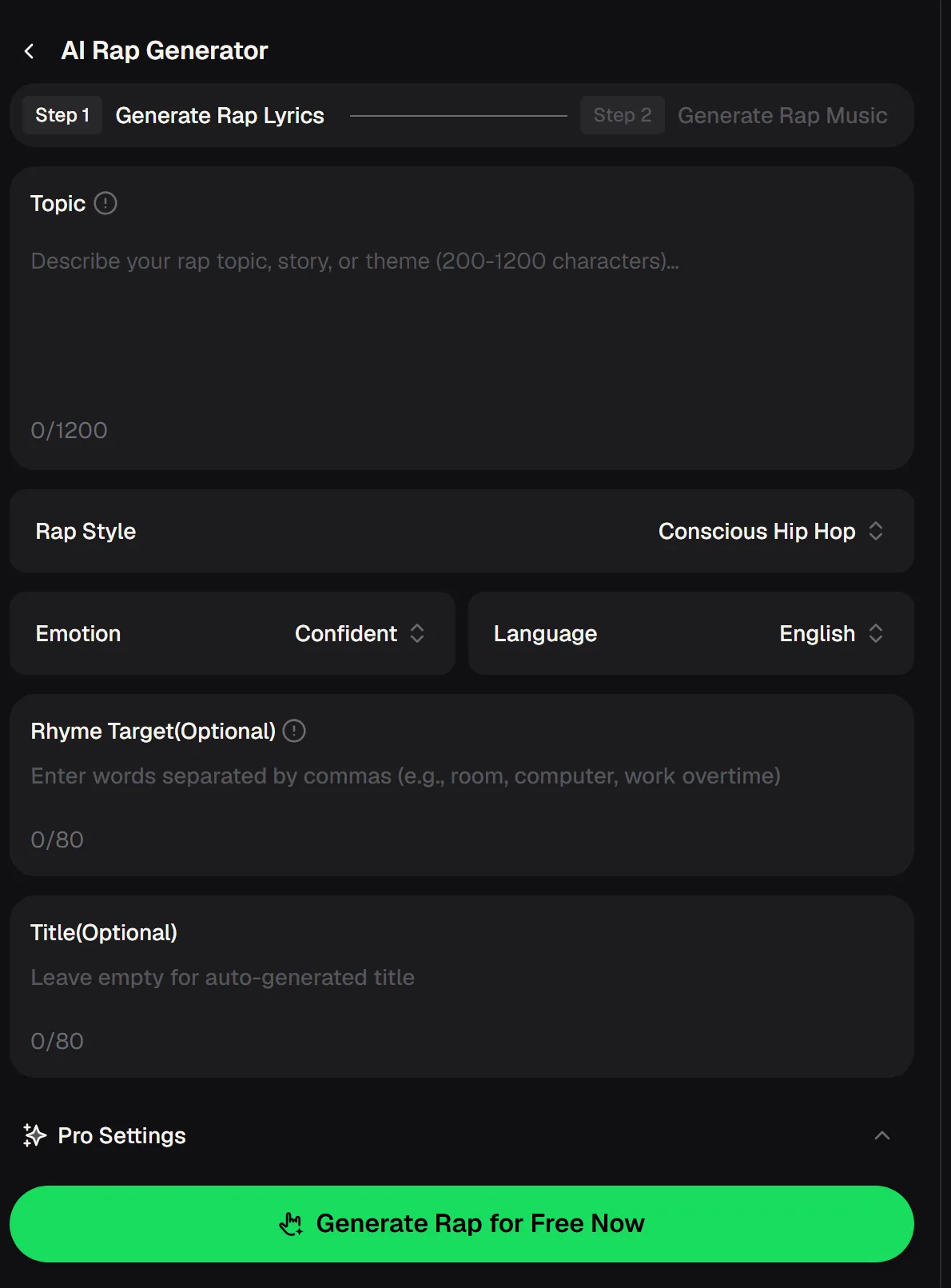
AI rap lyrics generator fields that shape a battle verse
The panel works in two steps: write the lyrics first, then generate rap music from them. Everything below comes from the live panel. For battle bars, the Topic box and Rhyme Target do most of the work, so spend your effort there and keep the other settings simple on the first pass.
- Topic
- Your story or theme, 200 to 1200 characters
- Rap Style
- Example shown: Conscious Hip Hop
- Emotion
- Example shown: Confident
- Language
- Example shown: English
- Rhyme Target
- Optional words, separated by commas
- Title
- Optional; left empty, one is generated
- Step 2
- Generate Rap Music from the lyrics
The Topic box needs at least 200 characters, which is a feature for battle writing: it pushes you to give real detail about the matchup instead of a one-line request.
From AI rap lyrics generator draft to your own battle round
Treat the draft as a sparring partner, not a script. This workflow moves from raw generated lines to a round that sounds like you, with the punchlines placed where you want them. Run it a few times for each round; the second and third drafts often surface angles the first one missed.
Brief the matchup
Write 200+ characters on the opponent, the stakes and your persona.
Set the targets
List the words your punchlines must land on in Rhyme Target.
Mine the draft
Keep the strongest lines and schemes, cut the rest.
Rewrite and rehearse
Put it in your own words, then practise over the track from step 2.
Brief the matchup in the Topic box, aim your punchlines with Rhyme Target and get a first draft of your round.
Landing punchlines with an AI rap lyrics generator
A battle punchline works when the rhyme and the meaning arrive on the same word. Rhyme Target lets you name those words up front, separated by commas, so the AI rap lyrics generator builds lines toward them instead of rhyming wherever it likes.
Choose words that carry the insult or the twist: the opponent's name, their crew, their hometown, the thing they bragged about last round. Keep the list short so each target gets a strong setup.

When the bars come out too soft
Battle writing needs edge, and a first draft can play it safe. These adjustments usually sharpen the result within a run or two. Remember that the strongest bars will still be the ones you rewrite yourself with details only you know about the matchup.
Add sharper details about the matchup to the topic and run another draft, then rewrite the best lines in your own words.
AI rap lyrics generator topics for battle rounds
Start from one of these and swap in your own details. The Topic box rewards specifics, so name the setting, your persona and the angle of attack, and use Rhyme Target for the words you want the punchlines to hit. Generate, keep the best lines, and run again with a tighter brief.
Questions about writing battle bars
Short answers about using the AI rap lyrics generator for battles, from credits to the music step and rights.
Is the AI rap lyrics generator free to try?
You can use it as a free AI rap lyrics generator to start, with free credits after a quick sign-up, so you can test a few drafts before choosing a plan.
Can I control which words rhyme?
Yes. Rhyme Target takes words separated by commas, and the AI rap lyrics generator builds the lyrics toward them.
Can I hear the verse as a song?
Yes. Step 2 on the AI rap lyrics generator panel turns the lyrics you made in step 1 into rap music.
Can I download the track?
Paid plans can download MP3, WAV and FLAC; free users can download a limited number.
Can I release a track made this way?
Monthly and annual plans both include commercial rights within the scope of the Commercial License. Downloading the license certificate costs 5 credits per song on a monthly plan and nothing extra on an annual plan.
Can I write in another language?
Even on the AI rap lyrics generator free plan, there is a Language setting, so you can choose the language of the verse.
Battles reward the rapper who prepared the most angles and kept only the sharpest ones. When the host calls your name, the work is already done and all that is left is the delivery.
Walk in with your best round ready
Brief the matchup, aim punchlines with Rhyme Target and rewrite the drafts until every line sounds like you. Then run the round over the music.