For creators building a recurring virtual singer
AI Singer Generator for Casting a Recurring Voice
A channel theme, a story series or a virtual band needs one singer people recognise. Treat the AI singer generator like a casting call: sing the same original lyric with two described voices, keep the one that fits, and save that song as a Persona to reuse on the next track.
- Free credits after a quick sign-up
- Vocal Gender: Random, Male, Female
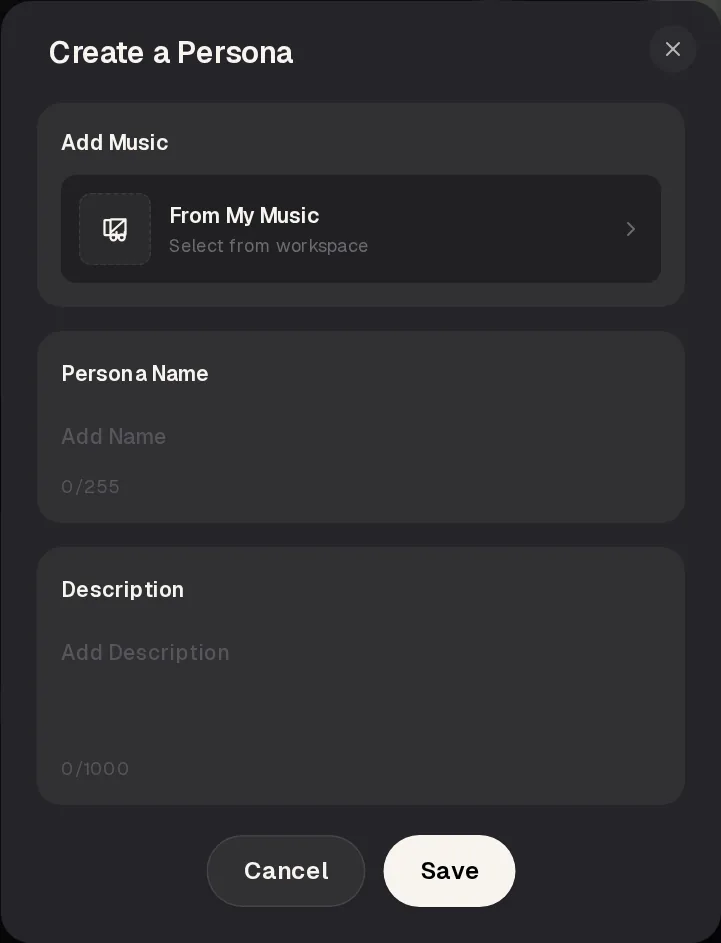
- Persona from My Music
What the AI Singer Generator Can and Can't Do
Short answer: you describe a singer in words and the AI singer generator sings your song. It does not copy real or famous singers, and a voice description is a request, not a guarantee.
| Does | Doesn't — try instead |
|---|---|
| Sings your own lyric in Own Lyrics mode, with the voice shaped by the Styles box and the Vocal Gender choice. | Offer sliders for pitch, age or range — describe them in plain words in the Styles box instead |
| Lets you save a song from My Music as a Persona with a name and a description, then add it to a new song. | Build a Persona from a file you upload — make the song on MusicCreator first so it sits in My Music |
| Returns two takes per run, so every audition gives you two versions of the same singer to compare. | Copy a famous artist's voice — describe a tone and attitude, or train a model on your own singing |
How closely a later song follows a saved Persona can vary with the genre and the lyric, so treat it as a strong hint and compare takes before you publish a new episode. If you need a voice that is truly yours, there is a separate route: train a model on your own singing, then use it in the cover tool.
| Route | What you give it | Best for |
|---|---|---|
| Describe a singer | Lyric, a Styles line with voice words, Vocal Gender | Auditioning new voices quickly |
| Reuse a Persona | A song from My Music, a name and a description | Keeping one singer across a series |
| Train your own voice | 1 to 30 minutes of clean singing, about 10 recommended | A singer that is literally you |
How to Describe the Singer You Want
Short answer: name the genre, the energy and three or four voice words. A vague line gives the AI singer generator nothing to cast.
good singer, nice voice, pop1980s synthwave pop, analog synth arpeggios, gated reverb drums, bright confident male vocal, big chorus, 118 BPMWhat changed: the line now sets an era, an arrangement and a tempo, and it tells the singer how to sound, bright and confident. Vocal Gender stays on Male so the voice word and the setting agree.
In the AI singer generator, voice words work best when they describe delivery rather than identity. Try pairs such as bright and confident, raw and youthful, warm and breathy, or low and gravelly. Keep the genre words because the singer's style follows the music around it: a raw voice sounds very different over punk guitars than over a piano ballad.
Change one thing per AI singer generator run. If you switch the genre and the voice words at the same time, you cannot tell which change made the singer better. Write each line you test into a notes file, so the winning description is ready when you build the Persona.
Two AI Singer Generator Auditions on One Lyric
Short answer: same words, two singer descriptions, one AI singer generator run each. Listen to the chorus first, because that is where a recurring voice has to work.
Audition A · 2:00
Bright synthwave singer
1980s synthwave pop, analog synth arpeggios, gated reverb drums, driving bass, bright confident male vocal, big chorus, 118 BPM
Listen for how clearly the line "Leave the porch light on, I'm coming home" carries over the synths. A polished voice like this suits a channel theme or an upbeat intro.

Audition B · 2:00
Raw pop-punk singer
energetic pop-punk, distorted power-chord guitars, fast punchy drums, gang vocals on the chorus, raw youthful male vocal, 165 BPM
Same lyric, faster and rougher. Compare the chorus with Audition A and ask which singer your audience would expect to hear again next week.
About these examples: we wrote the lyric for both auditions, and both tracks are examples made with the MusicCreator AI Music Generator using the style lines shown, so your singers will sound different.
Paste it into Own Lyrics in the AI singer generator, write two voice descriptions and compare the takes side by side.
Where Each Setting Lives in Own Lyrics
Short answer: four fields shape what the AI singer generator sings, and the Persona button sits at the top. Everything else can stay on its default for an audition.
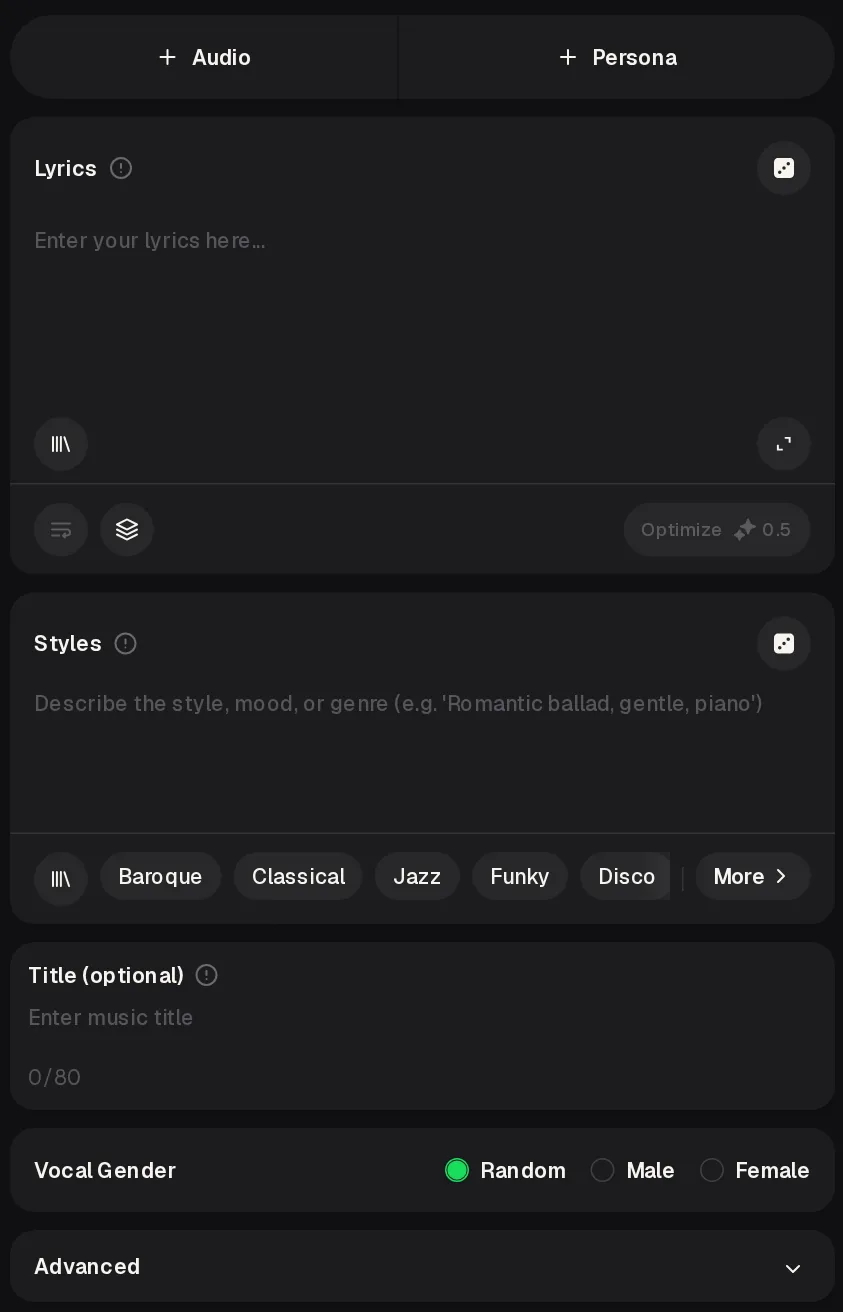
- Persona. Opens your saved singers: My Personas, Favorites, a search box and Create New.
- Lyrics. Paste the same original lyric for every audition so the voice is the only thing that changes.
- Styles. Write the genre, the arrangement and the voice words. This is where you cast the singer.
- Title. Optional. Name each run after the voice, such as Audition A bright, so the takes are easy to sort later.
- Vocal Gender. Random, Male or Female. Set it to match the voice words, and leave Random only when you want to be surprised.
Cast the Singer, Then Reuse It
Short answer: audition in one lane, then lock in the winner as a Persona in the other. The second lane is what turns a good take into a recurring voice.
Audition
- Write one original lyric with a clear chorus and paste it into Own Lyrics.
- Write two Styles lines with different voice words and set Vocal Gender to match each.
- Generate both in the AI singer generator. Each run costs 2 credits and returns two takes.
- Play all four takes and keep the single take whose chorus you would happily hear again.
Cast and reuse
- Open Persona, choose Create New and add the winning song From My Music.
- Give the singer a name and a description of the voice, such as the Styles line that worked.
- Save, then add that Persona when you write the next song in the series.
- Compare the new takes with the original audition before you publish.
Keep the Persona description close to the voice words that won the AI singer generator audition. A clear description is easier to reuse months later, when you no longer remember exactly which Styles line made the singer sound right.
Projects That Need a Recurring AI Singer
Short answer: anything with episodes. When listeners hear the same voice every time, the singer from your AI singer generator becomes part of the brand.
A channel theme song
Cast one singer for the intro and use the same Persona for seasonal versions, such as a holiday edit or an anniversary remix, so the theme stays familiar.
A story series with a narrator who sings
Give the storyteller one voice and keep it across episodes. A raw voice suits adventure stories; a warm, breathy one suits bedtime tales.
A virtual band
Audition a lead singer and save a Persona per band member, each with its own name and description, so every new single sounds like the same band.
A podcast jingle family
Use one singer for the opening, the ad break and the outro, so the short jingles feel like they belong to the same show.
Casting Tips for Your AI Singer Generator Runs
Short answer: small, controlled changes make it easy to hear which description gives you the singer you want.
Keep the lyric identical across auditionsJudge the chorus before the versesUse three or four voice words, not tenMatch Vocal Gender to the voice wordsName each run after the voiceSave the winning Styles line in your notesNever name a real artist in the prompt
Run a second round with the two best descriptions if the first one is close. A tiny change, such as swapping confident for playful, can move a voice from good enough to the singer you want people to remember, and every extra AI singer generator round costs only 2 credits.
AI Singer Generator FAQ
Short answer: describe voices in words, keep real people out of it, and use a Persona or your own trained voice to keep one singer across songs.
| Can the AI singer generator copy a famous singer? | No, and you should not try. Imitating a real singer's voice can mislead listeners and step on that person's rights, so keep artist names out of the Styles box. Describe what you like about a voice instead: its energy, its texture and its attitude, such as bright and confident or raw and youthful. If you want a voice that belongs to a real person, the only clean option is your own, trained on your own singing and used with your own songs. |
|---|---|
| Will a Persona sound exactly the same in every song? | With any singer AI generator, do not expect a perfect copy: how closely later songs follow a saved Persona can vary from run to run. Genre, tempo and lyric all shape how a singer sounds, just as a human singer changes between a ballad and a rock song. Keep the Styles line close to the one that won the audition, compare both takes from each run, and keep the take that sounds most like the singer your audience already knows. |
| Can I make my own voice the singer? | Yes, through a separate route. The AI singing voice generator trains a model on your own singing: you can upload clean vocal recordings or record in the browser, with at least 1 minute and up to 30 minutes of audio, about 10 minutes recommended. The trained model then appears under My Voice in the song cover tool, where it can sing over songs you are allowed to cover, including ones you make on MusicCreator. |
| How many auditions can I run for free? | To use the AI singer generator free, you get credits after a quick sign-up: 30 credits a year, which is enough for 15 generations, and each song costs 2 credits. Every run returns two takes, so a two-singer audition gives you four takes for 4 credits. Unused credits reset on the renewal date. If a generation fails, its credits are usually refunded automatically, so a failed run rarely costs you an audition. |
| Can I download the songs my singer makes? | Paid plans download MP3, WAV and FLAC, including songs you made while on the free plan, and free users can download a limited number of songs. For a series, keep a lossless WAV or FLAC of each episode's song next to its lyric, so you can remix or re-edit it later. Download the audition songs too, because they are the reference for how your recurring singer should sound. |
| Can I release songs sung by my AI singer? | Monthly and yearly plans include commercial rights, so you can release songs within the scope of the Commercial License. The license certificate costs 5 credits per song on a monthly plan and nothing extra on a yearly plan, and Pay Once credits can also get the license for 5 credits per song. Licenses you already obtained remain valid if you cancel later. Keep the singer fictional and the lyrics your own. |
Hold Your First AI Singer Generator Audition
Open the AI singer generator, paste one original lyric, describe two voices and keep the singer your listeners will hear in every episode.