AI Drummer for Custom Grooves
Not every song idea comes with a drummer, so this AI drummer plays the groove you describe. Tell it the feel you want, such as a tight funk pocket, a dusty hip-hop loop or a driving rock beat, and the AI drummer builds a full groove around it. Keep it instrumental, add a reference clip, and pick the take that sits right under your riff.
When an AI drummer helps most
A thread on r/musicians asks a simple question: “Best AI tool for creating drums ?” The people asking are usually songwriters and guitarists who have a riff or a vocal idea but no drummer and no time to program every hit. One member of r/WeAreTheMusicMakers described the bigger problem behind it:
“I tried to establish a band over the last years, but it was quite hard to motivate, organise people or focus on my genre to record my songs”— a member of r/WeAreTheMusicMakers
Demo without a band
Hear a song with real momentum before anyone else joins.
Jam along
Generate a groove in your style and play guitar or bass over it.
Fresh starting points
Try feels you would not program by hand, then build from there.
Some musicians are wary of AI in music, and that is a fair position. An AI drummer works best as a sketching partner: it fills the gap while you write, and you can always replace it with a real player once the song is ready for a band or a studio session.
What the AI drummer gives you to work with
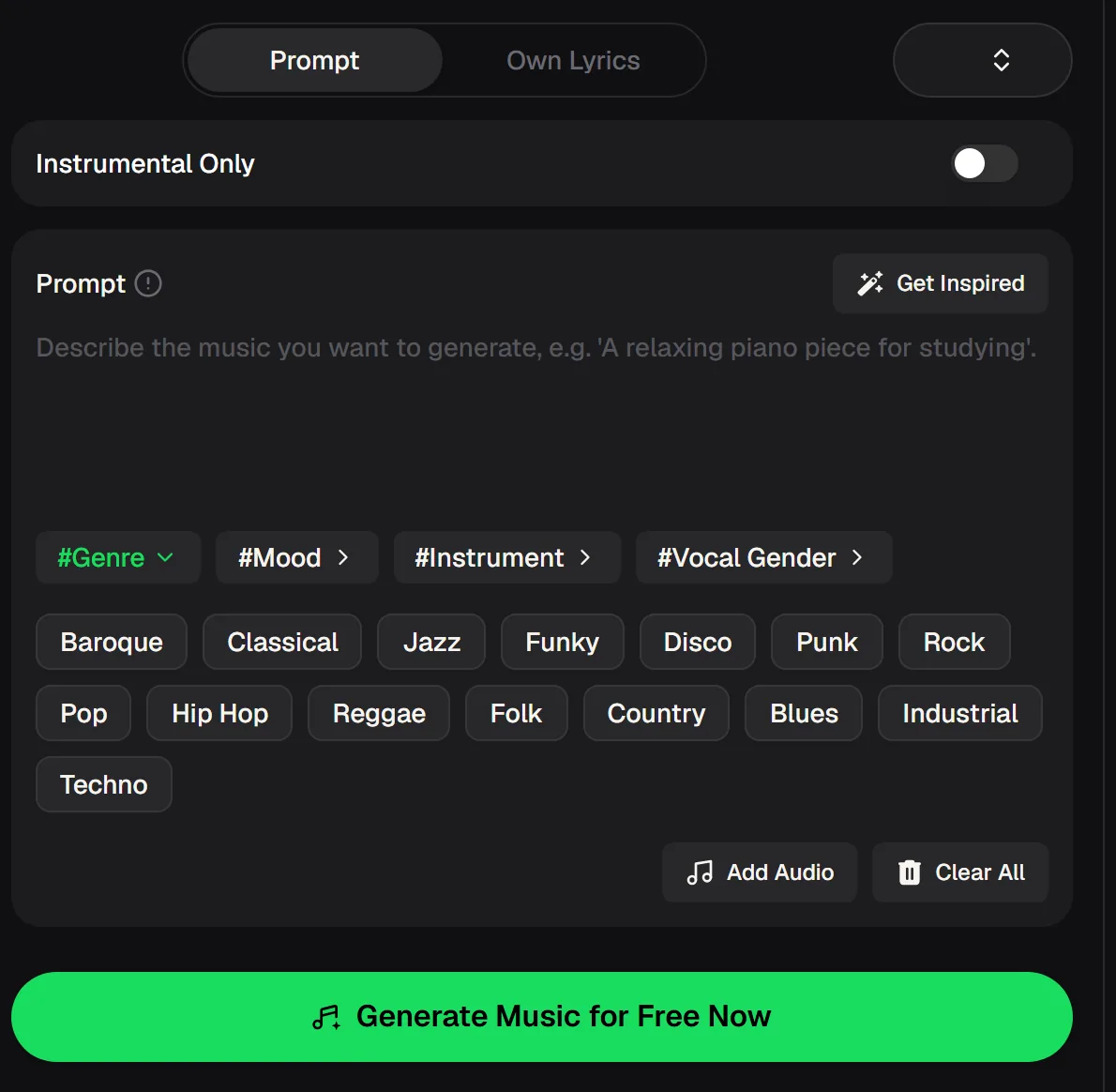
The generator behind this AI drummer takes a written description and returns full tracks. Switch on Instrumental Only when you want drums and backing without a vocal, then shape the result with tags for genre, mood and instrument. The figures below come from the live tool and pricing pages.
- Modes
- Prompt or Own Lyrics
- Vocals
- On, or Instrumental Only
- Reference
- Add Audio attachment
- Style tags
- Genre, Mood, Instrument, Vocal Gender
- Cost per song
- 2 credits
Two AI drummer grooves from one prompt
Both takes came from the same short instrumental description: a punchy live-feel drum groove with a tight kick and snare, crisp hi-hats, light bass and keys, and a funky hip-hop pocket.
Notice how the two results place the ghost notes and fills differently. That variety is useful when you are hunting for the right feel under a riff, because one take often suits a verse and the other a chorus.
Make a drum track with the AI drummer in four steps
You do not need to know drum notation or program a single hit. Treat the AI drummer like a session player you brief in plain words: the clearer the brief, the closer the first take lands.
Start with the genre and the energy, then add detail about individual drums only if the first result misses. Small word changes, like swapping “tight” for “loose” or “live” for “programmed”, can shift the whole feel, so run a few versions before you settle.
Describe the feel
Name the genre, tempo feel and drum sound, for example “laid-back boom bap with dusty snare”.
Go instrumental
Switch on Instrumental Only so the groove stays free of vocals.
Add a reference
Attach a clip with Add Audio if you want the drums to follow an idea.
Pick a take
Compare the results and keep the one that fits your song; paid plans can download MP3/WAV.
Drum prompts to start from
Good AI drummer prompts name three things: the genre, the energy and one or two sounds you care about. Copy one of these into the prompt box, switch on Instrumental Only, and adjust the words until the groove feels right for your track.
The Genre, Mood and Instrument tags under the prompt box are a quick way to add detail without typing, and Get Inspired can suggest a starting description when you are not sure how to phrase the feel you hear in your head.
Tight funk drums with ghost-note snare, open hi-hat on the offbeat, warm bass
Slow boom bap groove, dusty kick and snare, vinyl crackle, mellow keys
Driving rock beat with big crash cymbals, steady eighth-note hi-hats, power chords
Four-on-the-floor house drums, clap on two and four, shuffled hats, deep bass
Open the beat maker to set the exact tempo and key, and describe the groove so the drums lock to your riff.
AI drummer or beat maker: which to open
MusicCreator has two places to make drums. The beat generator, which powers the AI drummer, suits song-style grooves with backing parts from a free-form description. The beat maker is built for producers who want more control over the beat itself, with a style prompt, BPM and key choices such as 140 BPM in C Minor, a Hardness setting and vibe presets like 90s boom bap, UK drill and Melodic trap.
AI drummer questions
Common questions from songwriters, guitarists and producers trying an AI drummer for the first time, answered from what the live tools show today.
How do I use an AI drummer?
Write a short description of the groove, switch on Instrumental Only and generate. Compare the results and keep the one that fits. If you want the drums to follow an idea, attach a clip with Add Audio first.
Can I use these drums inside my DAW?
Yes. On a paid plan, download the track as MP3/WAV and drag it into your session like any audio file. If you only want the drums, run the result through the stem splitter, which separates drums from vocals, bass and other parts.
Can I set the tempo and key?
The beat maker offers BPM and key choices, a Hardness setting and vibe presets. The beat generator works from your written description, so mention the tempo feel in the prompt, for example a laid-back 80 BPM shuffle or a driving 140 BPM drum and bass pattern. Words like half-time, swung or straight also change how the AI drummer plays.
Will an AI drummer help me become a better drummer?
It can help as a practice partner. Generate grooves in the style you are learning, listen to how the parts fit, then play along or try to copy the pattern on a kit or pad. Slow grooves are easier to study, so describe a relaxed tempo feel when you are learning a new style.
Is the AI drummer free to try?
There is a free entry point: 30 free credits a year (15 songs) after a quick sign-up, and each song uses 2 credits. Monthly and annual plans include commercial rights within the scope of the Commercial License, and Pay Once credits can unlock a license for 5 credits per song.
Give your song a drummer today
Write one line for the AI drummer describing the groove in your head, switch on Instrumental Only and keep the take that fits. Then build the song on top.