AI Music App for Instrumental Tracks
An AI music app for background music, beds for videos and practice tracks, with no vocals in the way. Not every project needs a singer. A vlog needs a bed under the voiceover, a study playlist needs something calm, and a rapper needs a beat to write to.
MusicCreator works as an AI music app for exactly that: describe the mood, genre and instruments, switch on Instrumental Only, and listen to full instrumental tracks built around your words.

What people expect from an AI music app
People searching for an AI music app often want music, not a song: a mood under a video, a loop for focus, a track to rehearse over. The hard part is describing a sound you cannot play yourself. As one producer on r/WeAreTheMusicMakers put it:
“Often I want to make music or arrangements in a certain "style," but don't know enough about the trappings of a style to be able to incorporate it, nor do I have a word to describe the style I am looking for.”— a member of r/WeAreTheMusicMakers
A bed under the voiceover
Ask for a calm, steady instrumental so narration stays clear on top.
Tap a style tag
Inspiration tags like Country, Folk, Rock, Blues or Disco help when you can't name the sound you want.
A track to practise over
Generate a backing track in your genre and write or rehearse your own part on top.
Instrumental prompts work best when they name a genre, two or three instruments, a tempo feel and a mood, and say nothing about singing. These examples show how a short request in an AI music app becomes a clear brief.
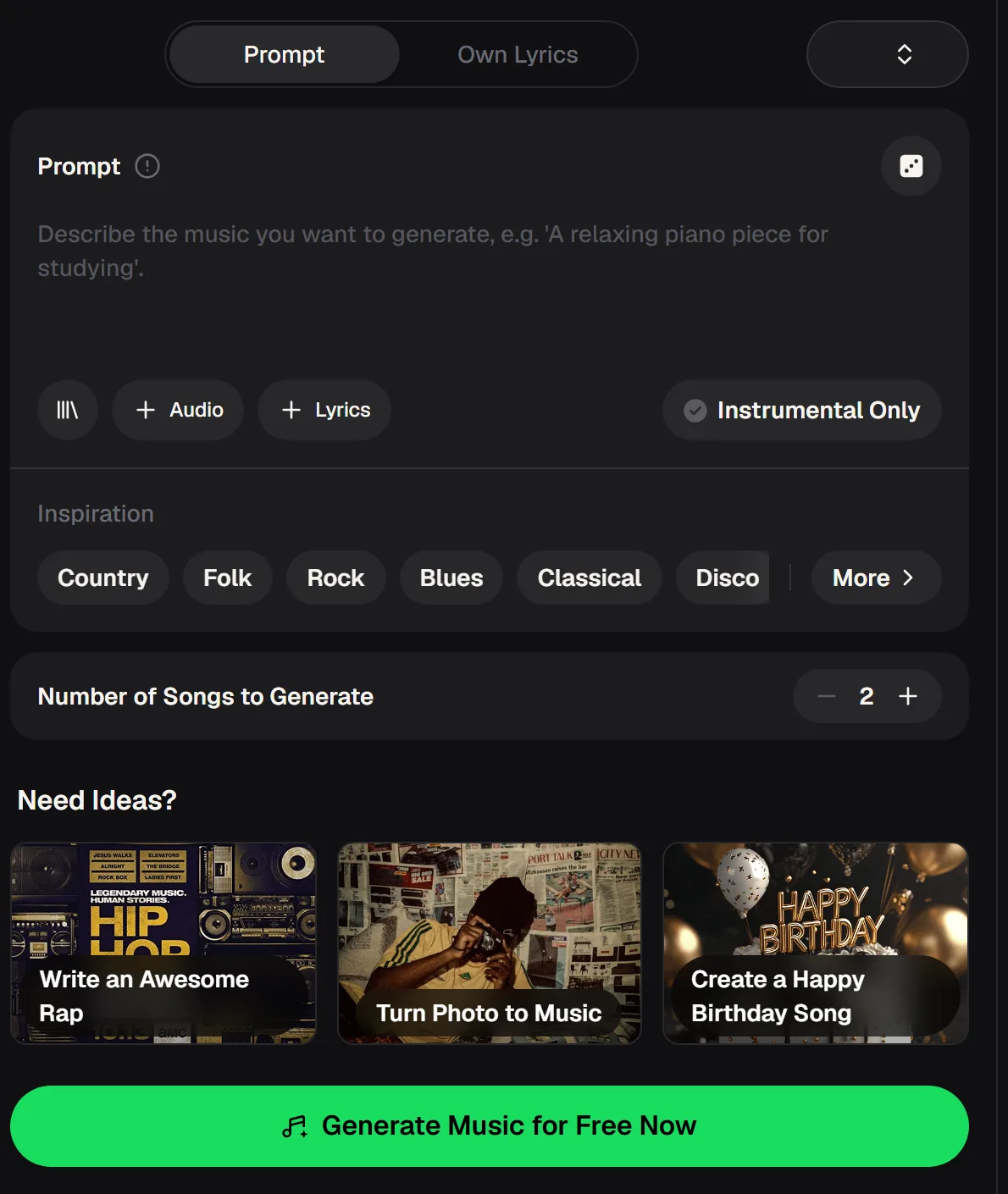
The AI music app at a glance
Instrumental Only sits right next to the prompt, so turning vocals off is one switch. Everything else about the AI music app stays the same. These details come from the live tool and pricing pages.
- Modes
- Prompt · Own Lyrics
- Attachments
- Audio reference, lyrics
- Vocals
- On, or Instrumental Only
- Takes per run
- Number of songs, default 2
- Length
- Songs up to 8 minutes
- Genre generators
- 19, from Rap and Lofi to K-Pop
- Cost
- 2 credits per song
Hear the AI music app, then turn the vocals off
Both takes below came from one short request: bright indie electronic pop, plucky synths, an airy male voice, and a few lines about riding the last train home. They include vocals, so you can hear how full the arrangement is.
Run the same prompt with Instrumental Only switched on and you get that kind of backing without the singer. Notice how the two takes differ in melody and energy: that is why each run gives you more than one result.

Instrumental or full song: which one do you need?
In the AI music app, the same prompt can give you a finished song or a clean instrumental, depending on one switch. Here is how the two outputs compare for common jobs, so you can decide before you spend credits.
| Question | Instrumental Only on | Vocals on |
|---|---|---|
| Under a voiceover or podcast | Leaves room for speech | Singing competes with talking |
| Practising your own vocal or rap | Backing track to perform over | Someone else is already singing |
| Study or focus playlists | Fewer distractions | Depends on taste |
| A song to share as is | Needs your own vocal | Ready to listen to |
| Separate parts later | Stem splitter: 4 or 6 stems | Stem splitter: 4 or 6 stems |
Describe the sound in one sentence and switch on Instrumental Only to get two takes with no vocals.

How to make an instrumental with an AI music app
Open the AI music app
Go to the MusicCreator music generator and sign in to your free account so your tracks and credits are saved.
Describe the music
Write a one-line prompt with genre, instruments, tempo feel and mood, and leave out anything about singing.
Switch on Instrumental Only
Turn the switch on so every take comes back without vocals, ready for videos, study or practice.
Listen and keep
Play both takes, keep the one that fits your project, and adjust a single word to try again. Small changes make it easy to hear what each word does.
AI music app questions
What people ask before making instrumental music with the MusicCreator AI music app.
How do I make music without vocals?
Open the AI music app, describe the track in a sentence with genre, instruments, tempo feel and mood, and switch on Instrumental Only. Generate and listen to the two takes. If one is close, change a single detail in the prompt and generate again. The free plan gives 30 credits a year, enough for 15 generations, so you can try several ideas.
How long can an instrumental be?
Songs can run up to 8 minutes, which covers most video beds, intros and practice tracks. For longer background sets, generate several tracks in the same style and line them up. Keeping the genre and instrument words identical between runs helps the tracks sit together, while small changes to the mood word give you variety.
Can I split an instrumental into parts?
Yes. The MusicCreator stem splitter separates a track into 4 stems (vocals, drums, bass, others) or 6 stems (adding guitar and piano). That is useful when you want only the drums for a practice loop, or want to turn the bass down under a voiceover. Upload formats include MP3, WAV, OGG, M4A, AAC, FLAC and WMA.
How much does it cost?
You can start free after creating an account: the free plan includes 30 credits a year. Each song generation uses 2 credits and the cost is shown on the button before you generate. Paid plans add credits every month and can download songs in MP3, WAV and FLAC, including tracks you made on the free plan, while free users can download only a limited number. Check the pricing page for current plans.
How do I cancel a subscription?
Your plan belongs to your MusicCreator account, so check the pricing page and your account settings for the current cancellation steps.
Can I use the instrumentals in my videos?
Monthly and annual members get commercial rights within the scope of the Commercial License. Monthly members spend 5 credits per song to download the licence certificate, annual members pay no extra credits, and Pay Once credit users can also get a licence for 5 credits per song. Download your tracks and licence files while your membership is active.
Make Your Next Instrumental Track
Describe the sound in one sentence, switch on Instrumental Only and keep the take that fits. The free plan includes 30 credits a year.