Kpop AI for Original Concept Songs
Every comeback starts with a concept. Bring yours, whether it is a girl crush anthem, a sunny summer debut or a moody OST, and this kpop ai generator turns it into an original track with your lyrics, a tempo and key you pick, and a female, male or any voice.
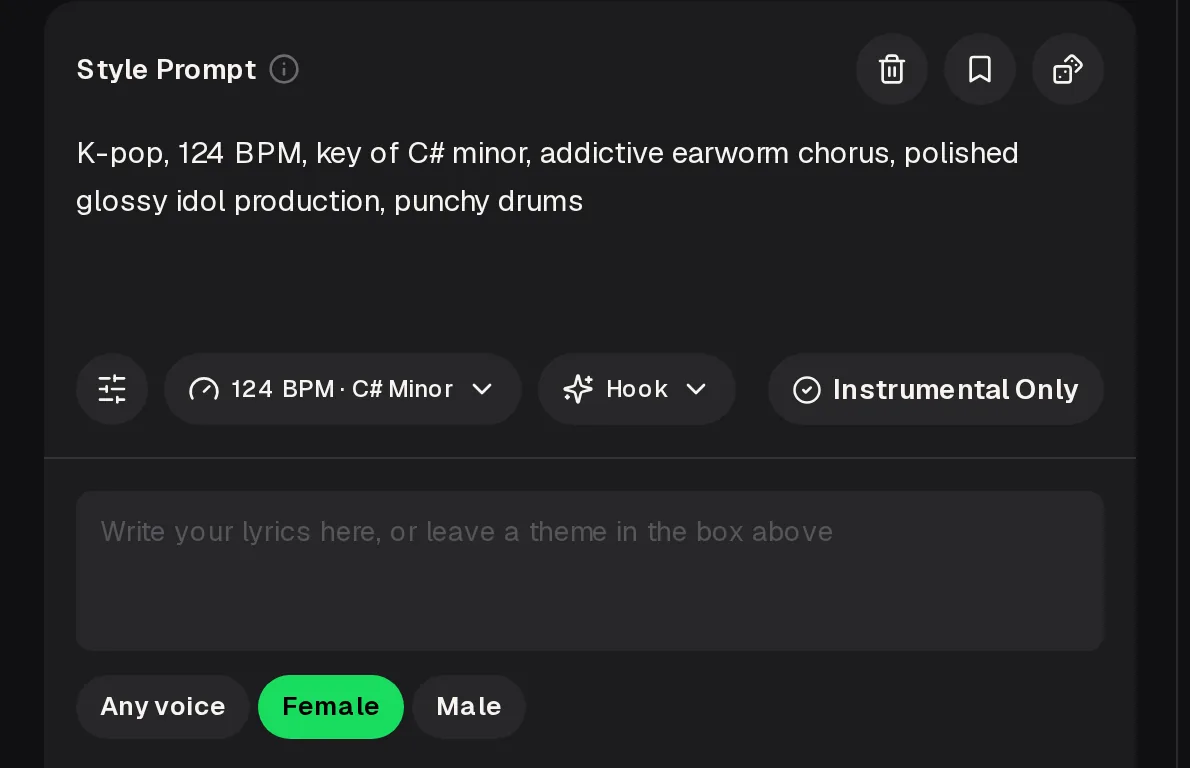
- Describe the concept, tempo and key
- Shape the hook or go instrumental
- Add lyrics or a theme, then pick a voice
What This Kpop AI Makes, and What It Won't
Search "kpop ai" or "ai kpop" and you will find AI idols, AI covers and karaoke apps side by side. The MusicCreator kpop ai tool does one of those jobs: it writes new K-pop style songs from your description. It does not copy the voice of a real idol, re-sing an existing hit, or make a performance video of a virtual member.
SupportedOriginal K-pop style tracksYour own lyrics or a themeFemale, male or any voiceInstrumental Only versionsTempo and key choiceSix concept presets
Not supportedCopying a real idol's voiceCovers of existing songsIdol or dance videosA phone app
The kpop ai generator runs in a desktop or phone browser. Free credits come after a quick sign-up, and each generation costs 2 credits.
Six Concepts to Start From
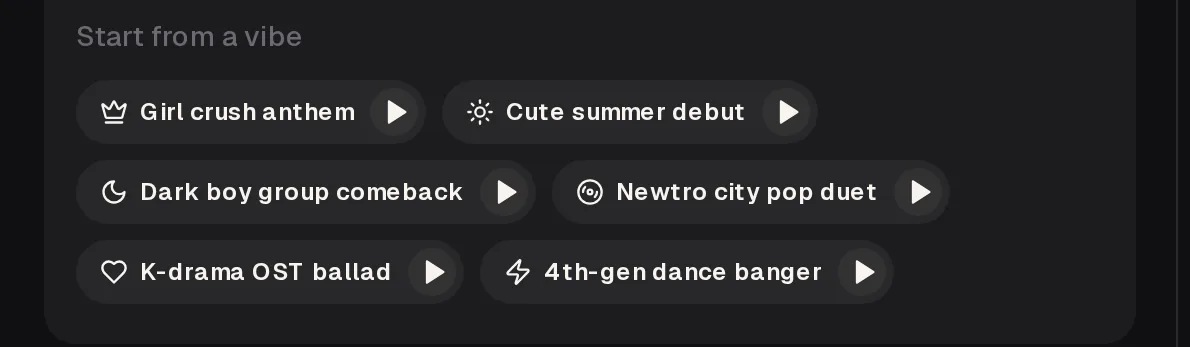
K-pop fans talk about concepts the way other listeners talk about genres. The kpop ai generator ships with six of them as "Start from a vibe" presets you can preview before you commit. Use one as is, or treat it as a base and rewrite the prompt around your own story.
Confident, hard-hitting energy for a fierce chorus and a big dance break.
Bright, bouncy and fresh, the sound of a rookie group's first title track.
Moody synths and heavy drums for a concept built on mystery.
Retro grooves with a modern polish, made for two voices trading lines.
Slow, emotional and built to swell under a dramatic scene.
Fast, punchy and switch-heavy, ready for a showcase routine.
Kpop AI for Fans Who Build Concepts
The people who enjoy this most already invent things around K-pop: fan lyrics, choreography, characters, imaginary groups. A kpop ai track gives that idea a sound you can actually play back.
You fill notebooks with lyrics. Hear them sung over a K-pop arrangement instead of reading them silently.
Need an original practice track for a routine? Go instrumental in kpop ai at the tempo your choreography needs.
Give your fictional idol group a kpop ai debut song or an OST for the big chapter.
Sketch a comeback-style reference fast with kpop ai, then study how the hook and drop sit.
From Concept to Track in Two Lanes
Making a song with kpop ai splits into what you do in the generator and what you do once the songs are back. Each run gives two tracks, so you usually have a choice right away. Log in first; the button shows the 2-credit cost before you generate.
In the generator
- Pick a concept preset or write your own style prompt.
- Set the tempo and key, and choose a hook setting.
- Paste your lyrics, or leave a theme and let the song be written around it.
- Choose Female, Male or Any voice, or switch on Instrumental Only.
After the songs are back
- Play both tracks and keep the stronger concept.
- Rewrite one line of the prompt and run again if the mood is off.
- Paid plans download MP3, WAV and FLAC; free users can download a limited number.
- Need to post it commercially? Add the Commercial License.
Turn it into an original K-pop track with kpop ai and hear two takes per run. New accounts get free credits after a quick sign-up.
Vague vs. Specific K-pop Prompts
The default prompt already shows the pattern that works: genre, tempo, key, what the chorus should do, how the production should feel, and one sound to lead with. The more of your concept you name, the less kpop ai output sounds like generic pop.
kpop song, catchyK-pop girl crush, 128 BPM, key of F minor, chant-style hook, brassy synth stabs, big dance break before the last chorusWhat changed: a concept, a tempo and key, a hook style, a lead sound and a structure cue.
sad kdrama songK-drama OST ballad, 72 BPM, key of D major, soft piano intro, strings rise into a high final chorus, longing but hopefulWhat changed: the scene's emotion, a slow tempo, the instrument that opens it and where the song should peak.
Four Ways Fans Use Kpop AI Tracks
Dance practice and showcases
An instrumental at your target tempo lets a crew rehearse a routine to music that belongs to the project.
Imaginary group debuts
Write the concept, the member lines and the title track for a group that only exists in your head.
Story soundtracks
A webtoon chapter or fan-fiction arc gets its own OST ballad or villain theme.
Lyric practice
Use kpop ai to hear whether your chorus actually sings before you share it with your writing circle.
Free Account vs. Paid Plans
You can try every kpop ai concept preset on the free plan. The differences show up when you want to keep many songs, download them in studio formats, or post them for money.
| Free account | Paid plans | |
|---|---|---|
| Credits | 30 credits a year, about 15 generations, after a quick sign-up | Monthly credits; yearly plans also add credits each month. Unused credits reset on the renewal date. Pay Once one-time credits are available too |
| Cost per generation | 2 credits | 2 credits |
| Downloads | A limited number of songs | MP3, WAV and FLAC, including songs made on the free plan |
| Commercial License | License free-plan songs later with credits | Monthly and Pay Once: 5 credits per song. Yearly: no extra credits |
Releasing or monetizing a kpop ai song works within the scope of the Commercial License. A generation that fails is usually refunded automatically.
Kpop AI Tips for a Comeback-Ready Hook
K-pop lives or dies on the hook, so spend your kpop ai prompt words there. A great verse rarely saves a weak chorus. These short habits come from how the default prompt is built: say what the chorus should do, keep one lead sound, and let the tempo match the concept rather than the other way round.
Name the concept firstSay how the chorus should feelPick one lead soundMatch tempo to the danceKeep lyric lines shortRun it twice, keep the best

Kpop AI FAQ
Can it make a song that sounds like a specific idol?
No, and that is deliberate. The kpop ai generator writes original songs and sings them with its own voices, chosen as Female, Male or Any voice. It does not clone or imitate a real singer, and it does not re-sing existing K-pop hits. If you want the feel of a certain era or concept, describe it in the prompt instead: name the concept, the tempo, the type of hook and the production style. That gets you close to the mood without borrowing anyone's identity.
Can I use my own lyrics, including Korean lines?
You can paste your own lyrics into the kpop ai lyrics box, or leave a theme in the prompt and let the song be written around it. Many fans mix English with Korean phrases the way real title tracks do. Write the lines the way you want them sung and keep them short, because short lines are easier to fit to a K-pop melody. Listen to both takes from each run, since phrasing can differ between them, and rerun if a line lands awkwardly.
Is kpop ai on MusicCreator free?
You can start free. A quick sign-up gives you 30 credits a year, which covers about 15 generations at 2 credits each, and each run returns two tracks to compare. Free users can download a limited number of songs. Paid plans download MP3, WAV and FLAC, including songs you made while on the free plan. If you only need a few extra songs, you can also buy Pay Once one-time credits instead of moving to a plan.
Can my dance crew use an instrumental for a performance?
Yes. Switch on Instrumental Only and set the tempo your routine needs, then generate until the energy fits the choreography. For a public showcase or a video you plan to monetize, get the Commercial License for that track. Monthly plans and Pay Once credits use 5 credits per song for the license certificate, and yearly plans add no extra credits. Downloading the WAV or FLAC file on a paid plan gives you a cleaner file for the venue sound system.
Can I release the song or post it on YouTube?
Yes, within the scope of the Commercial License. Monthly and yearly plans both include it, so you do not need a yearly plan to release music. Kpop ai songs made on the free plan do not have to be redone; you can license and download them later with credits. A license you already have stays valid if you cancel, so it is a good habit to download the song and the license file while your plan is active.
Does it work on my phone?
Yes. MusicCreator kpop ai runs in a phone browser, so you can write a concept on the bus and hear it a few minutes later without installing anything. There is no separate app in the app stores; open the site in Safari or Chrome and log in. A laptop helps when you are comparing many takes or editing long lyrics, but every step, from choosing a preset to downloading the track, works on a phone screen too.
Give Your Concept Its Title Track
Pick a preset or write your own concept and hear two original kpop ai takes. Free credits arrive after a quick sign-up.
Each generation costs 2 credits. Commercial License rules depend on monthly, yearly or Pay Once credits.