Music Splitter for Rescuing Old Band Recordings
Your old band's demo survives only as one stereo file, with the vocal buried and the drums too loud; split it into parts and give it the mix it never got. Many bands from years ago kept just the final bounce: a CD-R, an MP3 from a forum, a file on a dusty hard drive.
The session files are long gone, so the balance is stuck the way it was on the night. The music splitter on MusicCreator takes that one file and separates it into stems, such as vocals, drums, bass and others, so you can bring them into your editor and rebalance the song. Free credits come after a quick sign-up.
Why a music splitter helps when the session files are lost
Without multitracks, an old recording can only be turned up, turned down or equalised as a whole. If the singer was too quiet on the night, that is how the song stays. A music splitter gives you separate parts to work with again, even though they were recorded together.
The result will not be identical to a real multitrack, but it is often enough to give a beloved song a second life. These are the recordings people bring to a music splitter most often.
The CD-R era
Rough demos that only survive as a final bounce.
Gig recordings
Board or room recordings where one instrument swamps the rest.
A new listen
Rebalanced versions to share when the band gets back together.
Lost members
Bring a late bandmate's part forward in a song you made together.
How the music splitter handles an old file
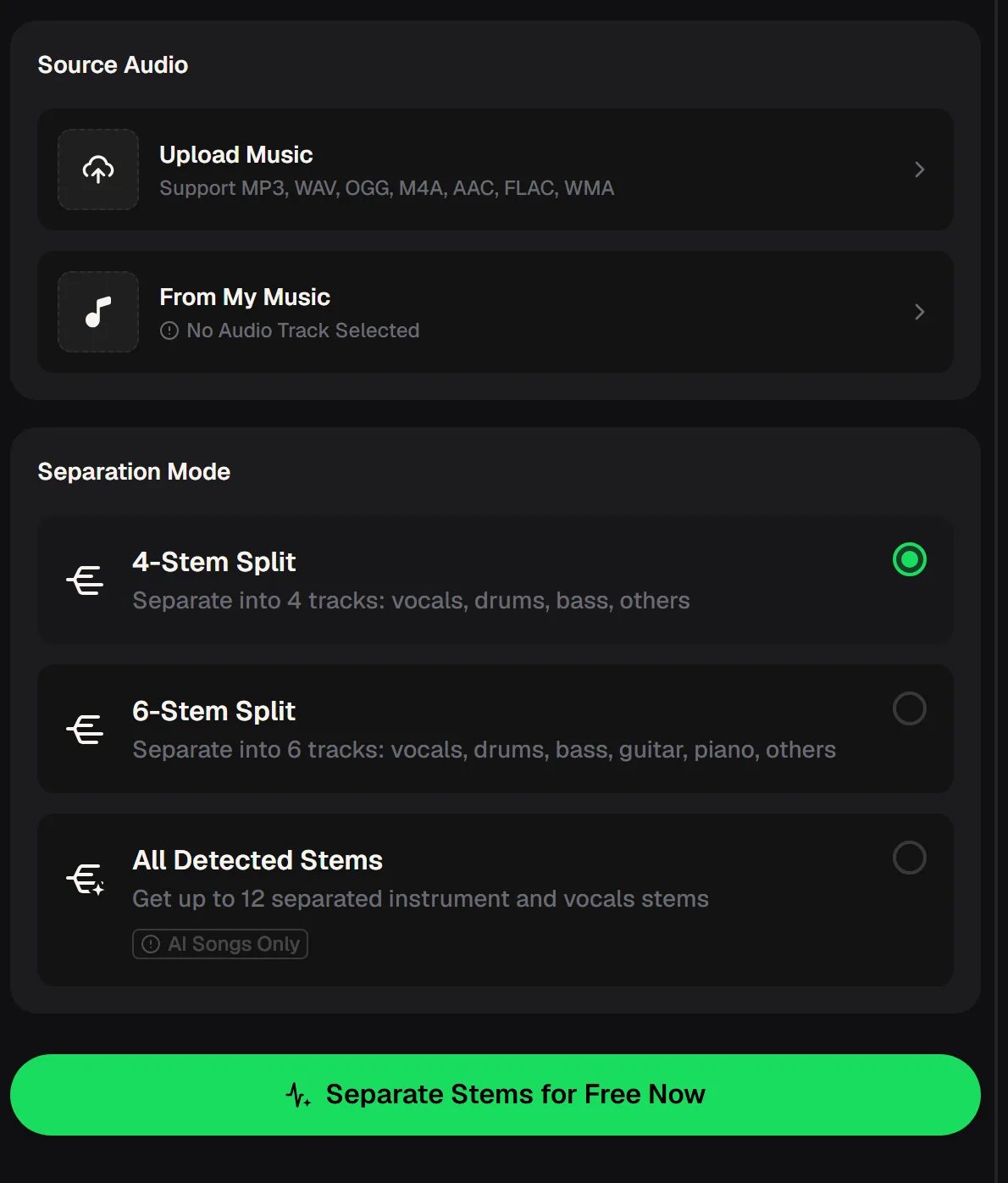
Here is the short version. Upload the old recording from your device, choose a Separation Mode, and run the split. For band recordings, 4-Stem Split is the usual starting point, giving vocals, drums, bass and others.
If guitars or keys carried the song, 6-Stem Split adds guitar and piano tracks. All Detected Stems only works on songs made on MusicCreator, so it does not apply to an old demo.
- Source
- Upload Music or From My Music
- Formats
- MP3, WAV, OGG, M4A, AAC, FLAC, WMA
- 4-Stem Split
- Vocals, drums, bass, others
- 6-Stem Split
- Adds guitar and piano
- All Detected Stems
- Up to 12, AI songs only
Music splitter modes for band recordings
Choosing the right mode depends on what was in the room when the song was recorded. The table below lines up the three Separation Modes on the music splitter panel with the tracks each one returns and how useful it tends to be for an old band file.
A four-piece rock band usually fits the first row; a band built around keys or several guitars will get more from the second. The third row is listed only so you know why it is not available for uploads.
| Separation Mode | Tracks returned | For an old band recording |
|---|---|---|
| 4-Stem Split | Vocals, drums, bass, others | Start here for most rock, punk and pop demos |
| 6-Stem Split | Vocals, drums, bass, guitar, piano, others | Use when guitar or keys need their own fader |
| All Detected Stems | Up to 12 stems | Not for uploads: works on songs made on MusicCreator only |
From a dusty file to a rebalanced mix
Rescuing a recording with a music splitter is mostly about patience and listening. Start with the best copy you can find, because every generation of MP3 conversion makes the split harder for a music splitter. Then work through the steps below, keep the original file untouched, and compare your new balance against it often, so you improve the song without losing what made it special.
Find the best copy
A WAV or FLAC from the original CD beats an MP3 shared later.
Split it
Upload the file to the music splitter and run 4-Stem or 6-Stem Split.
Rebalance
Load the stems into your editor and fix the levels that always bothered you.
Compare and share
Play the new version next to the original before sending it to the band.
Split its best copy into separate parts and hear the song again with a fresh balance, starting with free credits after a quick sign-up.
Split the recording
What to expect from a split of an old recording
Old recordings are hard material for any music splitter. Room sound, tape hiss and instruments bleeding into each other all make the parts harder to pull apart, so some of one instrument may remain in another stem. Treat the stems as a better starting point, not a perfect multitrack, and make gentle level changes rather than extreme ones, which tend to expose artefacts.
Give the music splitter the best copy you can find and the mode that matches your line-up, and compare the stems before you mix.
Try another splitBringing the band back together around the song
A rebalanced demo is a great excuse to get old bandmates in a room or a group chat again. Send the original and the new version side by side and let everyone hear their own part clearly, sometimes for the first time in years.
Some bands use the stems to relearn songs for a reunion show; others simply want a version that finally sounds the way they remember it. Either way, only use a music splitter on recordings you and your bandmates own, and only share those.

Music splitter questions
Short answers about splitting old band recordings on MusicCreator, from file types to what the stems can and cannot do. Results depend heavily on the quality of the file you start with.
Can it recreate the original multitracks?
No. A music splitter separates one stereo file into stems such as vocals, drums, bass and others. Some bleed between parts is normal, especially on old recordings.
Which file should I upload?
The music splitter accepts MP3, WAV, OGG, M4A, AAC, FLAC and WMA. Use the least compressed copy you have.
Can I get a separate guitar track?
Yes. 6-Stem Split returns vocals, drums, bass, guitar, piano and others.
Why can't I use All Detected Stems?
That mode works on songs made on MusicCreator only, not on uploaded recordings.
How do I get started?
The MusicCreator music splitter online is free to start, with free credits after a quick sign-up, and it runs in the browser, including phone browsers.
Give your old song its mix
Run one surviving stereo file through the music splitter and rebalance it at last, starting with free credits after a quick sign-up.