Beat Making Apps or Your Phone Browser?
Most beat making apps want an install, storage space and an hour of learning before the first loop plays. Sometimes that is worth it. Sometimes you just want to hear an idea on the bus. Here is how to tell which situation you are in, and what a phone browser can do for you instead of another download.
Install an App or Open a Tab?
Beat making apps fall into a few families: step-sequencer studios with a piano roll, pad and sampler apps for finger drumming and chopping, loop players that trigger ready-made parts, and AI tools that turn a written description into a full beat. MusicCreator is the last kind, and it is not an app at all. It runs in the phone browser you already have.
| Install one of the beat making apps when | Use the browser beat maker when |
|---|---|
| You want to program every hi-hat yourself on a grid or piano roll. | You can describe the beat in words, such as genre, tempo, key and how hard it hits. |
| You chop samples or finger-drum on pads. | Your phone storage is full, or the phone is not yours to install things on. |
| You need to work offline on a plane. | You want two finished takes back to compare, not a blank project. |
| You are building a full arrangement, part by part. | You want a reference beat to rebuild later in the app you already use. |
| Verdict: many producers keep both. Sketch the direction in a browser tab, then finish by hand in the beat making apps they love. | |
What Opens Instead of Beat Making Apps
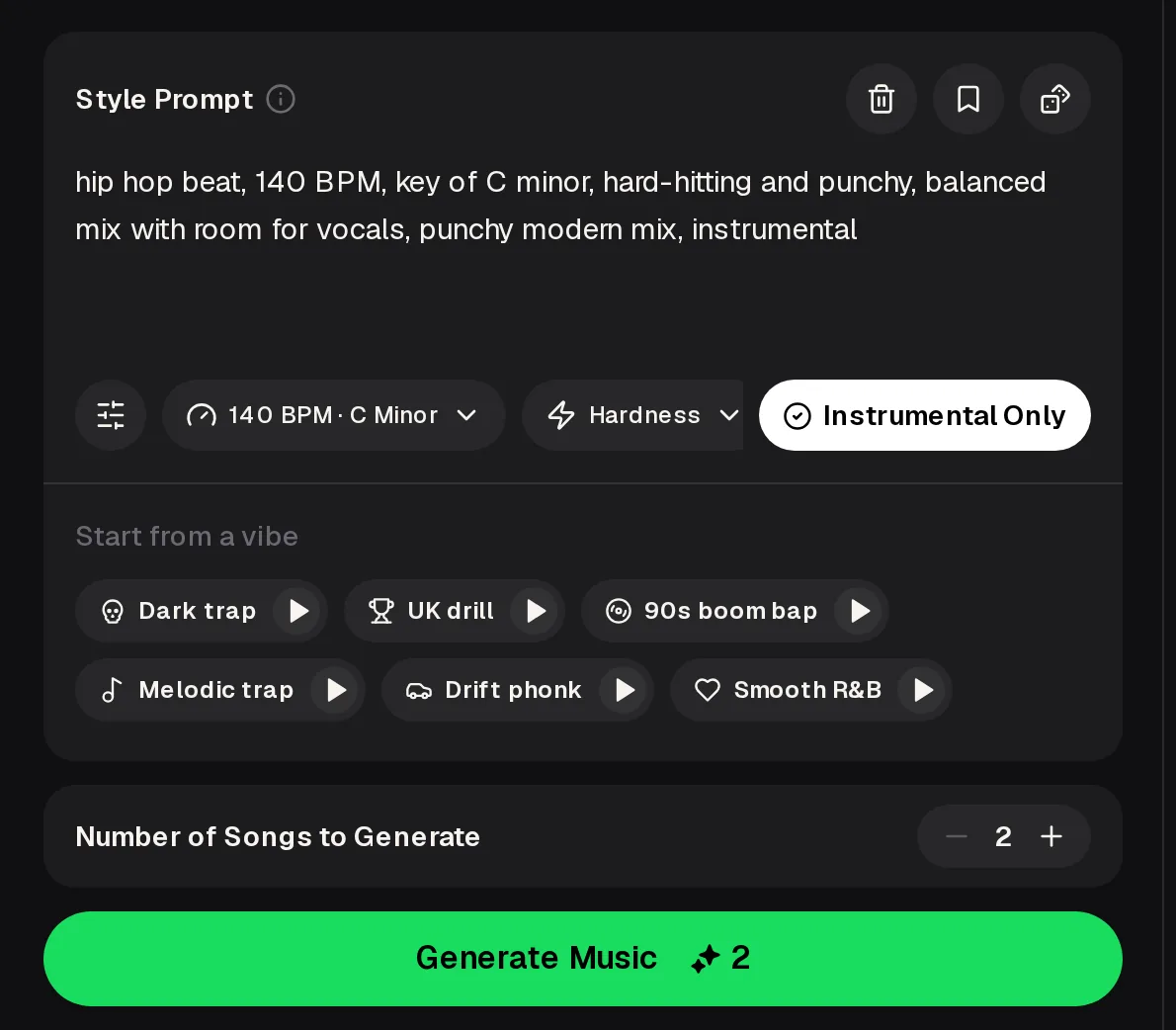
Instead of beat making apps, go to the AI beat maker in Safari or Chrome; this panel is the whole workflow. There is nothing to download first, and the controls fit a phone screen. Here is what each part does, letter by letter.
- A
- Style Prompt. Write the beat in plain words. The default reads "hip hop beat, 140 BPM, key of C minor, hard-hitting and punchy".
- B
- BPM · Key. Set tempo and key from a dropdown, shown as 140 BPM · C Minor.
- C
- Hardness. A dropdown for how aggressive the drums should feel.
- D
- Instrumental Only. Keep the result free of vocals for rapping or singing over.
- E
- Start from a vibe. Dark trap, UK drill, 90s boom bap, Melodic trap, Drift phonk and Smooth R&B, each with a preview.
- F
- Generate Music. Two songs per run; the button shows the 2-credit cost.
 ABCDEF
What a Browser Beat Maker Won't Replace
Writing a beat in words is fast, but it is a different skill from playing one in. If any of these limits is a dealbreaker, one of the dedicated beat making apps is the better home for that part of the job.
| Limit | What happens | Do this instead |
|---|---|---|
| No drum pads | You can't tap a groove in with your fingers. | Describe the groove, such as "bouncy hats, half-time snare", and rerun. |
| No step sequencer | You can't move a single kick on a grid. | Download the beat and rearrange it in your usual editor. |
| No sample chopping | You can't slice a record into pads here. | Keep chopping in a sampler and use this beat as a reference for the vibe. |
| Needs a connection | It runs online in the browser, so it won't work offline. | Generate before the flight and download the files while you still have signal. |
| No app to install | There is no iOS or Android app in the stores. | Bookmark the AI beat maker in your browser and log in when you open it. |
Got a beat idea right now? Describe it and hear two takes.
Start CreatingHear an Example Beat First
Before you decide between beat making apps and a browser tab, it helps to hear the kind of result a text-to-beat tool hands back. The track below is an example beat. Listen for how the drums, bass and melody already sit together, because that finished feel is what you trade for hands-on control.
 Late Night SlideExample track · 2:04
Example audio for illustration. Your own beats will sound different depending on the prompt, tempo and preset you choose.
How to Write a Beat Instead of Tapping One
In beat making apps you build the parts one by one. In a prompt you name them, so the order matters less than covering each part. A good beat prompt answers four questions: what genre, what tempo and key, what the drums and 808 are doing, and what the mix should leave room for.
melodic trap 145 BPM, key of A minor sliding 808, rolling hi-hats airy pads, room for vocals
- Genre Start with the family, or pick a vibe preset and edit it.
- Tempo & key Match the song you plan to write, or set it in the dropdown.
- Drums & 808 Say how they move: sliding, punchy, half-time, rolling.
- Mix Leave space for a voice, or ask for a fuller instrumental.
Your First Beat Without Beat Making Apps, Checklist
This is the whole route from idea to file, and unlike beat making apps, none of it needs an install. Sign up once for free credits, then each run costs 2 credits and gives you two beats to choose from.
- Open the AI beat maker in your phone browser and log inone time
- Tap a vibe preset, or write your own style promptprompt
- Set BPM · Key and Hardness, then keep Instrumental Only onsettings
- Generate and play both takes2 credits
- Change one phrase and run again if the drums feel off2 credits
- Download the keeper and open it in your editorplan-based
Do and Don't When Mixing Apps With a Browser Beat
The browser beat maker works best as a partner to the beat making apps you already use, not as a rival. These habits keep the handoff clean and save you credits.
Do
- Lock tempo and key before you generate, so the beat drops straight into the beat making apps you use.
- Download WAV or FLAC on a paid plan when you plan to edit further.
- Use Instrumental Only when you will record vocals over it.
Don't
- Expect to nudge single notes on a grid here.
- Pile ten genres into one prompt; pick one and a mood.
- Wait until you are offline to download your favourite take.
Beat Making Apps FAQ
Is there a MusicCreator app I can download?
No. MusicCreator has no iOS or Android app, so you won't find it in the app stores. It runs in the browser on your phone, tablet or computer. Open the AI beat maker in Safari or Chrome, log in, and the same panel is there each time, with your songs saved to your account.
Are beat making apps free?
Many offer a free version with paid upgrades. On MusicCreator, a quick sign-up gives 30 free credits a year, about 15 generations at 2 credits each. Free users can download a limited number of songs; paid plans download MP3, WAV and FLAC, including songs made on the free plan. Pay Once one-time credits are available too. Unused plan credits reset on your renewal date, so it is worth using them rather than saving them up. If you only want to test the idea, the free credits are enough to hear several beats before you decide whether to pay for anything.
Can I use the beat inside my usual app?
Yes. Download the file and import it into whichever beat making apps or editor you use, then add drums, chops or vocals on top. Setting tempo and key before you generate makes the beat line up with your project. Paid plans download WAV or FLAC, which keep more detail for editing than an MP3. If you want the drums or bass on their own, run the track through the AI Stem Splitter first and import the separate parts instead of the full mix.
Can I sell or release a beat I made here?
Yes, within the scope of the Commercial License. Monthly plans include it; the certificate costs 5 credits per song on monthly and Pay Once credits, and nothing extra on yearly plans. A license you already have stays valid if you cancel. Read the license before you upload to streaming services or sell the beat to an artist, so you know exactly what it covers. Free-plan songs do not need to be made again: you can download them and get the license later once you have credits on a paid plan.
Which is better for a total beginner?
If you want to learn drum programming, a step-sequencer app teaches it. If you mainly want something to write or rap over tonight, describing the beat is the shorter path, and you can learn the hands-on side later. Many people do both: they describe a beat to get a full idea quickly, then rebuild parts of it in an app to learn how the drums and bass fit together. Start with whichever one gets you making music today, because finishing small ideas teaches you more than reading about tools.
Skip the Install, Hear the Beat
Skip beat making apps: pick a vibe or write your own prompt in the phone browser and get two beats back. Free credits come after a quick sign-up.
Make My Beat