Song Generator from Prompt, Audio or Lyrics
Every song starts from something different. Sometimes it is a feeling you can describe in one sentence, sometimes a riff or a hummed clip you already recorded, and sometimes a page of finished words. This song generator gives each of those its own way in: write a Prompt, add Audio, or switch to Lyrics and paste what you wrote. Then pick a few tags and listen to two takes.

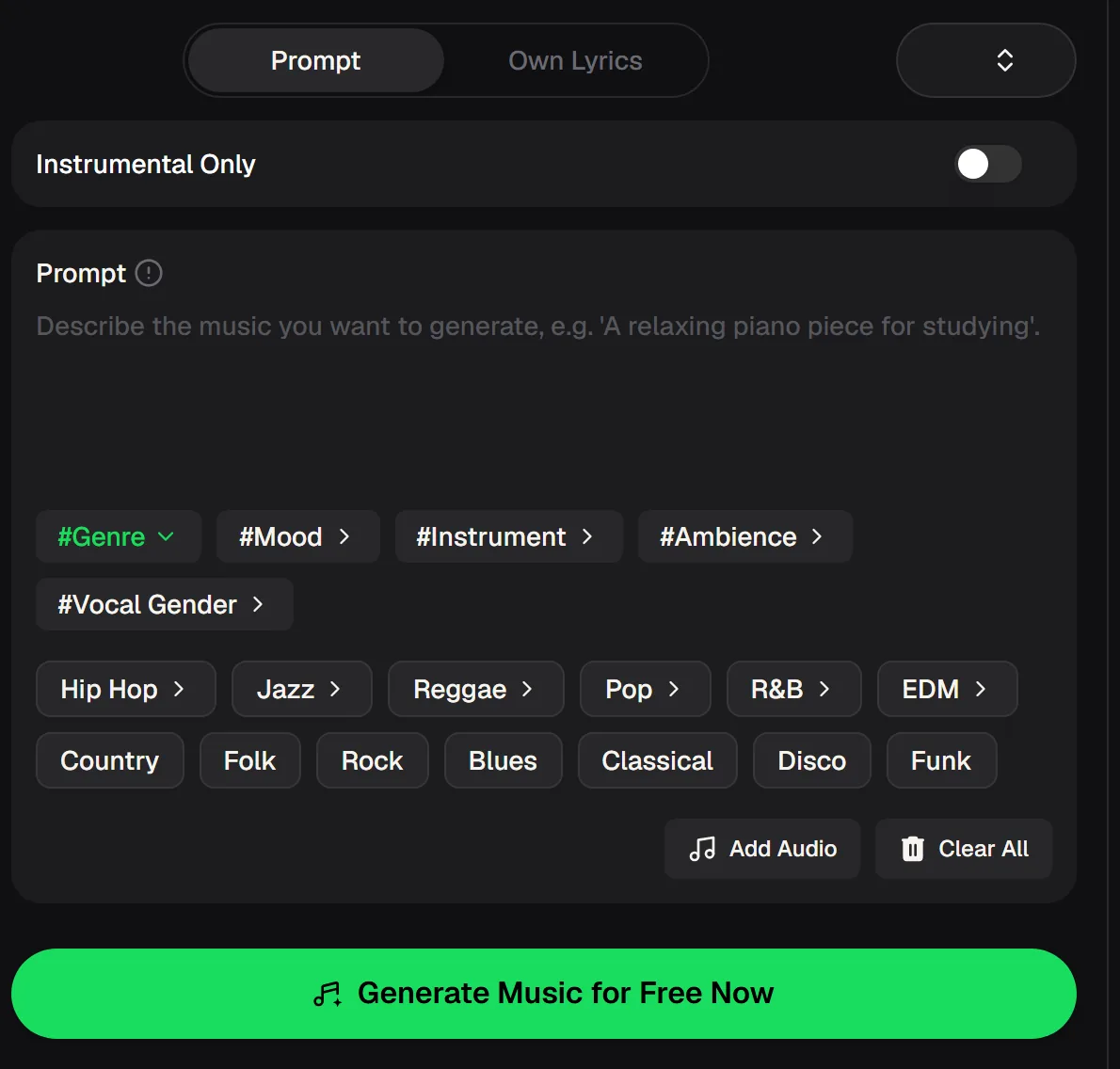
Three inputs in one song generator
All three starting points live in the same song generator panel. The Prompt tab takes a short description of the song you want, such as genre, mood and subject. The Lyrics tab, labelled Own Lyrics, takes the exact words you want sung. The Add Audio button lets you bring in a sound you already have as a starting point.
Around them sit the Instrumental Only switch and the tag groups for #Genre, #Mood, #Instrument, #Ambience and #Vocal Gender, with chips such as Hip Hop, Jazz, Pop, R&B, EDM or Folk. The panel opens and works in your phone's browser as well as on a computer.
- Inputs
- Prompt / Audio / Own Lyrics
- Songs per run
- 2 by default
- Cost per song
- 2 credits
- Free entry
- Free credits after a quick sign-up
Match the input to what you already have
The quickest way to a good song generator take is to start from the material you are most sure about. If you only know the mood, describe it. If you have a sound, add it.
If the words are finished, let them lead. Here is how each input works in practice, and the kind of idea it suits best, so you can choose before you spend any credits.
You know the feeling
Type one line, such as "sunny indie pop about starting over", and add a mood and an instrument tag.
You have a sound
Use Add Audio to bring in a clip you recorded or made, then set the genre and mood around it.
You have the words
Open Own Lyrics, paste your verses and chorus, and choose a vocal gender and style.
Compare two takes
Each run returns two versions, so listen to both and keep the one with the stronger chorus.
Choose Prompt, Audio or Lyrics, add a genre and a mood, and keep the take with the stronger chorus.
Press play on a song generator sample
This sample was made with the song generator on MusicCreator. Whichever input you start from, the same two questions decide whether a take is worth keeping: does the vocal sit clearly above the beat, and does the chorus lift when it arrives?
Listen for both on every take you generate, before you spend time polishing lyrics or styles. If either feels weak, change one part of your prompt, your tags or your lyrics and run it again.

Five tips for getting more from each input
The song generator can only follow what you give it, so a clear input matters more than a long one. Short prompts with strong tags, tidy lyrics with a repeated chorus and a clean audio clip all give the model less to guess. These habits work across all three inputs and help you hear exactly what each change does to the result.
Keep prompts to one line
Mood plus subject is enough: "late-night R&B about missing the last train".
Let tags carry the detail
Genre, Mood, Instrument, Ambience and Vocal Gender chips add detail without extra typing.
Mark the chorus in your lyrics
Paste finished lines into Own Lyrics and repeat the chorus so the hook is clear.
Add a clean audio clip
A short clip without background noise gives the song generator a clearer starting point.
Change one thing per run
Swap a single tag, word or clip so you can hear exactly what made the difference.
Write one line about the song, then swap a single tag or word on the next run to hear what made the difference.
Before you publish a generated song
Making a song with a song generator is quick, but sharing it publicly deserves a minute of checking. Your account, your plan and the platform you upload to all matter. Whether you are posting a short clip or sending a track to a streaming service, read the current terms first so there are no surprises later. If you started from your own lyrics or your own audio, keep your original files too.
Paid plans, monthly or annual, include the right to use your songs within the scope of the Commercial License; a license certificate costs 5 credits per song on monthly plans and nothing extra on annual plans, and Pay Once credits can unlock one for 5 credits per song.
Song generator questions about inputs
Which input should I use: Prompt, Audio or Lyrics?
Start from whatever you are most certain about. If you only know the mood and subject, use the Prompt tab. If you have a sound you want to build on, use Add Audio. If your words are finished, switch to Own Lyrics so they are sung as written. You can still add genre, mood, instrument and vocal gender tags with any of the three.
Is the song generator free?
You can try the song generator free after a quick sign-up. Each generated song uses 2 credits, and the generate button shows the cost before you click it, so you always know what a run will use. Unused plan credits reset on the renewal date. If you want to keep creating after your free credits, the pricing page lists the current plans.
Can I make a song from my own lyrics?
Yes. In the online song generator, switch to the Own Lyrics tab and paste the words you have written. Then pick a few tags to set the genre, mood and vocal gender, and generate. Short verses and a clear repeated chorus are easiest for the singer to follow, and they also tend to give the song a stronger hook.
Where do my songs go after I generate them?
Your song generator results are kept in My Music, which sits next to Create Music at the top of the panel. You can generate a pair of takes, close the tab and come back later to listen again. Give each run a clear prompt so you can tell your songs apart, and download the files and license you need before posting any of them publicly.
Can I make instrumental music?
Yes. Turn on Instrumental Only before you generate and the song generator will leave out vocals. This is handy for background music in videos, for a study playlist or for a beat you want to write lyrics over later. Use the Instrument and Ambience tags to shape the sound without typing a long description.
Start the song generator from what you already have
A sentence, a sound or a lyric sheet is enough for the song generator. Choose Prompt, Audio or Lyrics, add a genre and mood, and listen to two takes.