Stem Separation Software: 6 Stem Splitters Compared
Pulling a clean vocal, drum or bass part out of a finished song used to be close to impossible. Today a long list of stem separation software promises it, from browser services to features built into DJ and production apps. The six picks below show what separates a good result from a robotic one, and which kind of tool suits your work.
How to judge stem separation software
Every stem splitter sounds fine on a sparse pop song. The differences show up on dense mixes, reverb-heavy vocals and instruments that share a frequency range. Run the same two or three songs through every stem separation software you try and listen for these points.
Six stem separation software picks worth trying
These options cover the main types of stem separation software: browser services, separation built into production or DJ software, and open-source models. Features and plans change often, so check each developer's current information before you commit.
MusicCreator AI Stem Splitter
Browser · free to start
Upload a song in one of seven formats and choose 4-stem, 6-stem or All Detected Stems mode. The 6-stem mode separates guitar and piano, and the all-stems mode can find up to 12 parts on AI-generated songs.
Ableton Live
Built into a DAW
Ableton now lists stem separation as a feature of Live. If it is already your production software, test it first before adding another tool to your workflow.
AudioShake
AI separation service
Presents itself as an AI audio separation and stem creation company, with a focus on professional and industry uses of separated audio.
DJ.Studio
DJ software
A DJ mixing application that offers stem separation, useful when you want to build mixes and mashups with isolated parts inside one program.
Gaudio Studio
Browser · vocal and stems
An online AI vocal remover and stem splitter that runs in the browser, aimed at quick separation without installing software.
Demucs
Open-source model
An open-source separation model that technical users run themselves. Producers discussing it online mention tuning and post-processing to reduce artifacts.
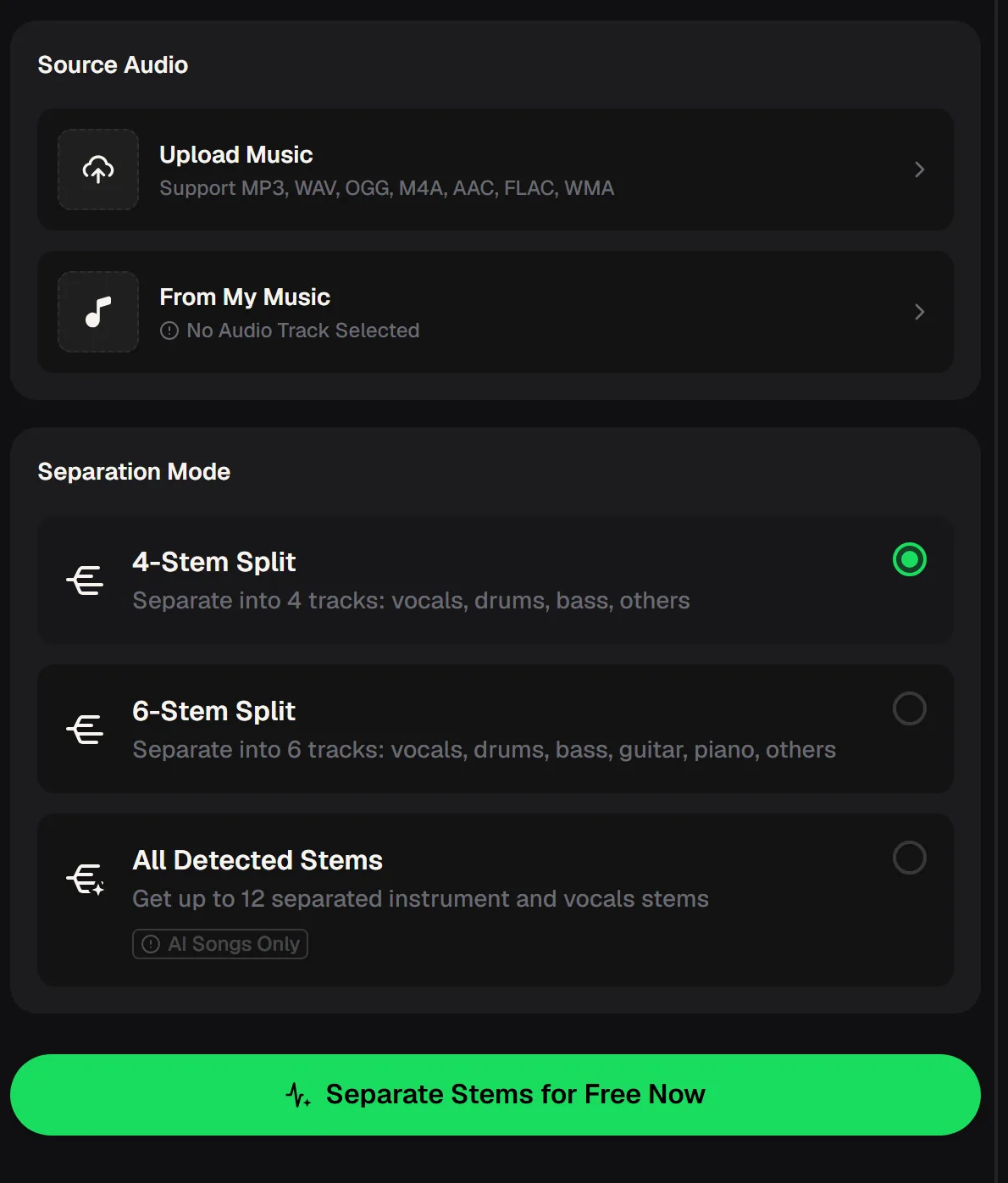
What the MusicCreator stem splitter handles
If you want stem separation software that starts in the browser, these are the facts from the live tool page. The mode you choose decides how many tracks you get back.
Which type of stem separation software fits you
The right choice depends less on brand and more on where separation sits in your workflow. This table compares the four types of stem separation software on the list.
| Question | Browser splitter | Built into DAW | DJ software | Open-source model |
|---|---|---|---|---|
| Install needed | No | Yes, the DAW | Yes, the DJ app | Yes, plus setup |
| Best for | Quick stems on any device | Producing and remixing | Live mixes and mashups | Custom pipelines |
| Technical skill | Low | Moderate | Moderate | High |
| Stems export as files | Yes | Yes | Depends on the app | Yes |
Upload a track you know well, split it into stems online and judge the result before you choose a tool.

What people do with separated stems
Stem separation software is not only for remixers. These are the jobs it is most often used for, and each one puts different demands on the quality of the split.
Acapellas and mashups
Lift a vocal and lay it over another track's instrumental for a live blend.
Remixes and sampling
Pull drums or a melody from a song you have permission to remix.
Karaoke backing
Remove the lead vocal and sing over everything else, at home or on stage.
Practising with stem separation software
One of the most useful jobs for a stem splitter is practice. Mute your own instrument and play along with the rest of the band, or isolate it to learn a part note for note.
- Bass players: mute the bass stem and play along with drums and vocals.
- Guitarists and pianists: use 6-stem mode so your part has its own track.
- Drummers: drop the drum stem to hear the song without the original kit.
- Teachers: give students a backing track with one part removed.
- Separation cannot recover parts that were never recorded in the mix.
Stem separation software questions
What people ask before choosing a stem splitter.
What is stem separation software?
It is software that takes a finished, mixed song and splits it into separate tracks called stems, usually vocals, drums, bass and everything else, and sometimes guitar, piano or more. Modern tools use AI models trained to recognise each instrument. The stems can then be muted, soloed, remixed or used for practice.
What is the best stem separation software?
Our first pick is the MusicCreator AI Stem Splitter: it runs in the browser on any device and offers 4-Stem, 6-Stem and All Detected Stems modes. If you already produce in a DAW with separation built in, use it alongside. Technical users who want full control often run open-source models. Start with MusicCreator, compare on the same songs and trust your ears.
What is the best free stem separation software?
Several tools offer stem separation software free to start. MusicCreator's stem splitter can be tried with the free credits a new account receives, and open-source models are free to run if you can set them up. Free tiers change over time, so check each tool's current offer before relying on it.
Can stem separation go beyond drums, bass, vocals and keys?
Yes, depending on the stem separation software. MusicCreator's 6-stem mode adds separate guitar and piano tracks, and the All Detected Stems mode can find up to 12 parts on AI-generated songs. Results for unusual instruments vary, so test with the kind of music you work with.
How do I reduce robotic artifacts in stems?
Start with the highest-quality source file you have, since compressed audio gives the model less to work with. Compare a few stem separation software options on the same song, and use gentle EQ or a little reverb to mask small artifacts once the stem sits back in a mix. Soloed stems always sound harsher than they do in context.
Can I use stems from someone else's song?
Stem separation software does not change who owns the audio. Use stems from your own music or songs you have permission to use, and check the licence before releasing a remix that uses someone else's recording.