Voice Isolator for Podcast Music Beds
Use a voice isolator to turn a song you own into an instrumental bed that sits quietly under your host's voice, from the intro to the sponsor read. Strip the vocal from your own songs with AI Vocal Remover, or keep only drums, bass and others with 4-Stem Split, so the music sits under a podcast host's voice.
A song with singing makes a poor bed for a conversation, because two voices compete for the same attention. The voice isolator on MusicCreator separates the singing from the music, leaving you an instrumental you can fade in under intros, segment breaks and sponsor reads.
Which separation mode suits a podcast bed
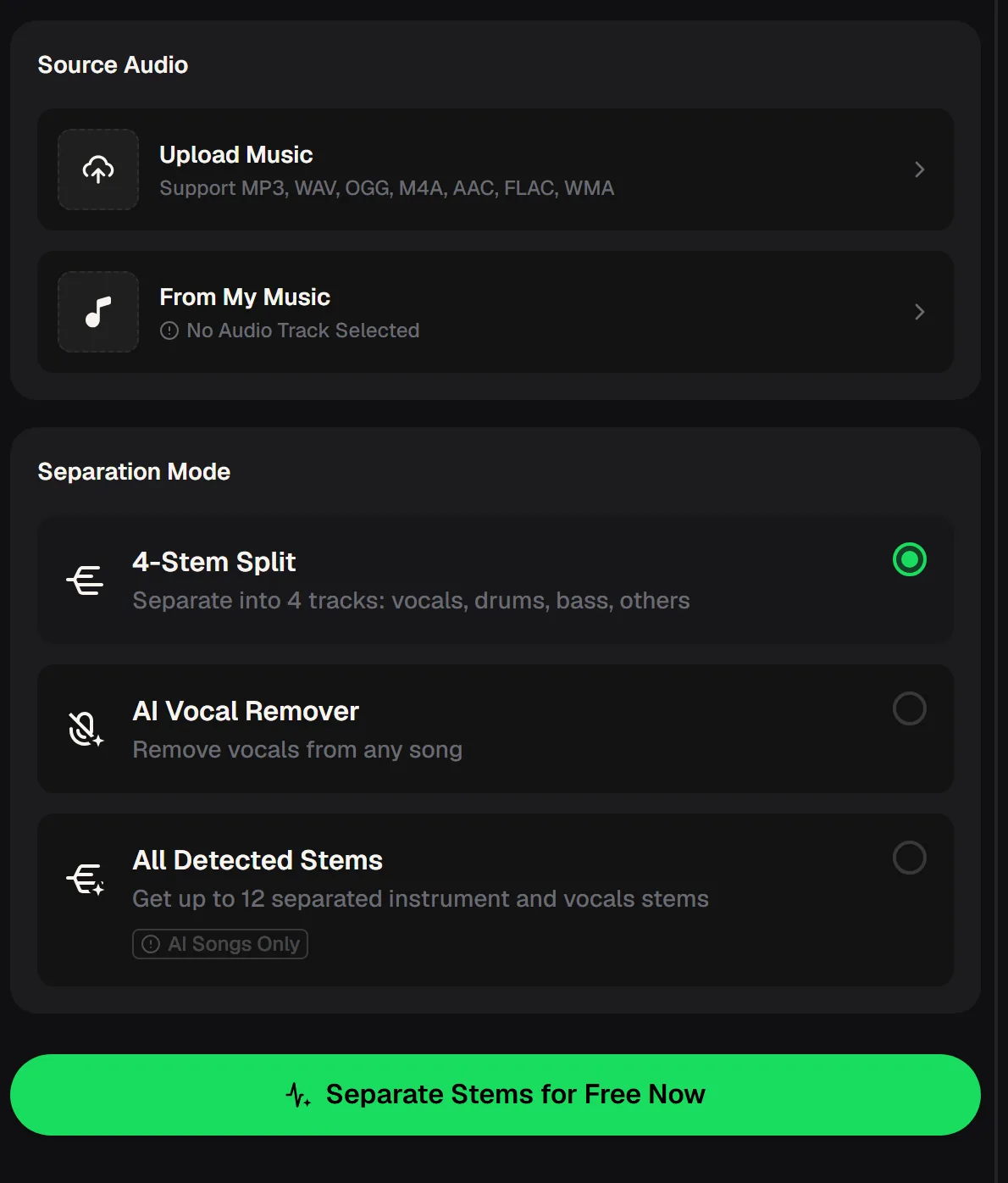
The voice isolator panel starts with Source Audio: upload a file in MP3, WAV, OGG, M4A, AAC, FLAC or WMA, or choose a song from My Music. Below it, Separation Mode offers three choices. AI Vocal Remover takes the vocal out and leaves the full instrumental, which is the quickest route to a bed.
4-Stem Split gives four tracks, vocals, drums, bass and others, so you can drop the vocal and also leave out busy drums. All Detected Stems returns up to 12 stems and works on AI songs only, which is handy for tracks you made on MusicCreator.
- Quickest bed
- AI Vocal Remover
- Most control
- 4-Stem Split
- AI songs
- All Detected Stems, up to 12
- Inputs
- Upload or From My Music
From a finished song to a podcast bed
A good music bed from the voice isolator starts with the right song. Pick a track you own or made yourself, with a mood that matches the show: calm and warm for interviews, brighter and more driving for news or sports. Songs with long instrumental passages work especially well, because they already leave space for talking.
Once you have chosen, the process takes four steps, and the result is a set of files you can drop straight into your podcast editing session. Label each file with the song name and the mode you used, so you can find the right bed quickly when you build the next episode.
Add the song
Upload the best-quality file you have, or choose a song you made on MusicCreator from My Music.
Pick a mode
In the voice isolator, choose AI Vocal Remover for a full instrumental, or 4-Stem Split to control each part.
Separate
Sign in and run the voice isolator, then listen to the instrumental on headphones.
Mix under the voice
Place the bed in your editor and lower it well below the host whenever someone speaks.
Upload a song you own to the voice isolator, separate the vocal from the music and keep the instrumental as a bed for your show.
Building a lighter bed with 4-Stem Split
Even after the voice isolator removes the vocals, some instrumentals are too busy to talk over. Loud drums and bright lead parts sit in the same range as speech and make the host harder to follow.
- With 4-Stem Split you get vocals, drums, bass and others as separate files, so you can build a lighter bed from just the bass and the others track for the talking parts.
- Bring the drums back for the intro and outro, where the music has the stage to itself; matching the bed's energy to each segment makes the show feel produced rather than looped.
- Run the voice isolator once per song and keep all four stems in a folder, so you can rebuild a lighter or fuller bed later without separating the track again.
Tip: keep the voice isolator's vocal file too. A sung line from your own song makes a memorable sound for an episode's opening or closing.
Six tips for podcast music beds
A music bed should be felt more than heard. Listeners should notice the mood it creates, not the song itself, and they should never have to strain to hear the host. These habits help the instrumentals from the voice isolator do that job across a whole season, whether you publish a weekly interview show or a short daily update.
Most of them are about restraint: less level, fewer parts and the same few beds used consistently. Test each bed with a real voice recording before you commit to it for the season. Play a minute of a past episode over the new bed, listen on cheap earbuds as well as studio headphones, and adjust the level until every word stays easy to follow.
Start from clean audio
A WAV or FLAC upload gives the cleanest separation and the fewest artefacts.
Keep the bed low
Under speech, the music should sit well below the voice, not beside it.
Drop the busy parts
Use 4-Stem Split to leave out drums or lead parts while someone is talking.
Fade, don't cut
Fade the bed in and out around speech so changes feel smooth.
Reuse a signature bed
One recurring instrumental for intros builds recognition across episodes.
Use songs you control
Songs you made yourself avoid questions about who owns the music in your show.
Prepare a set of beds from songs you made yourself, so nobody has to ask who owns the music in your show.
Beds from songs you made on MusicCreator
The simplest way to feed the voice isolator, and to stay in control of your podcast music is to make it yourself. Generate a song on MusicCreator, choose it from My Music in the voice isolator, and separate it into stems with All Detected Stems or 4-Stem Split.
The Editor on a finished song also includes the AI Vocal Remover and AI Stem Splitter, and Remix lets you Extend a track when a segment runs longer than the music. Check that your plan covers how you will publish the episodes.
Paid plans can download MP3, WAV and FLAC; free users can download a limited number. Monthly and annual plans both include commercial rights within the scope of the Commercial License. Downloading the license certificate costs 5 credits per song on a monthly plan and nothing extra on an annual plan. See the pricing page for current plans.

Voice isolator questions
Which mode should I use for a podcast bed?
For a quick full instrumental from the voice isolator, choose AI Vocal Remover. If you want a lighter bed without drums or lead parts under speech, choose 4-Stem Split and keep only the stems you need. For songs made on MusicCreator, All Detected Stems gives up to 12 separate parts.
Which files can I upload?
The voice isolator accepts MP3, WAV, OGG, M4A, AAC, FLAC and WMA, or a song from My Music. Lossless WAV or FLAC files usually give the cleanest separation.
Can I use any song as a podcast bed?
Only use songs you have the rights to, such as songs you wrote, recorded or made on MusicCreator. Running a track through the voice isolator does not change who owns it, so check the rights before an episode goes out.
Do I need an account?
Yes, you sign in to use the voice isolator, and there are free credits after a quick sign-up. The site also works in a phone browser.
Give your podcast its own music bed
Use the voice isolator to turn one song you own into a music bed that sits under your host's voice, and start with free credits after a quick sign-up.