Music Maker for Beginners with No Music Experience
You do not need to read notes, play an instrument or understand a mixing desk to make your first track. This music maker works from plain sentences: say what the song should feel like, pick a style tag if you want one, and listen to two different versions of your idea. It is the gentlest way to find out what music you have in you.

What stops beginners from making music
Most people who search for a music maker are not producers. They have a tune they hum in the shower, a video that needs a soundtrack, or a friend whose birthday deserves a song. Traditional software greets them with tracks, plugins, piano rolls and a manual. Here is how the usual blockers change when the starting point is a sentence instead of an instrument.
"I can't play anything"
You are not asked to play. You describe the music and the music maker performs it.
Words in, music out
A short prompt such as "a cheerful acoustic song about a road trip" is enough to start.
"I don't know music theory"
Keys, chords and time signatures feel like a foreign language.
Describe feelings instead
Words like calm, upbeat, dreamy or dramatic do the work that theory would.
"Software looks overwhelming"
Dozens of panels before you hear a single sound.
One box and one button
The main music maker screen is a prompt field, a few optional switches and a generate button.
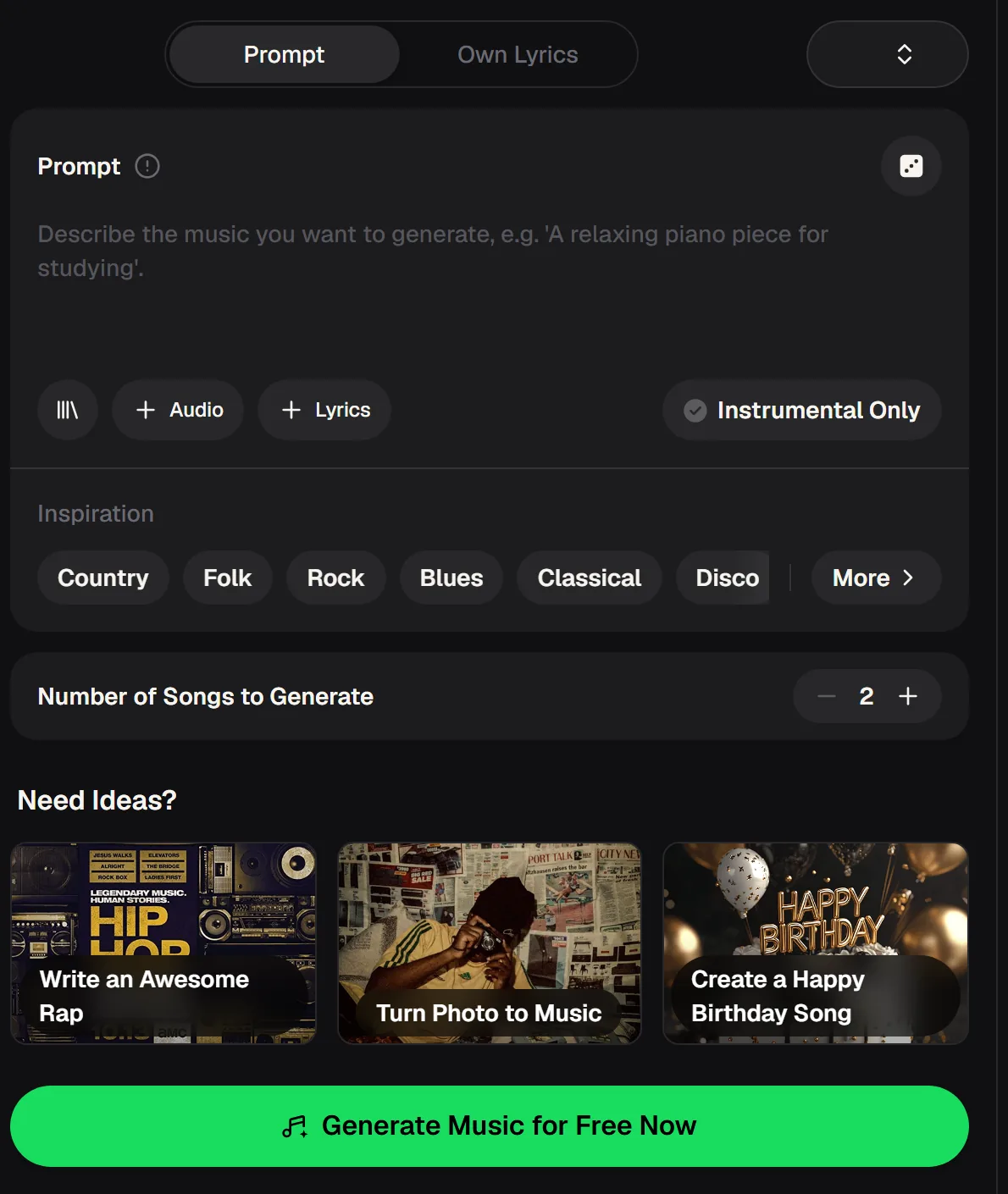
A tour of the music maker for first-timers
Open the music maker and you will see two tabs at the top. Prompt is where beginners should start: you write what you want to hear. Own Lyrics is for later, when you have words of your own and want them sung.
Under the prompt box you can attach Audio or Lyrics, and an Instrumental Only switch removes vocals when you need background music. Inspiration tags such as Country, Folk, Rock, Blues, Classical and Disco give you a one-click style if you are not sure what to type.
- Prompt and Own Lyrics modes
- Optional Audio and Lyrics add-ons
- Instrumental Only switch for music without vocals
- Number of Songs to Generate, set to 2 by default
- No instrument, notation or mixing skills required
Make your first track in four small steps
Treat your first music maker session as play, not as a test. Start with something you already know you like, such as the mood of a favourite playlist, and describe it in one sentence. You will learn more from hearing two results side by side than from any tutorial, because each pair shows you which words change the sound.
Write one sentence
Name a mood, a style and a subject: "a gentle lofi track for studying on a rainy evening".
Tap a style tag
Not sure about genres? Pick one from Inspiration and see what happens.
Choose vocals or not
Leave vocals on for a song, or switch on Instrumental Only for background music.
Listen and compare
The music maker returns two takes per run. Keep the one you like and change one word to try again.
Write one line about the mood and subject, choose vocals or Instrumental Only, and hear two versions of your first song.

Hear what a short description can become
The track below is a sample made with the music maker on MusicCreator. Play it before you write your own prompt, and notice how much a few words of direction already give you: a clear groove, an arrangement that builds and an ending.
As a beginner, use samples like this to train your ear. Ask yourself what you would change, a slower tempo, a softer voice, more guitar, and then put exactly those words into your next prompt.
The numbers a beginner should know
Learning a new tool is easier when you know the rules of the game up front. These are the music maker basics on MusicCreator, so you can plan how many experiments to run. A good habit for beginners is to change only one thing between runs, the mood word, the style tag or the vocals switch, so you can hear exactly what each change does to the music.
Beginner prompts that work the first time
Good prompts for a music maker read like a note to a friend who plays in a band. Say who the song is for, how it should feel and what it is about. Copy any of these into the music maker, press generate, then swap in your own details. If a result sounds too busy, ask for fewer instruments; if it feels flat, ask for a stronger chorus or a build toward the end.
Soft lofi beat with warm piano and vinyl crackle, relaxed, for late-night studying
Happy pop song for my sister Mia who loves dancing, upbeat chorus, fun lyrics
Bright acoustic guitar instrumental for a travel vlog, sunny and carefree
Slow folk song about moving to a new city, gentle female vocal, hopeful ending
Questions beginners ask about the music maker
Short, honest answers to what people ask before they try making music for the first time. If your question is about plans, the pricing page has the current details.
Is this music maker free to try?
Yes, there is a free entry point. New users get 30 free credits a year (15 songs) after a quick sign-up, and each generated song uses 2 credits, so you can run a few music maker experiments before deciding whether you need more. Unused credits on a plan reset on the renewal date, so it makes sense to use them rather than save them. The pricing page lists the current plans if you want to keep going after your first songs.
Do I need to download anything?
No download is needed. This online music maker runs in your web browser on a computer or a phone, so you can open it, type a prompt and listen without installing software. That also means your songs are waiting in your account when you come back later from another device. If you later want to edit tracks in other programs, you can download the results you like and open them there.
How do I become a music maker with no experience?
Start by listening actively. Generate two takes, decide which you prefer and put into words why. Then change one thing in your prompt and listen again. After a handful of runs you will start to understand how mood words, genres and instruments shape a song. Many beginners then move on to writing their own lyrics in Own Lyrics mode, which is a natural next step toward real songwriting.
Can I make music without vocals?
Yes. Switch on Instrumental Only in the music maker before you generate and the result will be music without singing. That works well for videos, presentations, study sessions and games, where words would compete with speech or concentration. You can still describe the instruments you want, such as piano, acoustic guitar or soft synths, and the overall mood of the piece.
Can I use songs from the music maker in public?
Monthly and annual plans both include commercial rights within the scope of the Commercial License; the license certificate costs 5 credits per song on monthly plans and nothing extra on annual plans, and Pay Once credits can unlock one for 5 credits per song. That covers uploads to a video platform, a streaming service or a client project.
Your first song is one sentence away
Write one line about the mood, choose vocals or Instrumental Only, and keep the take that makes you smile. Change one word and try again.