Beat Creator with 808 and Hardness Control
Decide how hard the drums and 808s hit, from laid-back and smooth to punchy and aggressive. The same tempo and key can feel completely different depending on how heavy the low end is and how sharply the drums land.
The MusicCreator beat creator puts a Hardness setting right next to BPM and key, and lets you describe the 808s in the style prompt, so the beat matches the energy of the verse or video it is for. It works as a beat creator online in your desktop or phone browser.

Why hardness and 808s decide how a beat feels
Two beats at 140 BPM in C minor can serve different songs. One with soft drums and a rounded 808 suits a melodic hook; one with snapping drums and a distorted 808 suits an aggressive verse. When a beat creator only lets you choose genre and tempo, you end up generating again and again hoping the weight comes out right. Setting the hit and low end on purpose is faster.
It also changes how the beat works with everything around it:
- A video edit that cuts on every snare needs drums that snap.
- A podcast intro or a background bed needs a softer hit so it does not compete with speech.
- Rappers often want the 808 to carry the groove in the verse and pull back under the hook, so it helps to make two versions of the same beat at different weights and switch between them while writing.
- Treat hardness as a mixing decision you make before the beat exists, rather than something you try to fix afterwards with EQ.
The beat has the right style but the wrong weight, so it either drowns the vocal or feels too polite.
The beat hits as hard as the track needs, with room left for the voice on top.
What the beat creator panel gives you
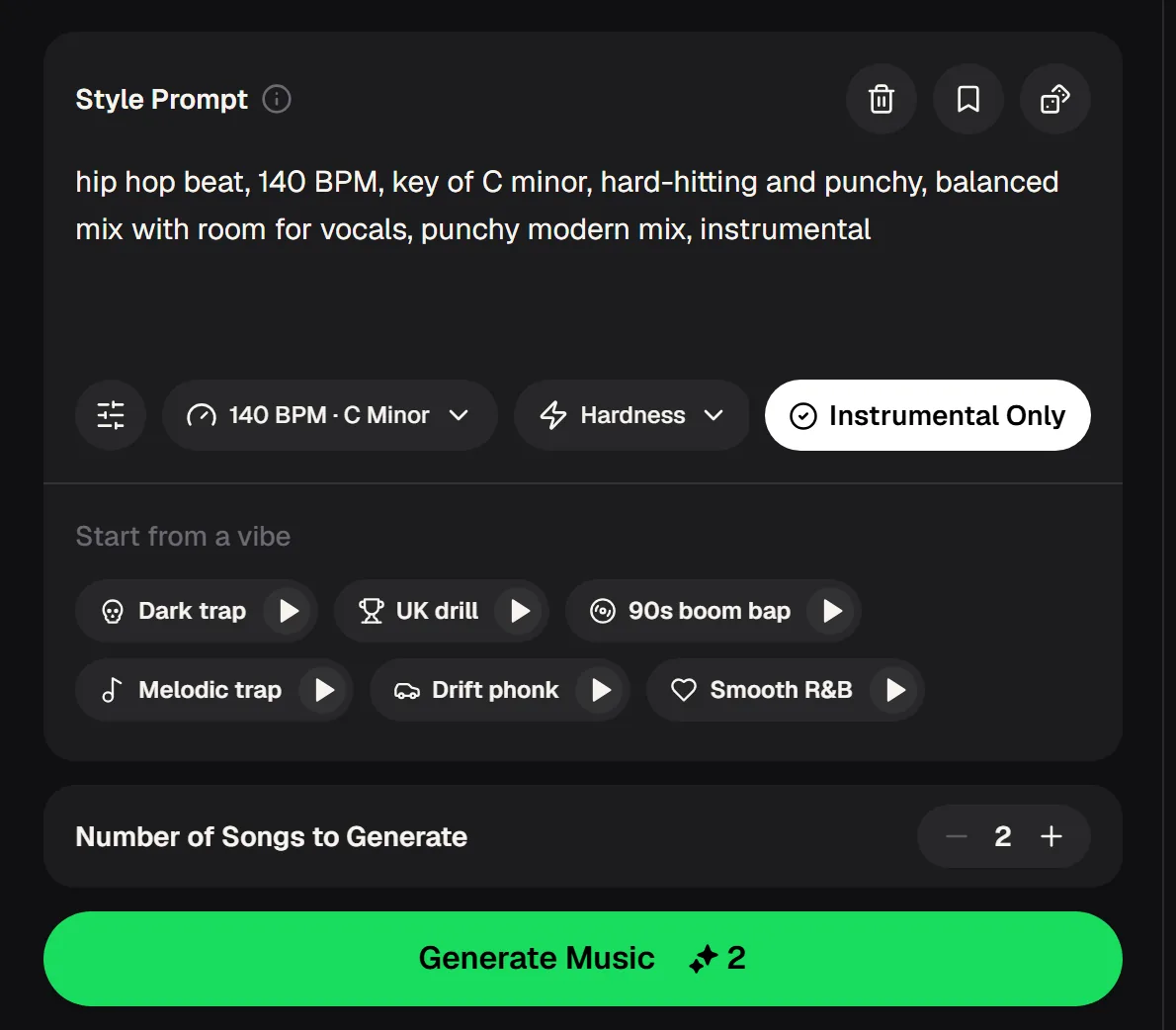
The beat creator on musiccreator.ai starts with a Style Prompt, pre-filled with an example such as a hard-hitting hip hop beat at 140 BPM in C minor. Under it sit three controls: a BPM and key selector, a Hardness selector and an Instrumental Only switch. Start from a vibe offers presets including Dark trap, UK drill, 90s boom bap, Melodic trap, Drift phonk and Smooth R&B.
Each run generates two beats, and the cost is shown on the Generate Music button. Generating needs a free account; new accounts get free credits.
- Prompt
- Style Prompt with 808 and mix details
- Controls
- BPM · Key, Hardness, Instrumental Only
- Vibes
- Dark trap, UK drill, 90s boom bap and more
- Per run
- 2 beats, 2 credits
- Downloads
- MP3, WAV, FLAC on paid plans
- Account
- Required to generate
Two beats from the beat creator
Every run of the beat creator gives you two beats, so you can hear how much the drums and low end vary between takes. Listen to the kick and 808 first: how long the bass notes ring, how hard the snare snaps and how much space is left in the middle for a vocal.
Then decide whether to push the hardness up or down on the next run. If both takes feel right but one has the better melody, keep that one and send it to the stem splitter to rebalance the drums later.
Raise the hardness setting, describe the 808s in plain words and compare the next two takes against the one you have.
Beat creator settings for different tracks
Use these starting points and adjust by ear. The middle column shows how to set the MusicCreator beat creator; the last column describes what the 808s should do. Write the 808 description into the style prompt, in plain words.
| Track type | MusicCreator settings | 808 description for the prompt |
|---|---|---|
| Aggressive drill verse | UK drill vibe, hardness pushed up | Sliding, distorted 808s |
| Melodic trap hook | Melodic trap vibe, hardness in the middle | Long, round 808s that follow the chords |
| Boom bap freestyle | 90s boom bap vibe, hardness in the middle | Short bass, punchy kick, dusty drums |
| Phonk edit for video | Drift phonk vibe, hardness pushed up | Heavy, overdriven 808s with cowbell |
| R&B or chill vocal | Smooth R&B vibe, hardness kept low | Warm, soft sub bass |
Dialling in the beat creator in four runs
Change one thing per run so you can hear what each setting does. Listen on the speakers your audience will use; phone speakers lose sub bass, so check the 808 on headphones too. Keep notes on the vibe, tempo, key, hardness and 808 words for every beat you keep; after a few sessions you will have your own starting recipes for each kind of track you make.
Pick a vibe
Start from the preset closest to your track, then set BPM and key to match your song.
Describe the 808s
Add a short phrase to the style prompt: sliding, distorted, short, round, or soft.
Set the hardness
Choose a hardness level for how sharply the drums should land, then generate two beats.
Compare and adjust
Keep the better take. If it crowds the vocal, lower the hardness or soften the 808 words and run again.
Beat creator questions
Is the beat creator free to try?
Yes, it is a free beat creator to start once you create an account; the free plan includes 30 credits a year, enough for 15 runs of two beats. Paid plans can download beats in MP3, WAV and FLAC, while free users can download only a limited number.
What does Hardness change?
Hardness sets how heavy and punchy the beat feels, next to the BPM and key controls. Combine it with words about the drums and 808s in the style prompt for the clearest result.
Can I make beats without vocals?
Yes. Keep Instrumental Only switched on and every beat creator run returns instrumental beats ready for rapping or singing over.
Can I get the drums or 808 on their own?
Yes. Send a generated beat to the AI Stem Splitter. Beats made on MusicCreator can use All Detected Stems for up to 12 stems, or 4-stem and 6-stem modes.
Can I release songs on these beats?
Monthly and annual members have commercial rights within the scope of the Commercial License. Monthly members spend 5 credits per song on the licence certificate, annual members pay no extra credits, and Pay Once users can get one for 5 credits per song.
The difference between a beat you skip and a beat you write to is often just the weight of the low end, so take a few beat creator runs to find it.
Make the Beat Hit Like the Verse
Pick the vibe, set the tempo and key, and describe the 808s. Keep the take that leaves room for your voice and adjust one setting at a time.