AI Rapper Trained on Your Own Voice
Most AI rappers sound like somebody else. This one can sound like you. Upload clean recordings of your verses, record straight into the page, or pull the vocal out of a full song you made, and the AI rapper tool trains a rap voice model from it.
Once your model is ready, you can use it to rap on new tracks or to put your voice on AI covers, without booking studio time for every idea.
How you give the AI rapper your voice
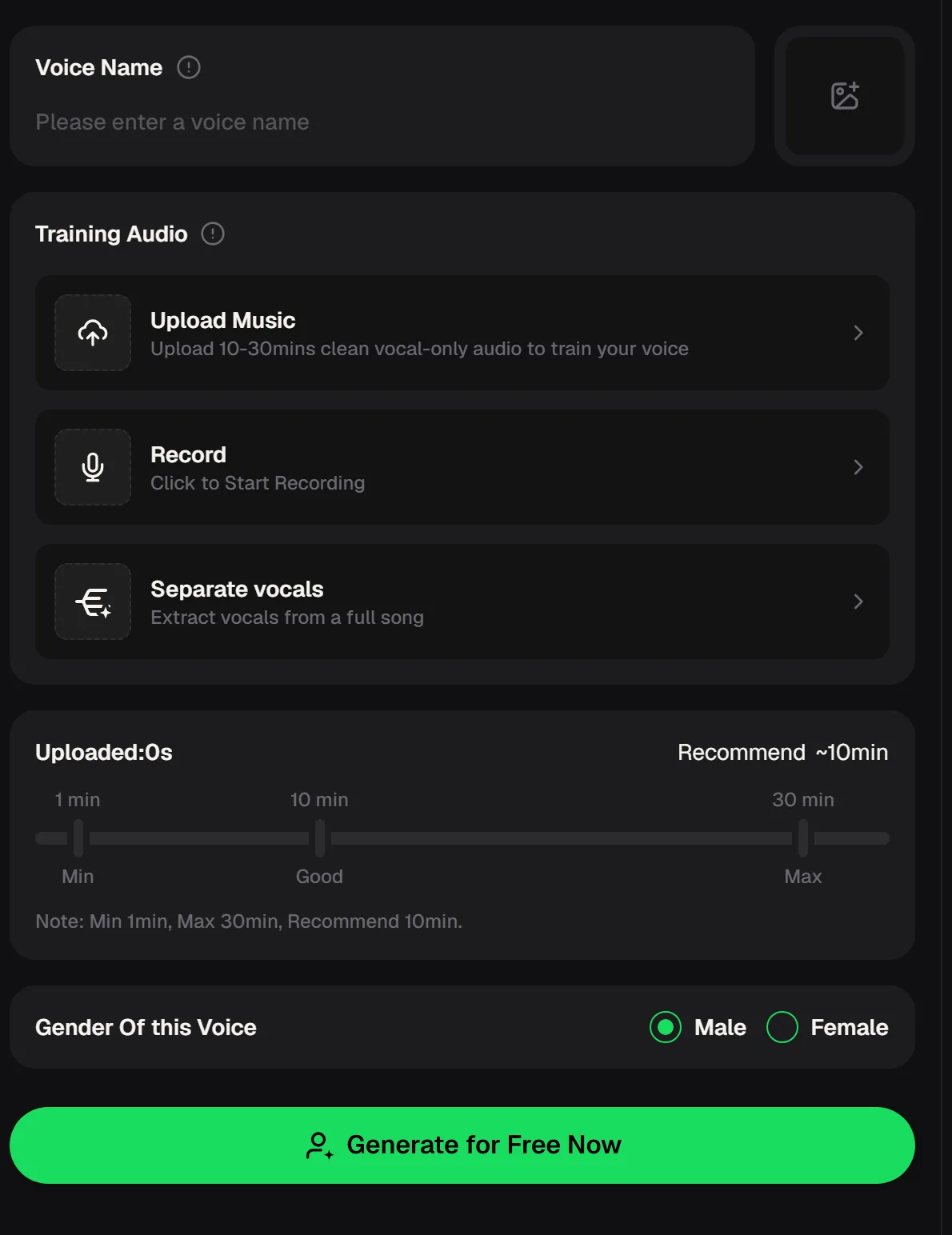
The training panel offers three sources. Upload Music takes recordings you already have; the page asks for clean, vocal-only audio. Record lets you click and rap straight into your microphone. Separate vocals extracts the vocal from a full song, which helps when your best takes are already mixed with a beat.
A duration bar shows how much audio you have added: the minimum is 1 minute, the recommended amount is about 10 minutes and the maximum is 30 minutes. You also set the gender of the voice, Male or Female, before training.
- Sources
- Upload Music / Record / Separate vocals
- Audio length
- Min 1 min, about 10 min recommended, max 30 min
- Voice gender
- Male / Female
- Where models go
- My Voices
Building your AI rapper step by step
A good voice model starts with good source audio. The cleaner and more varied your takes, the more the model has to learn from: different speeds, different energy levels and the way you naturally ride a beat.
Here is a practical way to go from a folder of old verses to a trained AI rapper you can use the same day. Keep a note of which takes you used, so you can add to the same set later if you want to train an improved version of your model.
Gather your takes
Collect dry, vocal-only recordings of your own rapping, or pick mixed tracks to run through Separate vocals.
Aim for about 10 minutes
Add audio until the duration bar reaches the recommended range; mix fast and slow flows.
Set the voice and train
Choose Male or Female for the voice and start training; the model appears in My Voices.
Put it to work
Use your model to rap on original tracks or to create AI covers in your voice.
Pick the cleanest takes, add about ten minutes of audio and train a model that raps in your own voice.
Press play on an AI rapper sample
This sample comes from the AI rapper sample set on MusicCreator. When you test your own voice model, listen to it the way you would judge a feature verse. Does the flow land on the beat, or does it drift? Do the consonants stay crisp on fast lines?
Does it still sound like you on the lines you rap hardest? If the answer to the last question is no, add more takes in that style and train again, because the model can only learn the range you give it.
Five tips for a better AI rapper voice model
An AI rapper can only copy what it hears, so most problems with a voice model trace back to the training audio. Background noise, a loud beat under the vocal or one single delivery style all limit what the model can do later. These habits help your AI rapper sound like you on calm lines and on aggressive ones, and they save you from training twice.
Record dry
Vocal-only audio without the beat gives the model the clearest picture of your voice.
Use a quiet room
Background noise and room echo end up in the model, so record somewhere still.
Show your range
Include slow storytelling verses, fast double-time lines and a hook or two.
Separate mixed takes
If a great verse only exists over a beat, use Separate vocals before adding it.
Train on your own voice
Only use recordings of yourself, or of someone who has given you permission.
Record your training takes for the AI rapper online, close to the mic in a quiet room, with no music behind you.
What you can make with your AI rapper
Once your AI rapper model sits in My Voices, it becomes another voice you can pick. On the AI song cover generator, choose it from the My Voice tab and upload a song to hear it re-sung in your voice.
You can also use it for original rap tracks, so a verse idea becomes a demo you can actually play for a producer or collaborator. Because the model is yours, it is a quick way to test how a hook or flow would sound before you go into the booth.
Paid plans can download MP3, WAV or FLAC; free users can download only a limited number. Paid plans, monthly or annual, include the right to use your songs within the scope of the Commercial License; a license certificate costs 5 credits per song on monthly plans and nothing extra on annual plans. See the pricing page for current plans.
AI rapper questions
How much audio do I need to train an AI rapper?
The panel accepts a minimum of 1 minute and a maximum of 30 minutes, and it recommends about 10 minutes. More clean, varied audio generally gives the model more to learn from, so aim for the recommended range and include different flows and energy levels rather than one long take in a single style.
Can I use verses that already have a beat under them?
Yes. Choose Separate vocals and the tool extracts the vocal from the full song before it is used for training. A dry recording is still best, because some of the beat can remain after separation, but this option lets you include strong takes that only exist as finished mixes.
Is the AI rapper free to try?
You can start with a free AI rapper test: there are free credits after a quick sign-up. If you want to keep creating tracks and covers with your voice model, the pricing page lists the current plans and what each includes.
Can I train it on someone else's voice?
Train the model on your own voice, or on recordings from someone who has given you permission. The point of this AI rapper online is to give you a version of your own sound that you can use to sketch tracks, demos and covers whenever inspiration hits.
When the real recording day comes, you will already know which flows and lines work best, and you can spend your studio time on the takes that matter instead of waiting for the next session in the booth.
Put your own voice on every idea
Gather your cleanest verses, add about ten minutes of audio and train your AI rapper. Then test hooks and sketch demos in your own voice.