Beat Making Website Test: Eight Checks
Every beat making website looks the same on its homepage. Eight quick checks show what you can actually make, keep and use, before you hand over an email address. Run the same prompt, tempo and key on each site, listen to the takes side by side, then read the download and license terms.
Test the Beat MakerFree accounts include 30 credits a year to run the test.
Who should run the test first
People land on a beat making website for different reasons, and the checks that matter change with them. Find your rung below. If you are on a school or work laptop where you cannot install software, a site in the browser is often the only option, so testing it well matters even more.
- First beatYou have never made a beat and want to hear something with drums and bass today, without learning a grid first.
- Locked laptopYour Chromebook or office machine blocks installs, so a beat making website in the browser is how you make music at all.
- Rapper or singerYou need instrumentals at a set tempo and key to write and practise over, and you want to keep the files.
- ProducerYou sketch ideas fast, then pull parts into your own setup, so stems and file formats decide everything.
Eight checks for any beat making website
Ask each question of every beat making website you are comparing. Below each one is the honest answer for the MusicCreator beat maker, so you can see what a full answer looks like, including the "no" answers.
1. Can it make a beat with no vocals?
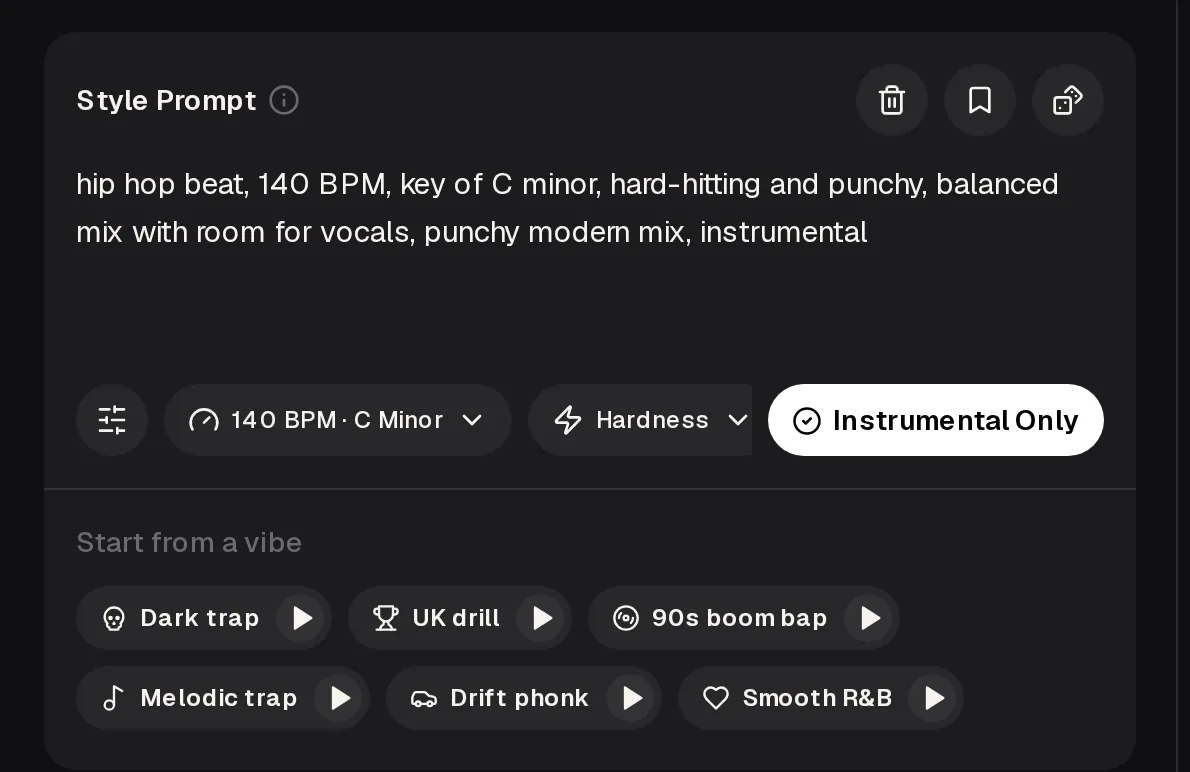
YesThe beat maker has an Instrumental Only switch beside the prompt, so a run gives you a beat without a singer on it.
2. Can you set tempo and key?
YesA BPM and key menu sits under the Style Prompt; the default reads 140 BPM in C minor. You can also write the tempo and key into the prompt itself.
3. Can you shape the sound without music theory?
YesYou describe the beat in words, pick a Hardness setting, or start from a vibe such as Dark trap, UK drill, 90s boom bap, Melodic trap, Drift phonk or Smooth R&B.
4. Can you hear a style before you spend anything?
PartlyEach vibe preset has its own play button, so you can hear the direction first. Making your own beat needs a free account and credits.
5. What does one run cost and give you?
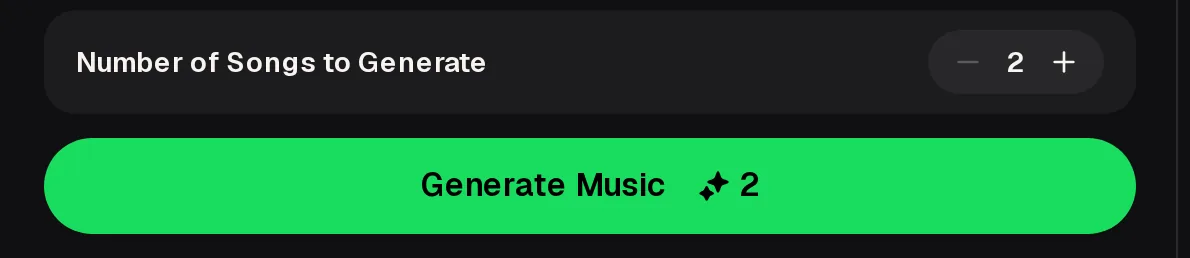
YesThe Generate button shows its credit cost before you press it, and each run gives two tracks to choose from. Free accounts get 30 credits a year, enough for 15 generations.
6. Can you download the files you make?
PartlyOn this beat making website, free accounts can download a limited number of songs. Paid plans download MP3, WAV and FLAC. There is no MIDI file in the downloads.
7. Can you get the parts separately?
YesSend a track to the AI Stem Splitter for 4 stems (vocals, drums, bass, others) or 6 (adding guitar and piano). Songs made on the beat making website can be split into up to 12 detected stems.
8. Can you release what you make?
YesPaid plans, monthly or annual, include the Commercial License, so you can release beats within its scope. Read the license terms on any site before you upload a beat to streaming.
What you set before the first run
Prompt, controls and vibes in one place
The beat making website starts with a Style Prompt where you describe the beat. You can then choose BPM and key, adjust Hardness, keep the take instrumental, or start from one of six vibe presets you can preview.
You also choose how many songs to generate, and the credit cost is clear before you run. There are no drum pads, no step grid and no sample upload: you describe the beat and the site builds it. That keeps the first test short: one prompt, one setting change, one run.
Listen to a test beat at 90 BPM
The fastest way to judge a beat making website is to give it a specific brief and listen hard. We wrote one boom bap prompt with a fixed tempo and key, then kept a take. Listen for whether the drums swing, whether the bass sits under the keys, and whether there is space where a verse would go.
boom bap hip hop beat, 90 BPM, D minor, dusty swung drums with crisp snare, warm upright-style bass, mellow jazzy electric piano loop, vinyl texture, head-nod groove, room for a rap verse, instrumental
 Verse at 90boom bap · 90 BPM · D minor · instrumental
Run the same prompt on each beat making website you are comparing. Same words in, different beats out: it is the fairest side-by-side test you can do in an afternoon.
What each plan lets you keep
Most beat making website comparisons stop at "free or paid". The real difference is what you can take home and use. Here is how that splits on MusicCreator, using only what the plans state.
| Free | Monthly | Annual | |
|---|---|---|---|
| Make beats with credits | ✓ | ✓ | ✓ |
| Credits included | 30 a year | Per plan | Per plan |
| Download MP3, WAV, FLAC | Limited | ✓ | ✓ |
| Commercial License | – | ✓ | ✓ |
| License certificate | – | 5 credits a song | 0 credits |
| Unused credits carry over | – | – | – |
The rows follow the MusicCreator plan terms. One-time Pay Once credits are also available.
Run your own beat test
Open the beat maker, set a tempo and key, and judge the two tracks with your own ears before you choose a plan.
Test the Beat MakerA four-step test run
Use the same four steps on every beat making website you try, so the comparison stays fair. Keep notes as you go: what you typed, what you heard, and what you could download.
Pick a vibe
Play two or three presets and choose the closest to the beat in your head.
Lock the grid
Set BPM and key, switch on Instrumental Only, and add two or three words about drums and bass.
Generate
Run it once and compare the two tracks; change one word and run again if neither fits.
Take it home
Download the take you like, or split it into stems if you will finish it elsewhere.
Tips for comparing websites for making beats
A few habits make the test honest. Open each one to see why it matters.
- Use one identical prompt everywhere.
Why
If every beat making website gets the same words, tempo and key, the differences you hear come from the site, not from your wording.
- Check downloads before you fall for a beat.
Why
A great beat you cannot download in the format you need is a demo, not a beat. Look for MP3 for sharing and WAV or FLAC for mixing.
- Read what "free" includes.
Why
Free tiers on beat making sites usually limit credits, downloads or use rights. Knowing the limits up front stops you building a project you cannot release.
- Ask whether you need a grid or a description.
Why
Some people love placing every hi-hat by hand; others want a full beat from a sentence. Pick the type of site that matches how you like to work.
- Try it on the device you will really use.
Why
A beat making website that feels fine on a desktop can be cramped on a phone. MusicCreator runs in a phone browser; there is no app to install.
Beat making websites for free: credits and limits
Every beat making website has limits. On the free tier the main one is credits: 30 a year, and the gauge below shows that as generations. Credits reset on renewal and do not roll over.
Beyond credits, know what the beat making website does not do. It has no drum pads, step sequencer, playable keyboard or sample upload on the beat maker, no MIDI in downloads, and no phone app. If you need to program every note, pair it with your own software.
Beat making website questions
The questions people ask most when they compare a beat making website with installing software.
Do I need to install anything?
No. The beat maker is beat making software online, so it runs in your web browser, including a phone browser, which helps on Chromebooks and laptops that block installs. You do need a free account to get credits.
Can I make beats for free?
Yes. On this website to make beats, free accounts include 30 credits a year, which covers 15 generations at 2 credits each, and every run returns two takes of the beat. Free users can download a limited number of songs, so save the downloads for the takes you actually want to keep. Paid plans add MP3, WAV and FLAC downloads and include the Commercial License, which matters once a beat is headed for a release rather than a practice session.
Can I choose the exact BPM?
On the beat making website, you pick BPM and key from the menu under the prompt, and you can also write them into the prompt, as in "90 BPM, D minor". Setting both in the menu and the prompt keeps the request consistent. The boom bap example earlier sits around 90 BPM in D minor. If a take drifts from the tempo you wanted, run it again with the same settings rather than rewording everything, so you can tell whether a change came from the settings or from the prompt.
Can I use the beats in my songs?
On a paid plan, yes, within the scope of the Commercial License, which is included on monthly and annual plans. A license certificate costs 5 credits a song on monthly plans and with Pay Once credits, and nothing on annual plans. Free accounts are best treated as a way to test the sound before you commit. Before you put a beat on streaming or release it with a verse on top, read the license terms so you know what the scope covers.
Can I get the drums on their own?
Yes. Run the beat through the AI Stem Splitter; the 4-stem split gives drums, bass, vocals and others as separate tracks. On an instrumental beat, the drums and bass tracks are usually the ones you keep. The 6-stem split and All Detected, which finds up to 12 stems on AI songs, break the rest into finer parts when you want more control, for example to rebuild the arrangement in your own editor or other beat making software online.
Can I upload my own samples?
Not on the beat maker. It builds the beat from your description, the vibe presets and the BPM, key, Hardness and Instrumental Only settings, so there is nothing to upload. If you work from your own loops, a grid-based beat making website or a desktop editor is a better fit for that part. You can still bring a generated beat into your editor afterwards and layer your samples on top, using the downloads your plan includes.
Put the beat maker to the test
Type one beat you know well into the beat making website, set the tempo and key, and judge the two tracks you get back on your own terms.
Test the Beat Maker