Music Visualizer App for Sound-Wave Videos
Turn songs into sound-wave videos with a music visualizer app right in your browser. A song without visuals is easy to scroll past. Platforms like YouTube, TikTok and Instagram need video, and most independent artists do not have the budget for a music video on every single.
A music visualizer app solves that: you upload the track, pick an image or a set of images, switch on a moving sound wave and captions, and export a video sized for the platform you post on. MusicCreator does this in the browser, with nothing to download and no editing timeline to learn.
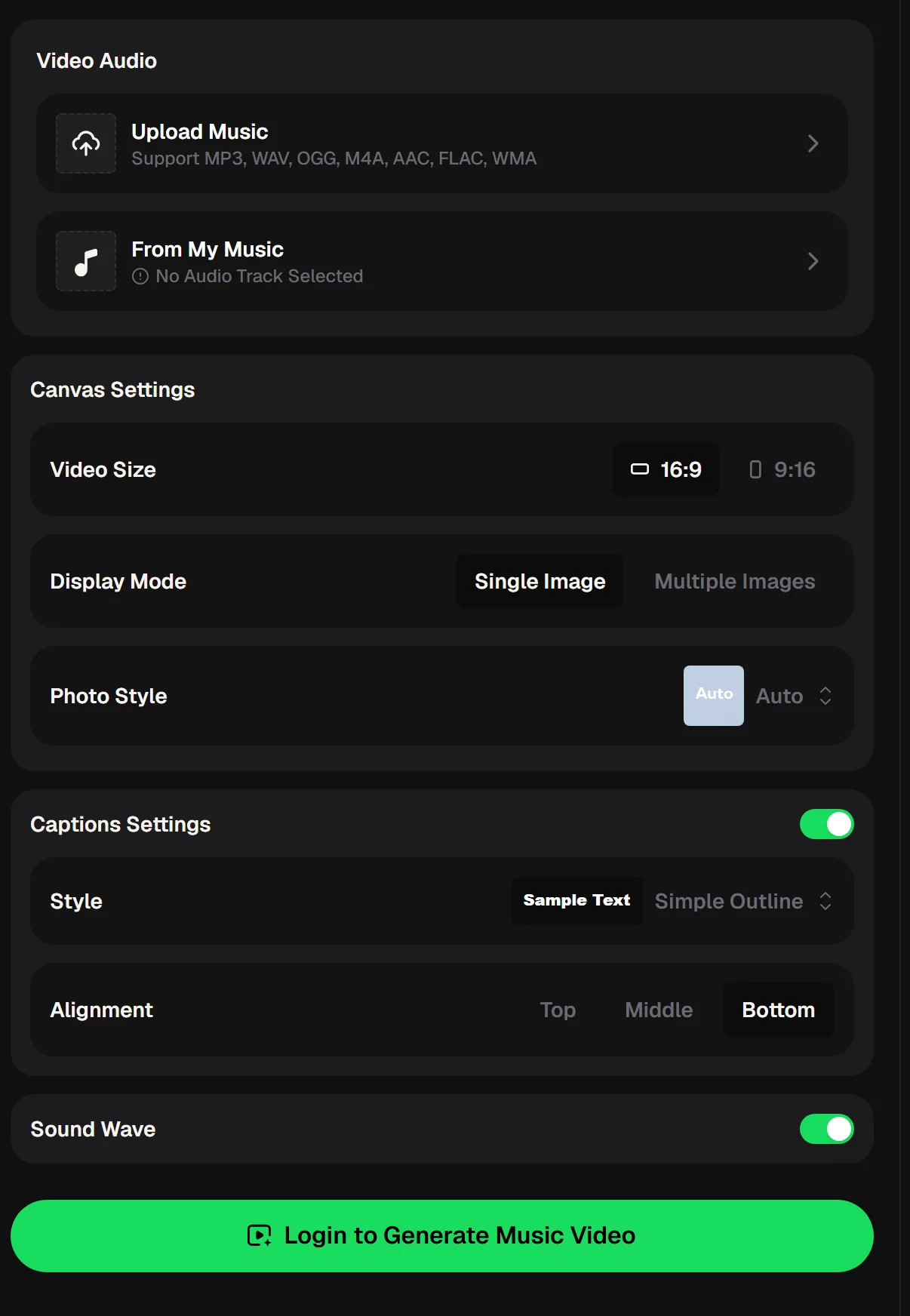
What you can set in this music visualizer app
Everything sits on one settings panel, grouped into audio, canvas and captions. You choose the shape of the video, how the images behave, and whether the words and a waveform appear on screen. Each option is a single click, so you can try a few combinations on the same song and keep the one that suits the track best.
- Video audio: upload a file or pick a song from your MusicCreator library
- Video size: 16:9 for YouTube, 9:16 for Shorts, Reels and TikTok
- Display mode: one image, or multiple images that change through the song
- Photo style: let it choose automatically or pick a look
- Captions: on or off, with a caption style and Top, Middle or Bottom alignment
- Sound wave: a moving waveform that follows the music
The music visualizer app at a glance
These figures are taken from the live MusicCreator tools, so you can compare them with any other audio visualization software you are considering. The upload list matters more than it looks: many visualizers only accept MP3, which forces you to convert your master before you start.
Upload the MP3, WAV or FLAC master, pick your images and turn on captions or a sound wave before you export.
How to make a video with a music visualizer app
The process takes a handful of decisions, made in order. You need a finished audio file and, ideally, one or more images that match the mood of the song, such as cover art, a photo from the session or a picture of the place that inspired it. The music visualizer app asks you to sign in before the video is generated.
Add the song
Upload your track in any of the seven supported formats, or choose a song you made on MusicCreator.
Shape the canvas
Pick 16:9 or 9:16, then decide between a single image and multiple images, and set the photo style.
Add words and motion
Turn on captions, choose a style and alignment, and switch on the sound wave.
Generate and post
Generate the video, watch it through once, then save it on a paid plan and post it to your channel.
Online music visualizer versus desktop software
Desktop visualizer software gives deep control over 3D scenes and particle effects, but it asks for a capable graphics card and a lot of learning time. A browser music visualizer app trades some of that control for speed. Here is how the two approaches compare for a typical release.
| Question | MusicCreator in the browser | Typical desktop visualizer |
|---|---|---|
| Download needed | No, open the page | Yes, plus updates |
| Learning curve | One settings panel | Timelines, layers and presets |
| Vertical video | 9:16 built in | Usually a custom canvas |
| Captions | Built in, three positions | Often added in an editor |
| Advanced 3D scenes | Not the focus | Strong |
A browser music visualizer app needs no install or graphics card, so you can test a look on one song in a few minutes.
Where a visualizer video earns its place
Visualizer videos fill the gap between a static cover image and a full music video. They give listeners something to watch, keep the song moving on screen, and take a fraction of the time to make. Producers, independent artists and DJs use them in slightly different ways, as shown below, and many of them reuse the same images across several songs to build a recognizable look.



Common visualizer headaches, and fixes
“I'm a small music producer starting out and was looking for some software to create a visualizer for a song I've released.”— a post on r/WeAreTheMusicMakers
That search usually runs into the same walls: expensive software, steep learning curves and videos that look wrong once posted. Here is how to avoid each one.
Music visualizer app questions
Short answers on making visualizer videos for your music.
What is a music visualizer?
A music visualizer turns audio into moving visuals, usually a waveform or shapes that react to the sound, often over an image. It gives a song something to watch on video platforms without filming a full music video. Many artists post visualizers as the official video for a single or as short clips for social media.
Is there a music visualizer app that works without a download?
Yes. The MusicCreator music visualizer app runs in the browser, so there is nothing to install. Upload a song, choose the video size, images, captions and sound wave, and generate the video. You need to sign in before generating, and new accounts receive 30 free credits a year after a quick sign-up.
How do I make a music visualizer for YouTube?
Choose 16:9 as the video size, add your cover art or a set of images, switch on the sound wave and, if you like, captions. Generate the video and upload it to YouTube. For YouTube Shorts, make a second version at 9:16 so nothing is cropped.
Can I add lyrics to a visualizer video?
Yes. Turn on captions in the settings panel, pick a caption style and choose Top, Middle or Bottom alignment. Place the captions away from the busiest part of your image so they stay easy to read, and preview the video once before you post it to catch any line that sits over a face.
Can I make 3D visualizers?
The MusicCreator visualizer focuses on image-based videos with captions and a sound wave rather than full 3D scenes. If you need complex 3D particle animation, dedicated desktop software is a better fit; for fast, clean release videos, the browser music visualizer app is quicker.
Who owns the videos I make?
Use music and images you have the rights to. For songs you generate on MusicCreator, monthly and annual plans include commercial rights within the scope of the Commercial License, and Pay Once credits can unlock a license for 5 credits per song.
Give your next release something to watch
Upload the track, pick your images, turn on captions and the sound wave, and export one version for YouTube and one for vertical feeds.