Create Music for Your Workout Sessions
Describe the energy of your run, ride or circuit, and build a set of tracks shaped around how you actually train. Workout playlists drift: a slow song lands in the middle of your intervals, or the same tracks wear thin after a month. When you create music for a session yourself, you decide the feel of each part, from warm-up to the final push.
To create music on MusicCreator, you describe it in a prompt, switch on Instrumental Only if you prefer no vocals, and choose how many songs to generate per run. Keep the takes that fit, and use Extend on finished songs when a track needs to last longer. Free credits come after a quick sign-up.

What changes when you create music for training
Most workout music is chosen for popularity, not for the shape of your session. When you create music with a specific workout in mind, each track can match a phase: easy for the warm-up, steady for the main block, driving for the last effort.
You can also create your own music whenever the old playlist starts to bore you. These are the sessions where people find it most useful, and each one benefits from a slightly different kind of track, so it is worth planning them separately rather than reusing one sound for everything.
Steady miles
Describe a steady, driving groove for long easy runs.
Indoor rides
Build tracks that rise and fall like a climb and descent.
Home workouts
Short, punchy tracks for stations and rest breaks.
Stretch and recover
Calm instrumental pieces for the end of the session.
Where you create music for each part of the session
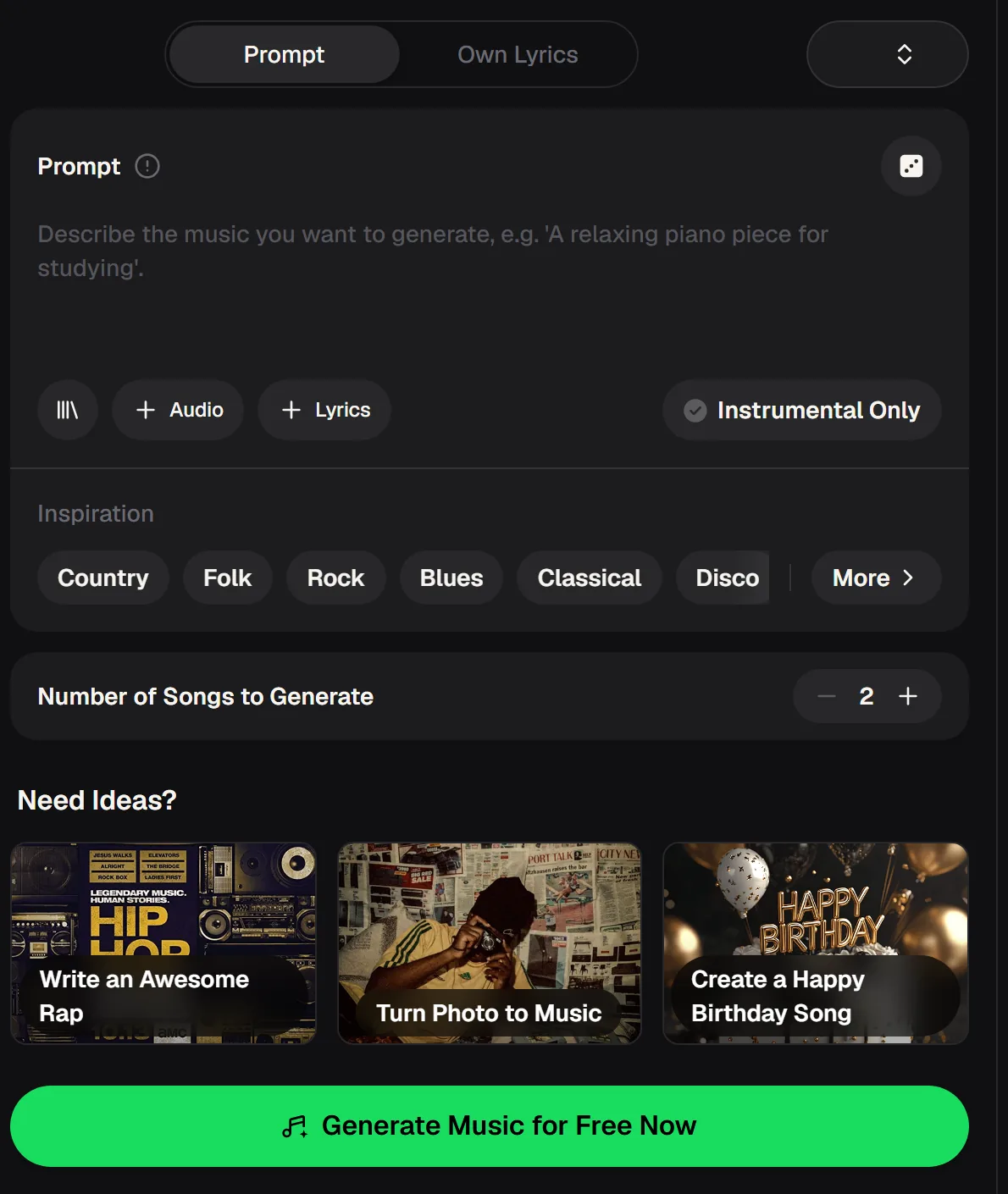
The generator keeps things simple, which suits workout planning: describe the feel, decide whether you want vocals, and choose how many versions to get. Everything below comes from the live panel. Write the prompt the way you would describe the session to a training partner.
- Prompt
- Describe the music in your own words
- + Audio and + Lyrics
- Add a reference clip or your own words
- Instrumental Only
- Leave out the vocals
- Inspiration
- Country, Folk, Rock, Blues, Classical, Disco and more
- Number of Songs
- Shown at 2, adjustable with plus and minus
There is no tempo slider on this panel, so describe the pace you want in the prompt, such as "fast and driving" or "slow and steady", and keep the takes that match.
Create music for a full workout in four steps
A session usually has phases, so plan the music the same way. Create music for one phase at a time rather than trying to get everything from a single prompt. It takes a few runs, but the result is a soundtrack that follows your training instead of fighting it, and you can reuse it every week.
Save the prompts that worked in a note next to your training plan, so building next week's set is a matter of a few small edits rather than starting from a blank box.
Map the session
Note the phases: warm-up, main block, final push, cool-down.
Prompt each phase
Describe the energy and instruments you want for each one.
Keep the best takes
Compare the versions and keep those that match the phase.
Stretch what you need
Use Extend on finished songs in My Workspace for longer blocks.
Map the session into phases and create a track for each one, with Instrumental Only on when you want nothing in your way.
Describing pace and intensity when you create music
Because there is no tempo control on the panel, the words in your prompt do the work. Name the energy directly, describe the drums, and mention how the track should move over time.
Results will vary between runs, so generating a few versions and keeping the best ones is part of the process. The phrases below are starting points that tend to steer the feel in the right direction when you create music for training.
When a track does not fit the session
Not every take will match the phase you planned when you create music this way. These adjustments usually get you closer within a run or two. Keep the near misses; a track that is too slow for the main block may be perfect for the cool-down, and nothing you generate needs to go to waste.
It also helps to change only one phrase between runs, so you can tell which words actually moved the result toward the energy you wanted.
Change one phrase in the prompt and try another take, so you can hear which words moved the energy where you wanted.
Prompts to create music for common workouts
Start from one of these and adjust the details to your own training. Name the energy, the drums and the mood, and say whether it should build or stay steady. Generate a few versions for each phase, keep the ones that match, and assemble them into a session you can come back to whenever you train.
Questions about how to create music for workouts
Short answers about using the generator to create music for training sessions.
Is it free to create music for workouts?
Yes, you can create music for free to start, with free credits after a quick sign-up.
Can I set an exact BPM?
This panel has no tempo control. Describe the pace in your prompt and keep the takes that match.
Can I create music without vocals?
Yes. Switch on Instrumental Only before generating.
Can I download the tracks?
Paid plans can download MP3, WAV and FLAC; free users can download a limited number.
Can I make a track longer?
Yes. When you create music online, finished songs in My Workspace offer Extend in the Remix menu, along with Cover, Mashup and Replace Section.
Can I create music on my phone?
Yes. It runs in a phone browser as well as on a computer.
The right soundtrack makes a hard session feel more manageable and an easy one more enjoyable. Extend the tracks that should last longer, and next week create music for a new set, so the music stays as fresh as the training plan you are following.
Train to music made for your session
Map your workout into phases, create music for each with a clear prompt and keep the takes that match the energy you need.