Vocal Isolator for Remixers
Every remix starts with the same problem: you need a clean acapella, and the vocal you want is locked inside a finished song. Official acapellas are rare, and hunting for them eats the time you wanted to spend producing. This vocal isolator pulls the voice out of a full mix and gives you the instrumental too, so you can start building your remix, mashup or DJ edit straight away.

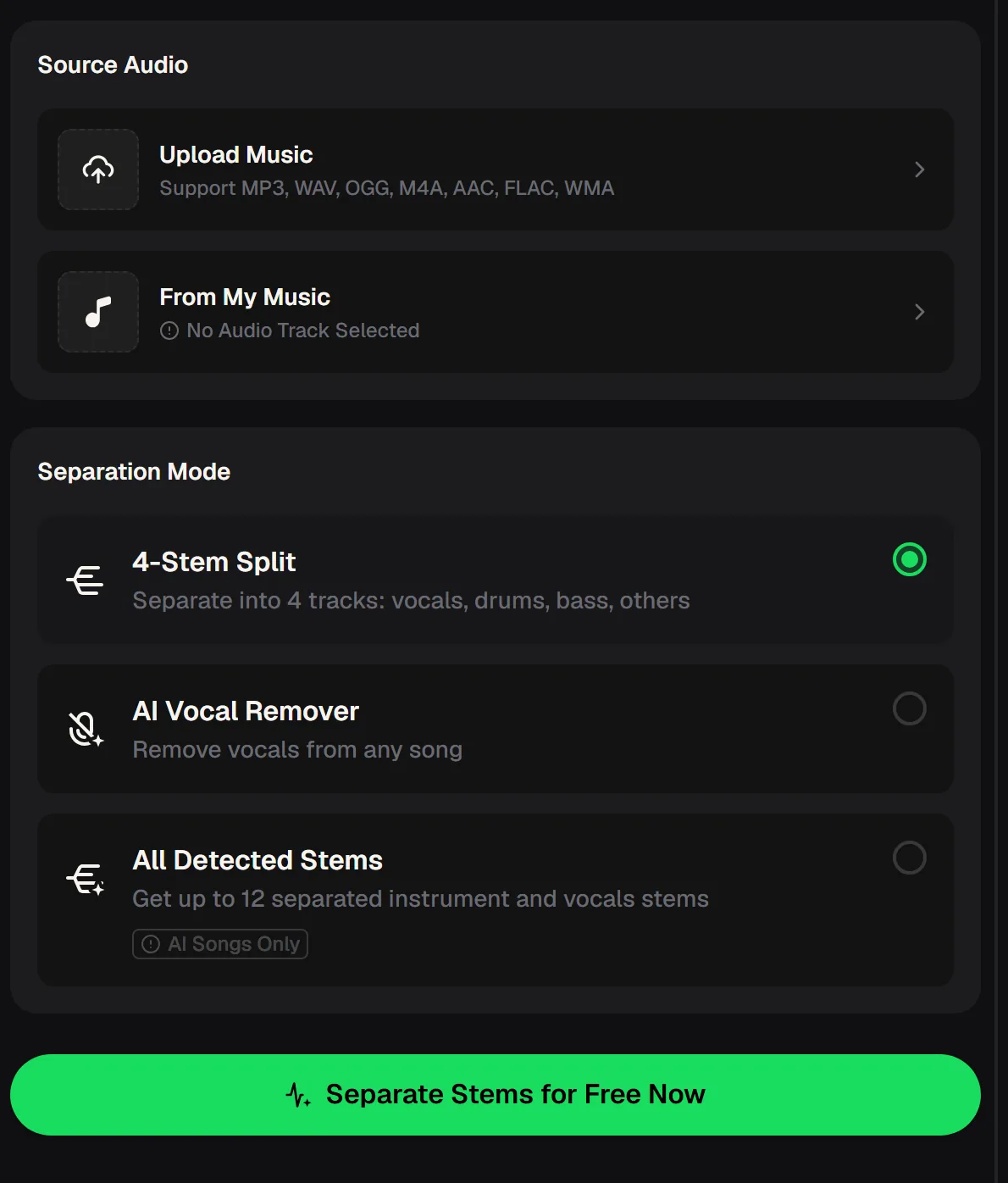
Three ways the vocal isolator can split a track
Start the vocal isolator by uploading a song or picking one from My Music. Then choose how far to take the separation. For a remix, the AI Vocal Remover mode is usually all you need: it hands you an isolated vocal and an instrumental.
If you want to rebuild the groove as well, the 4-Stem Split gives you vocals, drums, bass and everything else on separate tracks, which makes it easy to keep the original bassline under your new drums or the other way round.
- AI Vocal Remover
- Isolated vocals + instrumental
- 4-Stem Split
- Vocals, drums, bass, others
- All Detected Stems
- Up to 12 stems, AI songs only
- Upload formats
- MP3, WAV, OGG, M4A, AAC, FLAC, WMA

From finished song to working acapella with the vocal isolator
With a vocal isolator, the cleaner the source, the cleaner the acapella, so begin with the best copy of the song you have, ideally a lossless WAV or FLAC rather than a heavily compressed file. Then follow these steps and you will have stems ready to drop into your project before the coffee goes cold.
Upload the best source
Use a WAV or FLAC if you have one; any of the seven supported formats works.
Pick the separation mode
AI Vocal Remover for vocal plus instrumental, or 4-Stem Split to keep drums and bass apart.
Check the vocal solo
Listen for bleed from hi-hats or reverb tails before you commit to it.
Drop stems into your project
Set your session tempo to the song's BPM and line the vocal up to the grid.
What you can make once the vocal is free
An isolated vocal is raw material. Producers and DJs use the same acapella in very different ways, depending on whether they are making something to release, to play out or simply to learn from. These are the most common jobs people give a vocal isolator once they have a clean voice track to work with.
New production
Write fresh chords and drums around the original vocal, in a new genre or tempo.
Two songs, one track
Lay the vocal from one song over the instrumental of another in a matching key.
Intros and breaks
Build an acapella intro or a vocal-only breakdown for your set.
Learn the mix
Solo the vocal to hear how it was compressed, doubled and placed in space.
Upload it to the vocal isolator, split it into an acapella and an instrumental, and solo the vocal to hear how it was compressed and placed.
Tips for a remix-ready acapella
Vocal isolator quality depends a lot on the song itself. Dry, upfront vocals over a sparse beat separate more cleanly than a voice buried in a wall of reverb and distorted guitars.
A little preparation and a little cleanup in your own software go a long way, and it helps to know what no separation tool can fix for you. Treat the vocal isolator as the first step, and your own editing as the polish.
- Start from the highest-quality file you have
- Prefer songs where the vocal sits clearly on top of the mix
- Use the instrumental stem to check what was removed
- Gate or fade small bleed between phrases in your editor
- Cannot remove reverb or effects baked into the original vocal
- Does not clear the rights to release a remix

Remix rights and our terms
Using a vocal isolator for practice or a private DJ edit is one thing; releasing a remix is another. The original song belongs to its writers and label, so publishing a remix of someone else's track usually needs their permission, whatever tool made the acapella.
For songs you generate on MusicCreator, monthly and annual plans include commercial rights within the scope of the Commercial License, and Pay Once credits can unlock a license for 5 credits per song.
Check that you have the rights to the source song before you release a remix made with the vocal isolator.
Vocal isolator questions from producers
What is the best way to get a vocal stem from a finished song?
Upload the highest-quality version of the song you have to the vocal isolator and choose AI Vocal Remover. You get an isolated vocal and an instrumental, which is the simplest pair for a remix, and listening to both side by side tells you quickly how clean the vocal isolator's split is. If you also want drums and bass on their own, use the 4-Stem Split instead and you will get vocals, drums, bass and others as separate tracks.
What is the difference between a vocal remover and a stem splitter?
A vocal remover separates a song into two parts: the voice and everything else. A stem splitter goes further and breaks the backing into separate instruments as well. This vocal isolator covers both: AI Vocal Remover for two tracks, 4-Stem Split for vocals, drums, bass and others, and All Detected Stems for up to 12 stems on AI-generated songs.
Which audio formats can I upload?
The vocal isolator online accepts MP3, WAV, OGG, M4A, AAC, FLAC and WMA. For remix work, a lossless WAV or FLAC usually gives the cleanest acapella, because compressed files already carry artefacts that separation can make more noticeable. You can also choose a track you made earlier from My Music instead of uploading a new file. That is handy when you want an acapella of a song you generated yourself.
Is the vocal isolator free to use?
There is a free vocal isolator entry point: 30 free credits a year after a quick sign-up, so you can try a separation before choosing a plan. Each tool shows its cost on the button before you run it. For the current plans and what they include, check the pricing page. A sensible first test is a song you know well, so you can judge straight away how clean the vocal isolator's result sounds.
Can I release a remix made with an isolated vocal?
Running a song through a vocal isolator does not give you rights to the original song. If you want to release a remix of a track you did not write, you normally need permission from the people who own it.
Whether it ends up as a club edit, a mashup for your next set or a study of how the original was mixed, the hard part is already done. Save your favourite acapellas in one folder so the next idea is always ready.
Your next remix starts with one upload
Upload the best copy of the song to the vocal isolator, split it into an acapella and an instrumental, and drop both into your project to build around the voice.