Voice Isolation for Learning Vocal Parts
Use voice isolation to pull the lead vocal out of a song so you can hear every breath, slide and word. Learning a song by ear is hard when the vocal is buried under drums, synths and reverb.
Voice isolation solves that: you upload the track, MusicCreator separates the singing from the instruments, and you get the vocal on its own plus the backing music without it. Listen to the vocal to learn phrasing and lyrics, then sing your part over the instrumental to check yourself.

Which kind of voice isolation are you looking for?
The phrase voice isolation covers two different jobs. Phones, earbuds and call apps use it for a microphone mode that cuts background noise while you talk. That happens live, inside the device, and has nothing to do with songs.
The other meaning is separating a singer's voice from a recorded track, so you can hear the vocal alone. That second job, voice isolation for songs, is what MusicCreator does.
MusicCreator voice isolation works on audio files you upload. It does not change your phone's microphone settings and it does not clean up noisy voice recordings; it separates vocals from music.
The vocal extractor behind voice isolation
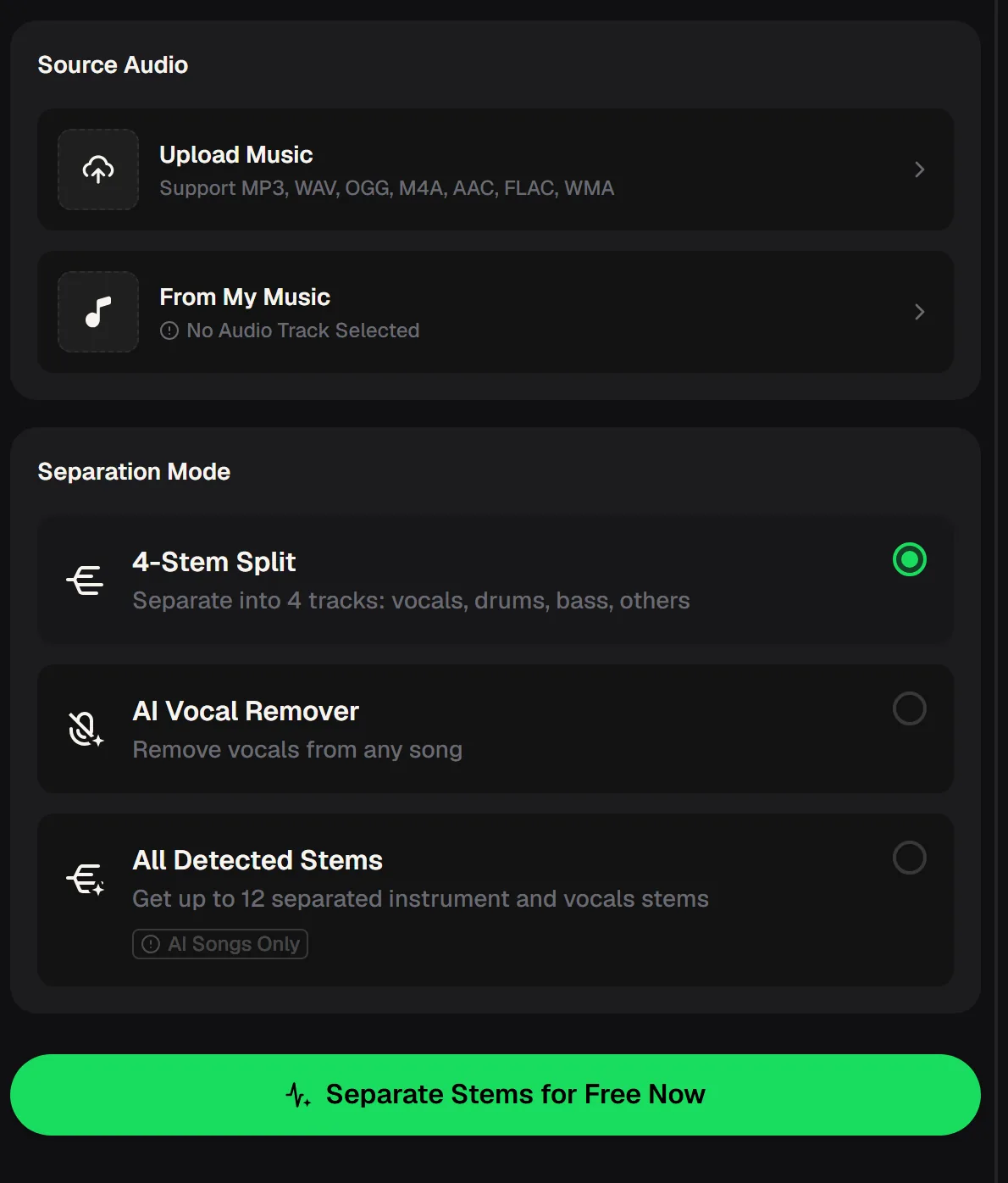
On musiccreator.ai the vocal extractor starts with a Source Audio box. Upload a file in MP3, WAV, OGG, M4A, AAC, FLAC or WMA, or pick a song from My Music. Then choose a separation mode and run it. Processing needs a free account, and new accounts receive free credits on registration.
For voice isolation on a vocal line, the AI Vocal Remover mode is usually enough: it gives you two files, the isolated vocals and the instrumental. When you also want to hear the bass or drums on their own, the 4-stem mode splits the track further.
- Upload formats
- MP3, WAV, OGG, M4A, AAC, FLAC, WMA
- Vocal Remover mode
- Vocals + instrumental
- 4-Stem Split
- Vocals, drums, bass, others
- All Detected Stems
- Up to 12, AI songs only
- Downloads
- MP3 or WAV on paid plans
- Account
- Required to process
Three singers who lean on voice isolation
Voice isolation changes how fast you learn a song. These are the situations where singers tell us an isolated vocal helps the most, and what each person does with the two files they get back.
Nail the original phrasing
Loop the isolated vocal to catch where the singer breathes, which words they lean on and where they slide between notes, then decide what to copy and what to make your own.
Check your lyrics and timing
Sing along with the vocal track to lock in words and entrances, then switch to the instrumental and see whether you still come in at the right moment.
Bring a clean reference to lessons
Share the isolated vocal with your teacher so you can both hear the exact line you are working on, without the band masking the details.
Which separation mode to pick for a vocal
All three voice isolation modes start from the same upload, but they return different sets of files. Pick by what you want to hear next to the voice. The table sums up what each mode gives you and where it fits in vocal practice.
| Mode | You get | Best for |
|---|---|---|
| AI Vocal Remover | Isolated vocals and an instrumental | Learning the melody and lyrics, then singing over the backing |
| 4-Stem Split | Vocals, drums, bass, others | Practising timing against drums or pitch against the bass line |
| All Detected Stems | Up to 12 stems | Songs you generated with MusicCreator; not for other uploaded songs |
| Stem splitter 6-stem | Adds guitar and piano | Hearing the chords under the vocal, on the separate stem splitter tool |
Choose AI Vocal Remover mode to get two files: the isolated vocal to study and the instrumental to sing over.
What voice isolation can and cannot separate
Knowing the limits of voice isolation saves you from chasing a result the tool is not built for. Most problems singers run into come from expecting it to split voices from each other rather than voices from instruments.

- Separates the singing from drums, bass and other instruments.
- Returns the vocal and the instrumental as separate files.
- Works on uploads in seven common audio formats, or on songs in My Music.
- Splits further into four stems when you need the rhythm section alone.
- It does not split the lead singer from backing vocals; stacked harmonies stay together on the vocal track.
- It cannot take a YouTube or streaming link; download the audio and upload the file.
- It is not a noise cleaner for speech recorded in a noisy room.
If harmonies matter, use voice isolation anyway and listen with headphones: the lead is often louder and centred, which makes it easier to follow even when the backing parts are still there.
A practice routine built around voice isolation
Voice isolation gives you two files, all you need for a focused session. Work through these steps with headphones on, and repeat them over a few days until you can sing the whole part with only the instrumental playing.

Listen to the vocal alone
Play the isolated vocal twice without singing. Write down the lyrics and mark where the singer breathes.
Shadow it quietly
Sing softly along with the vocal, matching words and rhythm before worrying about tone.
Switch to the instrumental
Sing the same section over the backing track only. Missed entrances show up straight away.
Record and compare
Record yourself over the instrumental, then play it back next to the isolated vocal to hear the difference.
Upload it, separate the vocal from the band, then record yourself over the instrumental and compare it with the isolated vocal.
Questions about voice isolation for singers
Is voice isolation free on MusicCreator?
You can start free once you create an account. The free plan includes 30 credits a year, and the cost of each run is shown before you start processing. Song downloads are included on paid plans, in MP3 or WAV, and they also cover tracks you processed while on the free plan. If you only need a couple of vocals to practise with, the free credits are a good way to test how well the separation works on your songs.
Which audio formats can I upload?
The vocal extractor accepts MP3, WAV, OGG, M4A, AAC, FLAC and WMA. You can also pick a track you already have in My Music. A higher-quality source, such as a WAV or FLAC file, usually gives a cleaner isolated vocal than a heavily compressed copy, so use the best version of the song you have.
Can it separate the lead vocal from the harmonies?
No. Voice isolation online separates voices from instruments, so all the singing ends up together on the vocal track, including backing vocals and stacked harmonies. Complex vocal layers may not come apart cleanly. For learning a lead line, listen on headphones: the main voice is usually louder and centred, which makes it easier to follow even with harmonies present.
Can I paste a YouTube link?
No. Voice isolation online works with audio files you upload. If the song you want to learn is on a video site, you would need a downloaded audio file that you have the right to use, and then upload it in one of the supported formats.
Can I share a cover I record over the instrumental?
An instrumental separated from someone else's song is still their music, so publishing a cover depends on the rights for that song, not on the tool. For songs you generate with MusicCreator, paid plans include commercial rights within the scope of the Commercial License; check the pricing page for how licence certificates work on your plan.
Hear the Line, Then Sing It Back
Upload the song you are learning, use voice isolation on the vocal and shadow it. Then switch to the instrumental, record yourself and compare.