Music Writing Software for Breaking a Style Rut
Use music writing software to hear your song idea in genres you never write, then make it your own. When every song starts to sound the same, hearing your idea in another style can show you a new way in.
- Describe your idea in the Prompt box
- Pick a style from the Inspiration chips
- Get two tracks to learn from
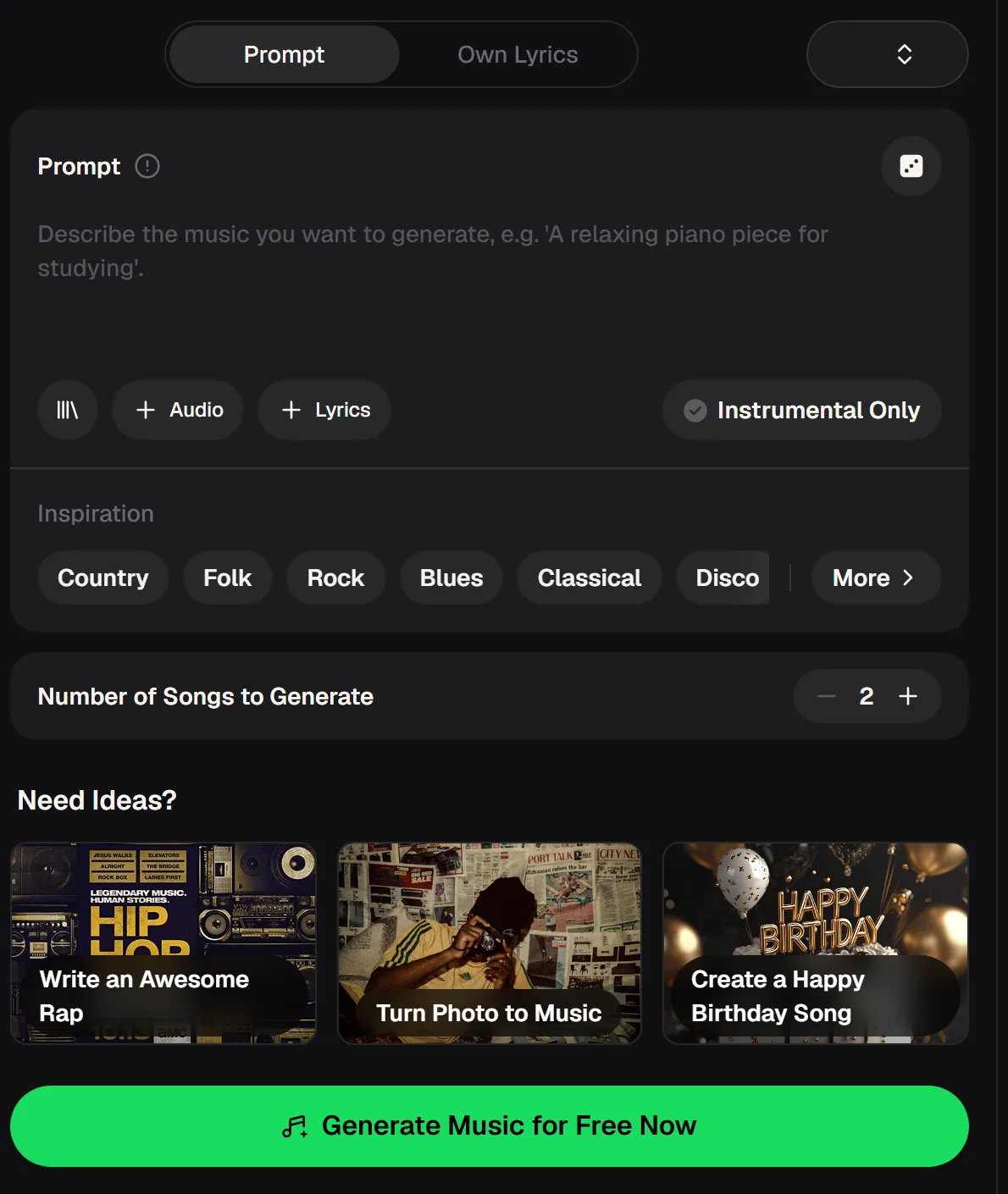
Free credits come after a quick sign-up, and the music writing software runs in the browser.
Notation software or a generator: pick by what you need
If you need sheet music, use notation software; if you need to hear ideas fast, use a generator. Most "music writing software" results are notation programs, and they do a different job.
Notation software is where you place notes on a staff and print parts. A generator like MusicCreator does not write sheet music. It turns a description or your lyrics into a finished track you can listen to and learn from.
Use notation software to write and print the parts.
Use a generator to hear your idea in new styles.
Ways out of a style rut, by the kind of writer you are
How music writing software helps depends on what you usually write, so start from your own habit. Choose the description closest to you.

If every song is a piano ballad
Describe your idea and pick Disco or Rock from the Inspiration chips. Listen for how the rhythm section changes the feel of the same melody idea.
Then sit at the piano and try writing your chorus over that groove.

If every song is strummed folk
Paste a verse with Own Lyrics and choose Blues or Classical. Hearing your words over a different harmony can suggest chords you would not reach for.
Pick up the guitar and borrow one change you liked.

If every beat sounds the same
Switch on Instrumental Only and try Country or Folk. Acoustic styles use space and swing differently from programmed beats.
Take one rhythmic idea back into your own setup and build from it.
A 20-minute session for writing in a new style
A short, fixed routine keeps this music writing software a reference and the writing yours. Work through the list in order.
- Describe · 2 min
Write one line describing your idea.
- Generate · 1 run
Generate it in a style you never use.
- Listen · 5 min
Listen to both tracks and note one idea.
- Write · 10 min
Write your own part using that idea.
- Record · 2 min
Record a rough voice memo of your take.
Hear it in a style you have never tried and leave with one new idea to write from, with free credits after a quick sign-up.
Start a session
The four parts of a useful prompt
In music writing software, specific prompts give you references you can actually learn from. A vague request such as "a song in a different style" gives you little to study. This prompt names four parts instead.
upbeat disco leaving a small town four-on-the-floor drums, bright bass line hopeful mood
- GenreNames the style you want to study.
- SubjectKeeps the story of the song you are stuck on.
- Rhythm and instrumentsGives you parts you can learn from.
- MoodSets the feel of the arrangement.
Keep the subject the same as the song you are stuck on. Change only the style, so you hear what the style itself adds.
Free music writing software credits or a paid plan for writers
The free plan is enough to try the music writing software routine; paid plans add full downloads. Match the plan to how often you write.
| Free credits are enough when | A paid plan fits when |
|---|---|
| You want to try the routine: 30 credits a year cover 15 generations, with 2 tracks per run. | You run the routine often and want more plan credits, still with 2 tracks per run. |
| Listening in the browser is enough, plus a limited number of downloads. | You want MP3, WAV and FLAC downloads for reference listening or a DAW. |
| The tracks are only private references for your own writing. | You need commercial rights within the Commercial License; the certificate costs 5 credits per song monthly and nothing extra annually. |
| Verdict: start free to test the routine, then pick a plan once you know how often you write. | |
Based on MusicCreator pricing and plan terms.
Habits that keep your writing your own
Use music writing software like this for references to learn from, not the finished song. These six habits keep your own voice at the centre of every song you finish.
Change one thing at a time, the style, and keep your subject.
Write your own part after every listen, before you generate again.
Keep a note of the chords, rhythms or sounds worth borrowing.
Try styles that feel uncomfortable; they teach the most.
Never copy a generated melody note for note; rewrite it in your voice.
Stop at one or two runs, then record your own take.
Music writing software questions
Answers for songwriters choosing music writing software. They cover notation, generators, files and rights.
What music writing software should I use?
It depends on the job. If you need to put notes on a staff, print parts for players or prepare a score, notation software is the right choice. If you want to hear an idea quickly in different styles, test lyrics or get past a rut, a generator like MusicCreator fits better. Many songwriters use both: a generator to explore and spark ideas, then their instrument or notation software to write the final parts in their own way.
Does MusicCreator write sheet music?
No. As software for writing music, MusicCreator generates finished audio tracks from a description or your own lyrics, and each run gives two tracks. It does not produce notation, scores or printable parts. Songwriters use it to hear ideas in different genres and moods, then write their own parts on their instrument. If you need written parts for a band or choir, write them in notation software after you have decided on the ideas you want to keep from your listening sessions.
How does a generator help with a style rut?
A rut usually means you keep reaching for the same rhythms, chords and arrangements. Hearing your own idea played in a style you never write breaks that habit, because you notice how a different groove or harmony changes the feel. Describe the idea, pick a new style from the Inspiration chips, listen to both tracks and take one idea back to your instrument. The writing stays yours; the generated track is a reference.
Can I use my own lyrics?
Yes. The music writing software has an Own Lyrics tab for pasting words you wrote, and a Prompt tab for describing the song instead. You can add an audio clip as a reference and switch on Instrumental Only when you want no vocals. For rut-breaking sessions, keeping your own lyrics and changing only the style is useful, because it shows how much the genre alone changes the way your words land and feel.
Which files can I download?
Paid plans can download MP3, WAV and FLAC; on the music writing software free plan you can download a limited number. For reference listening, MP3 is usually enough. If you want to write or record over a generated track in your own setup, WAV or FLAC keeps the full quality. Name each file with the style and prompt you used so you can find the track that sparked an idea when you return to the song later in the week.
Can I release a song that started from a generated track?
Monthly and annual plans both include commercial rights within the scope of the Commercial License. Downloading the license certificate costs 5 credits per song on a monthly plan and nothing extra on an annual plan. If you only used a generated track as a reference and wrote and recorded your own parts, keep your drafts and voice memos dated, and read what the Commercial License covers before you release anything that includes generated audio.
Hear your idea in a new style with music writing software
Break out of your usual sound with two tracks per run to learn from, starting with free credits after a quick sign-up.