Generators
Prompt, Own Lyrics, Add Audio and Instrumental Only cover the ways a track can start: a description, your own words, a reference clip, or a bed with no vocal. Songs run up to 8 minutes.
Browser tool · DAW-ready files
AI music production software should earn its place next to your DAW. MusicCreator runs in a desktop or phone browser, so nothing installs. Describe a track or paste lyrics, get two songs per run, then carry WAV or FLAC bounces, separated stems, MIDI parts and a mastered reference back into your session. Judge it on files, credits and licence.
Free credits after a quick sign-up · paid plans download MP3, WAV and FLAC

Plenty of music ai software stops at a single generator. Here one sign-in links four areas, so a song stays in the same account while you shape it, split it and export it for your own session.
Prompt, Own Lyrics, Add Audio and Instrumental Only cover the ways a track can start: a description, your own words, a reference clip, or a bed with no vocal. Songs run up to 8 minutes.
Cover, Extend, Replace Section and Mashup rework a song you already made, so a weak bridge or a short outro gets fixed without starting from a blank prompt.
AI Vocal Remover and AI Stem Splitter pull a finished song apart, while Story Video and Photo Video turn a track into something you can post alongside the release.
MP3, WAV and FLAC files, Batch Download, a PNG cover image and the Commercial License sit in one menu for every song you keep.
Read it like the spec page of any plugin or DAW you have bought. Prices are left out on purpose, because plans change; the counts and formats below are what the tools work with.
That makes it ai music software for PC, and just as much ai music software for Mac or a phone, because the browser does the work. Thirty free credits cover 15 generations at 2 credits each, and you can also buy Pay Once credits.
Paid plans download MP3, WAV and FLAC, including songs made while you were on the free plan; free users can download a limited number. Unused plan credits reset on the renewal date.
Stems are where AI output meets a real mix. In the AI Stem Splitter, upload a bounce or pick a song from My Music, choose how far to split it, then drag each part onto its own track.
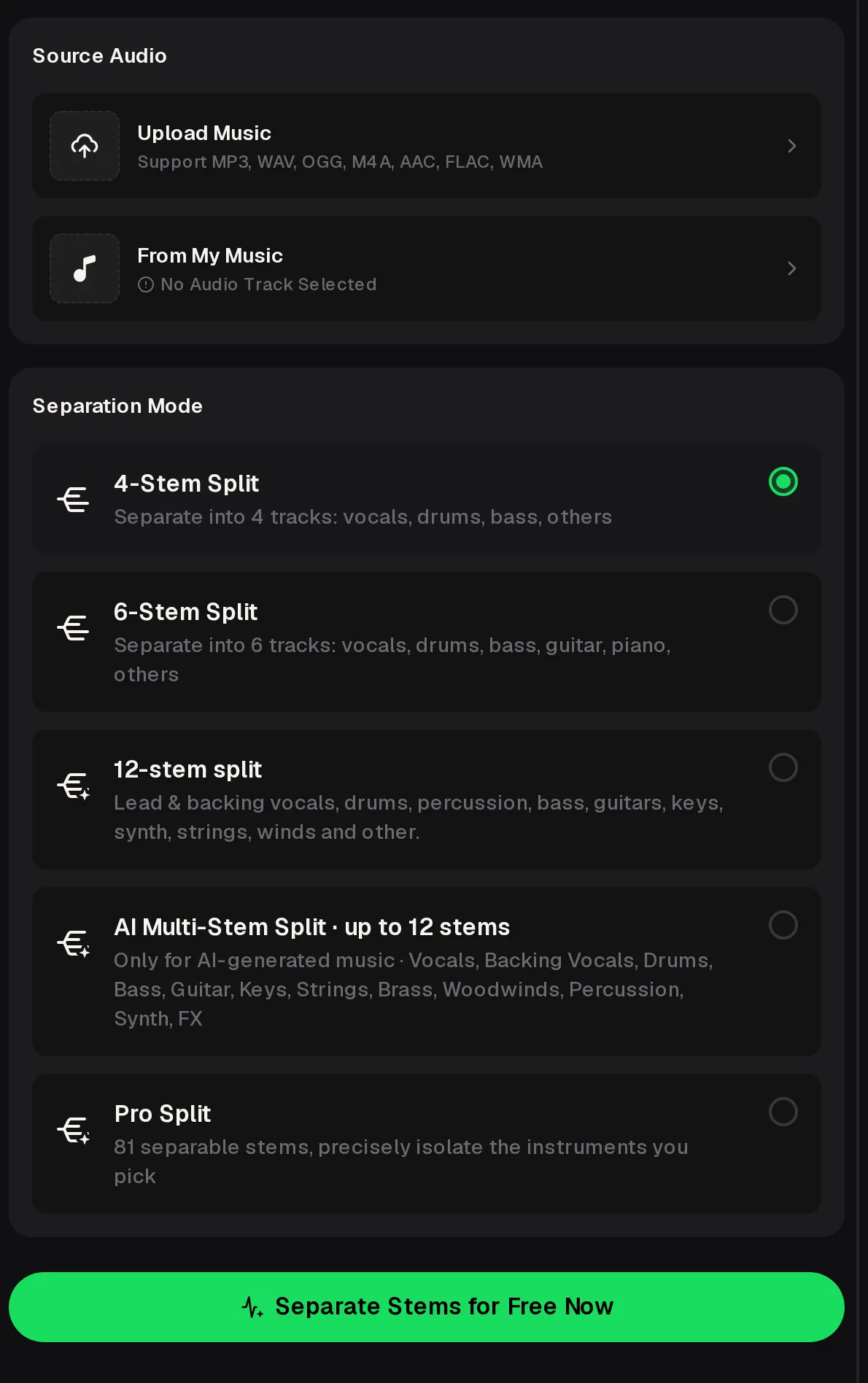
Upload MP3, WAV, OGG, M4A, AAC, FLAC or WMA, or choose a song saved in My Music.
Vocals, drums, bass and others, with guitar and piano added in the six-way split.
Lead and backing vocals, percussion, guitars, keys, synth, strings, winds and other parts.
Multi-Stem works on AI-made songs only; Pro Split isolates the instruments you pick from 81 stems.
Treat the browser as an extra room in the studio. Make the idea there, then carry files into the session where your plugins, vocals and arrangement already live.
Write a prompt or paste Own Lyrics, switch on Instrumental Only when you plan to record vocals yourself, and keep the stronger of the two songs from the run.
Use Extend or Replace Section in My Workspace for a short outro or a weak bridge, so the arrangement is close before it reaches your grid.
Download WAV or FLAC, split the song into stems, and read tempo and key with the Key & BPM Finder. Sketch a bass or chord part in the MIDI Editor and download it as MIDI.
After your mix, upload the bounce as the Target in AI Mastering and add an optional Reference track you want it to sit near.
Unlike ai music creation software that tries to replace the DAW, this works best as a supplier of parts. Three setups get the most from it, and each keeps the final mix in software the producer already knows.
A producer with a full sample library but no fresh ideas generates two Instrumental Only songs, splits the better one into 6 stems, and keeps the drums and bass as a starting groove to rebuild with their own sounds.
For a writer, ai song making software only helps if the vocal can be replaced. They paste Own Lyrics, keep the take with the right feel, split out the instrumental, and record a real vocal over it before pitching.
Someone cutting videos on a work laptop where installs are blocked uses the browser, extends a track toward the edit length with the AI Music Extender, and drops the WAV straight into the video timeline.
Compared with installed ai music making software, a few jobs sit outside the scope. Knowing them up front saves credits, and failed generations usually refund their credits automatically.
| Limit | What happens | Do this instead |
|---|---|---|
| No desktop or mobile app | Nothing installs on PC, Mac or phone. | Bookmark the generator in your browser; files save to your usual downloads folder. |
| Runs beside the DAW | The tools work in a browser tab, not inside your session. | Export WAV, FLAC or stems and import them as audio tracks. |
| No MIDI in song Downloads | Finished songs export as audio files and a cover image. | Write the part you need in the MIDI Editor and download the MIDI file there. |
| Multi-Stem is for AI songs | Uploaded songs cannot use the AI Multi-Stem mode. | Use 4-Stem, 6-Stem, 12-stem or Pro Split for your own uploads. |
| Free downloads are limited | Free users can download only a limited number of songs. | Paid plans download MP3, WAV and FLAC, including songs made on the free plan. |
No. MusicCreator runs in the browser, so there is nothing to install or update on Windows, macOS or a phone. Open the generator in Chrome, Safari, Edge or Firefox, sign in, and every song you make is saved to My Workspace in your account. Files you export land in your normal downloads folder, ready to drag into a DAW, a video editor or a sampler, and the same account works on another computer.
Yes, with free credits after a quick sign-up. The free plan gives 30 credits a year, which covers 15 generations at 2 credits each, and every run returns two songs to compare. Free users can download a limited number of songs. Paid plans unlock MP3, WAV and FLAC downloads for every song, including the ones you made on the free plan, and you can also buy Pay Once credits.
Finished songs download as MP3, WAV or FLAC on paid plans, with Batch Download for several at once. For separate parts, run a song through the AI Stem Splitter for 4, 6 or 12 stems, AI Multi-Stem on AI-made songs, or Pro Split. Parts you want as notes can be written in the MIDI Editor and downloaded as MIDI, then dropped onto an instrument track in any DAW you use.
Monthly and annual plans include commercial rights, within the scope of the Commercial License. The licence certificate is part of each song's Downloads menu. On monthly plans and Pay Once credits a Commercial License costs 5 credits per song, and on annual plans it costs nothing extra. Read the licence before you sign a distribution or sync deal, so you know exactly what it covers for that release.
Songs can run up to 8 minutes, which leaves room for a long intro, a full arrangement or an extended outro. If a take ends too early, use Extend in My Workspace or the AI Music Extender, which accepts audio from 3 seconds to 8 minutes. Replace Section rewrites one part of a song without touching the rest, which helps when only the bridge or a single chorus needs another try.
Yes. The same tools work in a phone or tablet browser, so you can start an idea on the train and finish it at the desk. Songs sit in My Workspace, so the takes you made on the phone are waiting on the computer when you sign in. For stems and mastering, a computer is easier because dragging files into a DAW is quicker there.
Open the generator, describe a track or paste lyrics, keep the better of two takes, then send WAV files and stems to your own session.
Free credits after a quick sign-up · 30 credits a year on the free plan